6-9
6.6 Operation
[1] [2] [3] [4] [5] [6] [7] [8] [9] [10] [11] [12] [13]
[14] [15] [16]
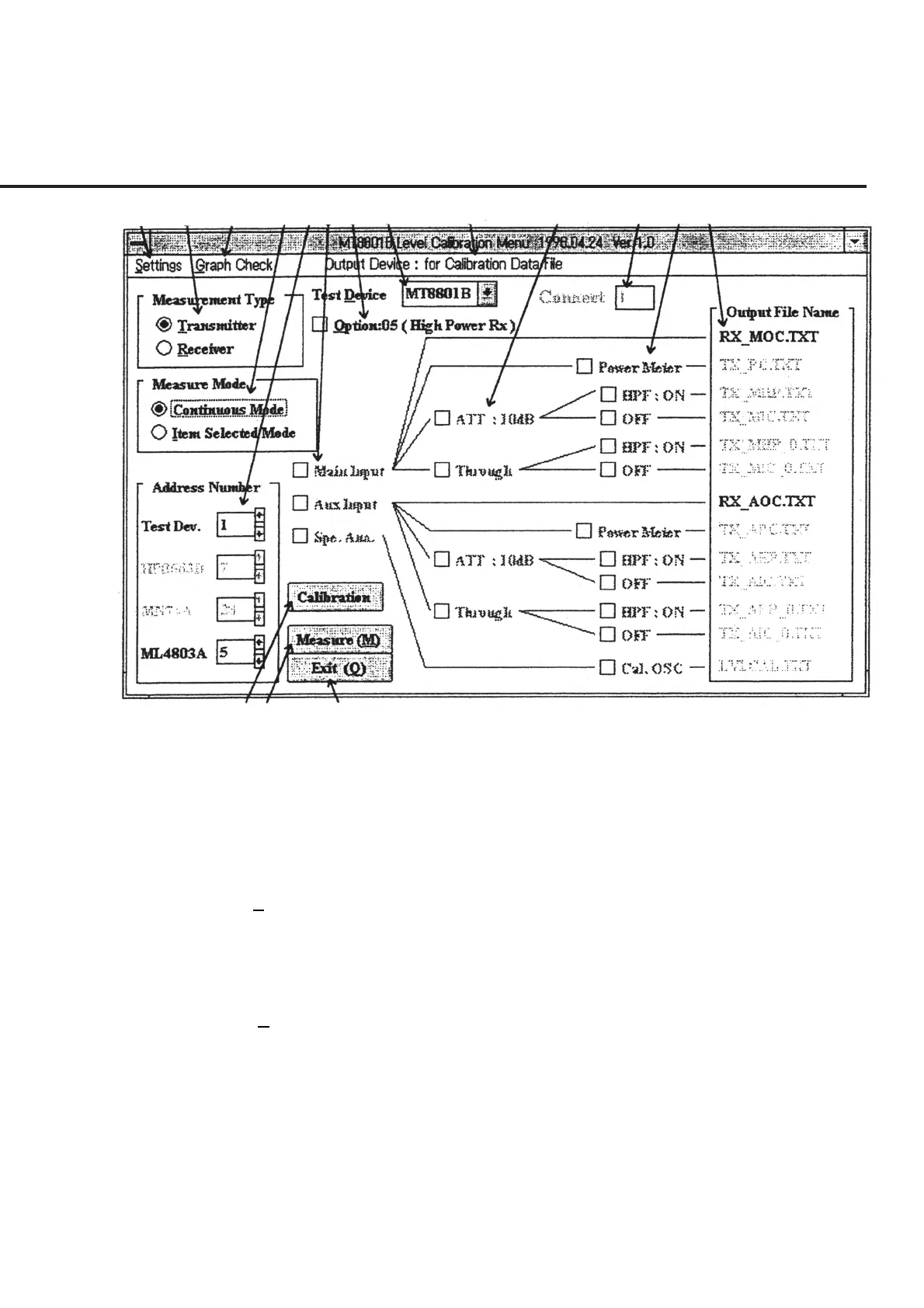
Fig. 6-4 Initial Menu Screen
When section [1], “Settings,” is clicked on this screen, the menu of setup items used for
this program is displayed as shown in Fig. 6-5 “List of Setup Items.” The following
section shows the names of control functions on the menu bar as well as an outline of
these functions.
[17] Serial Number (N) (Serial number input command)
This command is used to input the serial numbers for the DUT’s connected set in sec-
tion [11]. See 6.6.3 “Inputting Serial Number” for more information on how to input
the serial number.
[18] Out Device Set (D) (Command to select the device for output of the measured results)
This command is used to modify the device with which to output the measured results.
See 6.6.4 “Setting Output Destination of Measured Results” for more information on
how to modify the device for output.
[19] Section to select the use of the channel selector
This section is displayed when “Receiver” is selected in section [2]. This program
enables, when this item is selected, skipping of switching in connection between Main
and Aux after measurement is started. Moreover, selection of this item also enables
continuous measurement of up to four units.



 To Next Page