6-27
[9] Reference Cal Factor (Reference Cal factor input section)
This section displays the reference Cal factor of each power sensor. To modify the
setting, directly input a numeric value.
[1] [2] [3] [4]
[5]
[6]
[7]
[8]
[9]
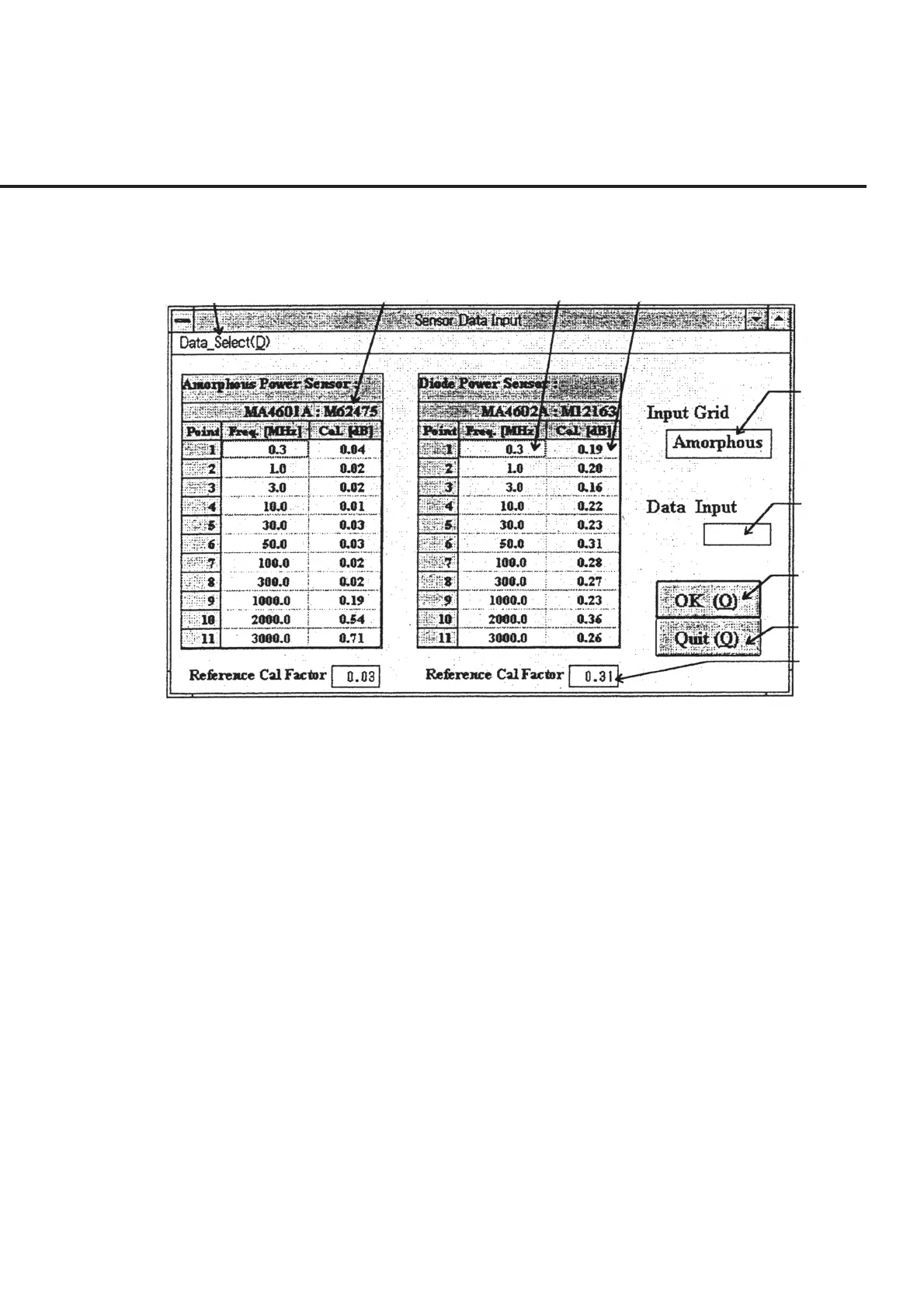
Fig. 6-22 Power Sensor Cal Factor Input Screen
Input a Cal factor by following the instructions below.
(1) Click either the left or right grid, or the reference Cal factor input section to select
the power sensor type to constitute the target of data editing. Select the left grid
to edit the “Amorphous Power Sensor” and select the right grid to edit the “Diode
Power Sensor.” This causes the power sensor type that is to be the target of edit-
ing to be displayed in section [5].
(2) Check the serial number displayed in section [2]. If no serial number is found
displayed or a serial number different from that of the power sensor is found
displayed, select a correct data file from “Data_Select” in section [1]. See 6.6.11
“Registering the Power Sensor Serial Number” for more information on the reg-
istration and selection of the name of the file to be used.
(3) To modify the data displayed in section [3] and [4], click the cell displaying such
data. This causes the data of the cell clicked to be displayed in section [6], en-
abling data entry.
(4) Directly input data to modify the data displayed in section [9].
6.6 Operation



 To Next Page