User’s Manual
24
Highlight the box beside ID and press the button. A virtual keyboard appears allowing you to enter the
ID for ADSL connection.
Highlight the box beside Password and press the
button. A virtual keyboard appears allowing you to
enter the password for ADSL connection.
NOTE: Entering the ID and Password and highlighting OK reads the current IP address of the DVR
configured by the ADSL network.
NOTE: If the DVR is configured for DHCP or an ADSL network, the IP address of the DVR might
change whenever the unit is turned on.
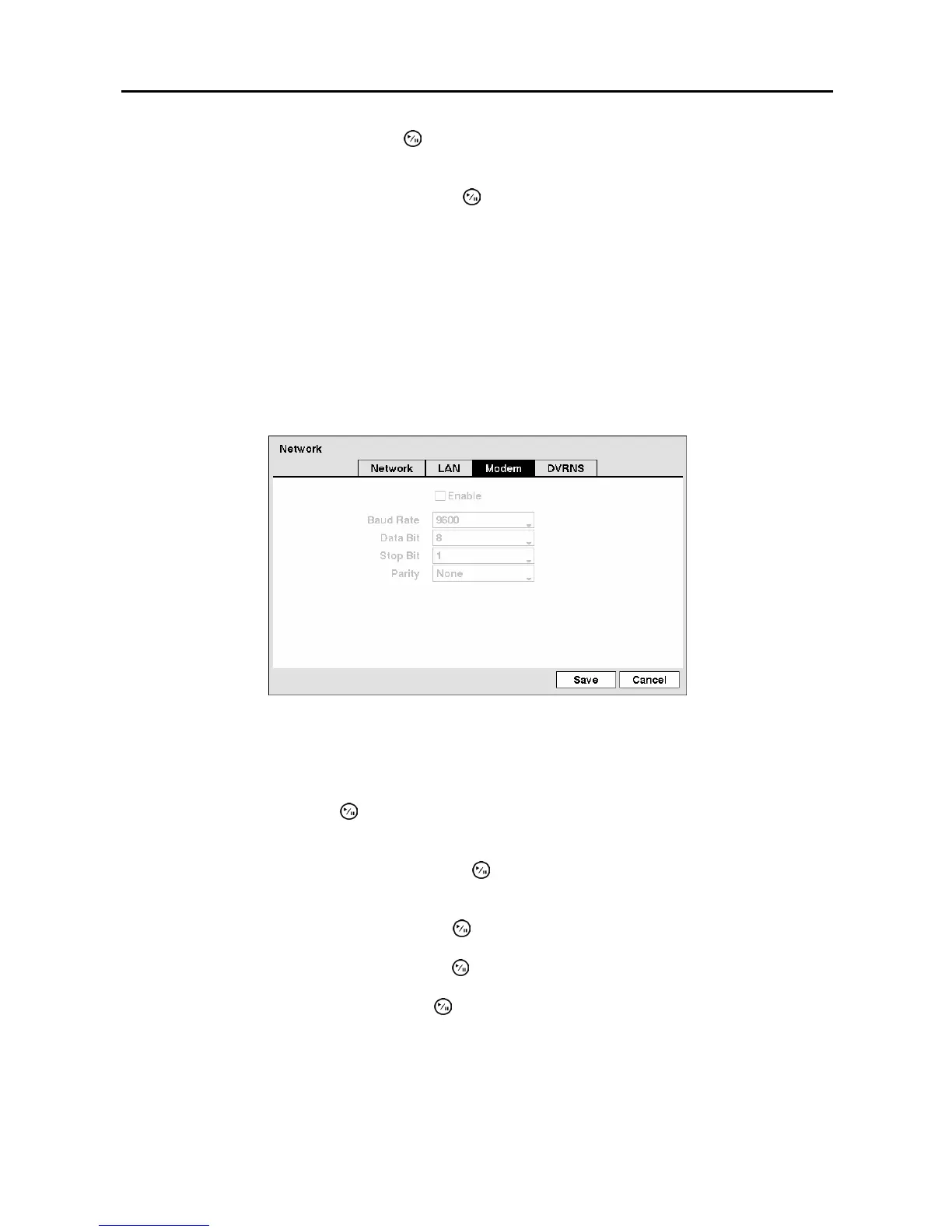
Modem Setup
Highlight the Modem tab, and the Modem screen displays.
Figure 30 ─ Modem setup screen.
NOTE: If the RS232 port is in use for remote control, networking cannot be configured for a
modem.
Highlight Enable and press the
button to toggle between On and Off. You will only be able to change
the settings if Modem is enabled.
Highlight the box beside Baud Rate and press the
button. A list of baud rates ranging from 300 to
115,200 appears.
Highlight the box beside Data Bit and press the
button. Choose between 7 bit and 8 bit formats.
Highlight the box beside Stop Bit and press the
button. Choose between 1 and 2 Stop Bits.
Highlight the box beside Parity and press the
button. A drop-down list appears. You can select from
None, Odd or Even parity.



 To Next Page