ComNav P4 Installation and Operation Basic Operations
Document PN 29010100 V1r0 - 123 -
Basic Operations
This chapter describes the basic modes of operation and features of a P-Series system,
and
instructions on how to use them.
Control Head LCD Screen and Buttons
All of your interaction with your autopilot system will be done using the Control Head:
Selecting an operating mode
Setting up the parameters you wish to use in each mode
Monitoring your boat’s heading
Setting a desired heading to be followed, etc.
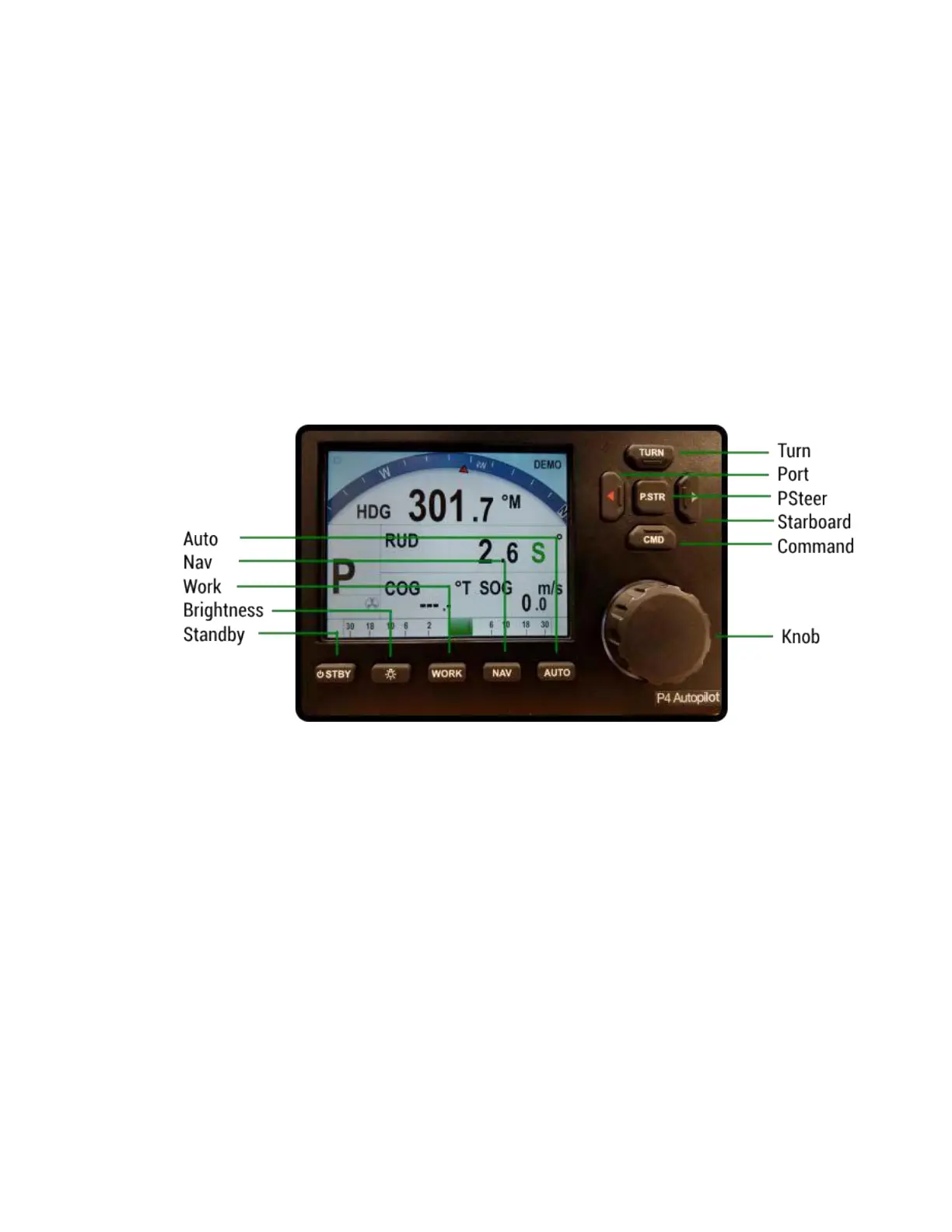
Figure 52 – Using the Control Head
The elements of the Control Head (with reference to the identifiers in Figure 52) are:
1) LCD Screen
While the system is powered, the LCD screen is normally displaying the compass
heading, rudder angle, and mode of operation.
It can also be displaying desired heading, system status, other information, or various
menus.
2) STANDBY (and On/Off) button
To power on the system, press and hold this button until the LCD screen lights up,
and then release it.
To power off, press and hold this button approximately 3 seconds.
The autopilot always powers up in STANDBY mode, and it can always be put into
STANDBY mode, by pressing and holding this button for approximately 1 second.
Double-pressing this button brings up (or exits) the Standby menu.



 To Next Page