ComNav P4 Installation and Operation
Basic Operations
Document PN 29010100 V1r0 - 137 -
over positions are known as the “physical limits”, beyond which the rudder simply cannot be
turned. However, you can artificially limit the rudder travel through the autopilot software.
To do so, set the Power Steer Limits to the number of degrees port and starboard that you
would like to limit the rudder movement to. These rudder limits will be in effect whenever the
autopilot is in POWER STEER mode, and during all Dodge and Jog Lever turns. The
minimum setting is 5°; the maximum is the same as the physical limits measured in Dockside
Setup. Setting the limits to “Off” means that the full range – up to the physical limits – will be
allowed. The range beyond the selected limits will be shown on the bottom bar of the Rudder
Angle Indicator display during normal operation.
NOTE: SPU firmware versions before 3.05 allowed the rudder to be moved in Standby mode
with a Jog Lever. However, this feature was disabled in that version and onwards, for safety
reasons. The parameter name in the menu was not changed, however.
Auto/Nav Limits
The Auto/Nav Limits are essentially the same as the Power Steer Limits detailed above, but
they are in effect only when the autopilot is in AUTO or NAV modes.
RAI Offset
The Rudder Angle Indicator (RAI) display at the bottom of the autopilot display may require a
slight offset adjustment in order to read zero degrees when the vessel is moving in a straight
line. This is a fairly common scenario and may be due to vessel loading or design, rudder
design or function, or the installation of the Rudder Feedback Unit. For example, if the vessel
is traveling in a straight line, but the RAI reads 2° to starboard, adjust the RAI Offset to port
so that the RAI display reads zero.
Auto Mode
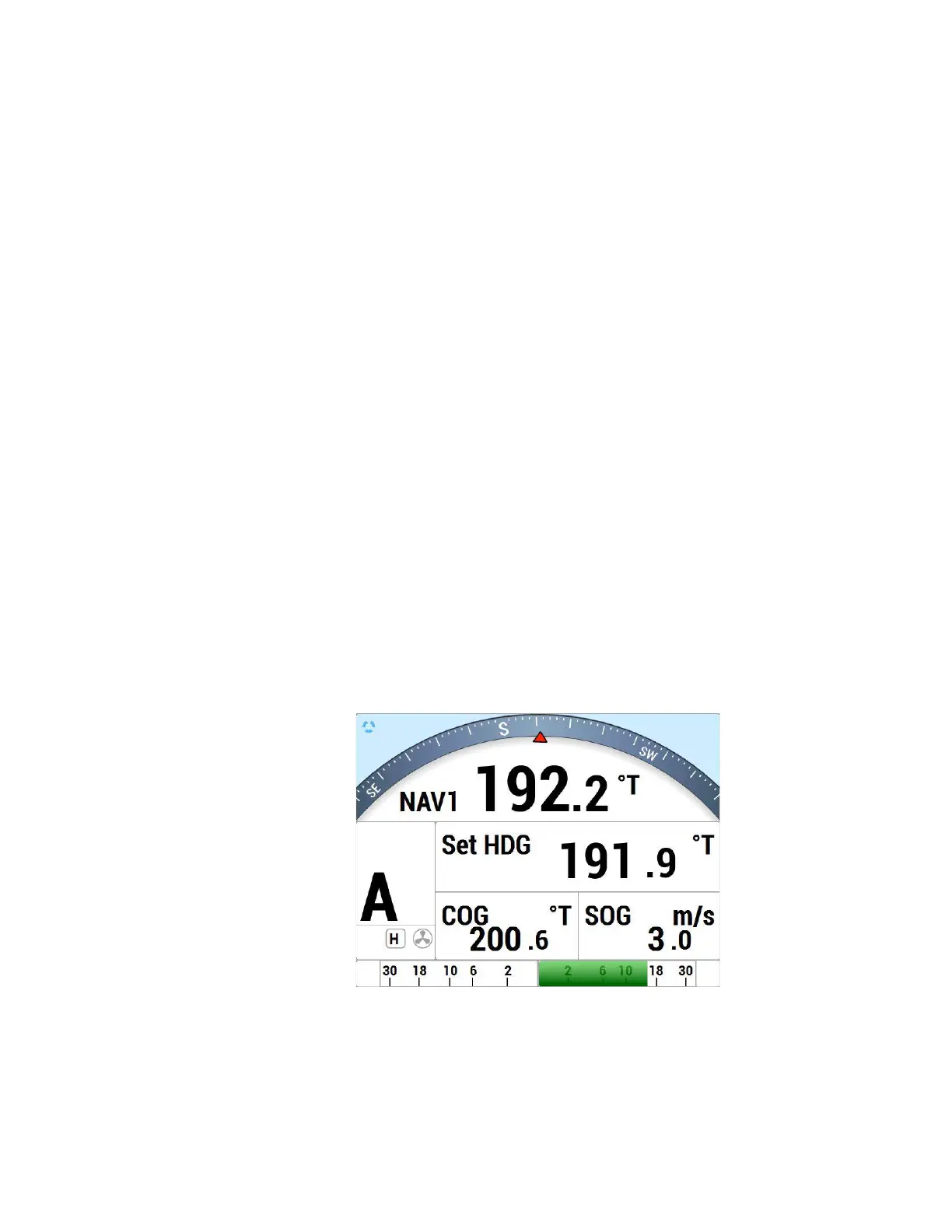
In AUTO mode, the autopilot will steer the vessel on your desired Heading. To enter AUTO
mode, press and hold the AUTO button for about 1 second, until the large
letter `A´ appears in
the upper left portion of the display (see Figure 59).
Figure 59 – Typical AUTO Mode Screen
The vessel’s current actual heading is shown in large letters in the middle of the LCD
screen, with the
source and type. Your Desired Heading – also known as the “Commanded Heading” – is shown in
smaller digits at
the top-centre of the screen.



 To Next Page