ComNav P4 Installation and Operation Getting Started
Document PN 29010100 V1r0 - 88 -
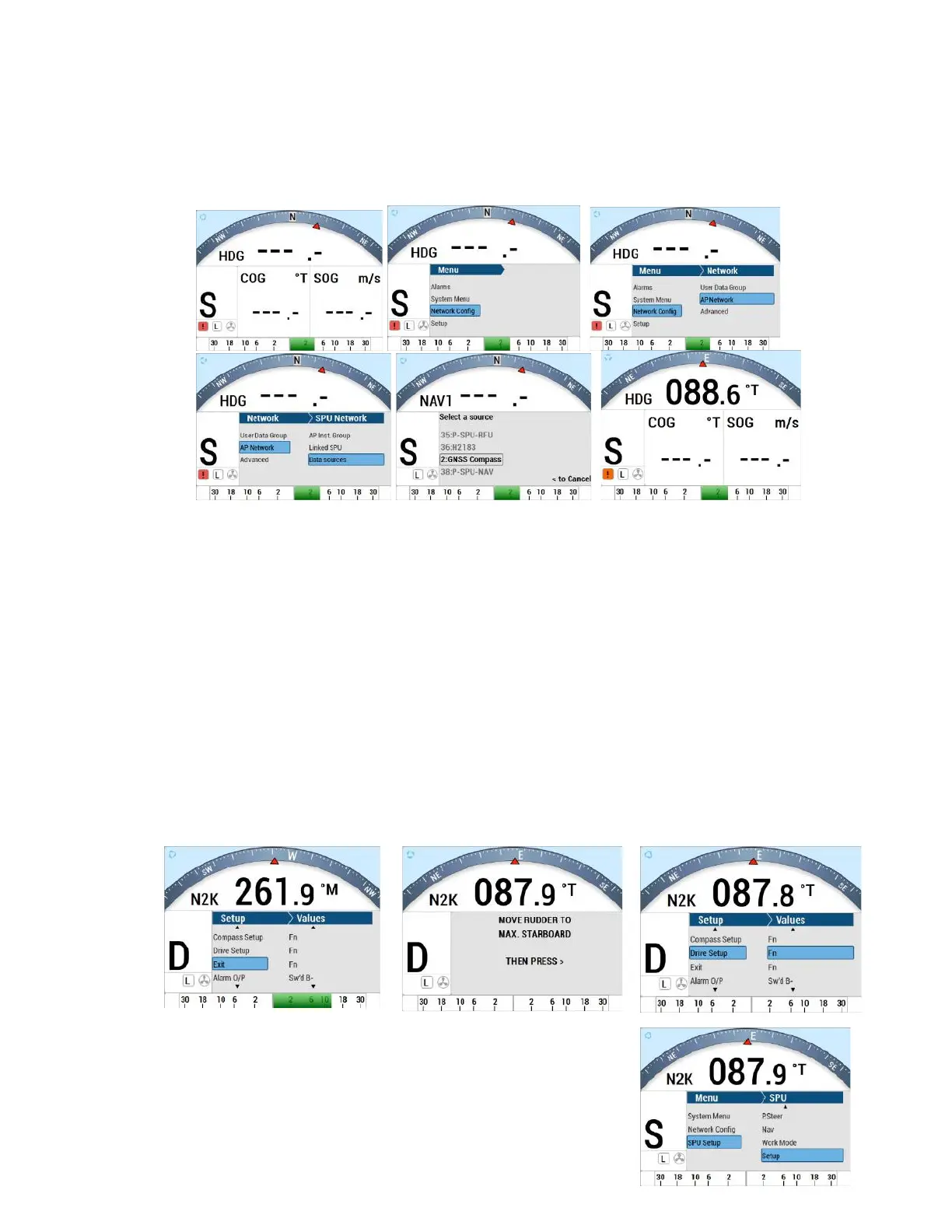
Connect GNSS (N2K) Compass to system
By default, the P4 system links to a compass source from a N2K (NMEA 2000 device). It is
first indicated by “N2K ---.-“ with no specified N2K device.
To configure GNSS (N2K) Compass as HDG (Heading Source) and/or POS (Position Source)
1. Press Enter to acknowledge the alarm
2. Press the CMD button to take control
3. Press the CMD button to bring up the menu.
4. Select Network Config
5. Select AP Network
6. Press the ENTER button to acknowledge Warning MessageSelect Data Source
7. Select HDG (Heading) Source, select POS (position) Source
8. Select the GNSS serial number
9. Press ENTER to select the compass.
10. Press the Menu button to go to previous screen
11. Press the CMD buttom to take control of the Head
12. From the STANDBY mode screen, the compass reading should show “HDG
XXX.X°T” where XXX.X is the True Heading from N2K network



 To Next Page