ComNav P4 Installation and Operation Getting Started
Document PN 29010100 V1r0 - 81 -
error detected (i.e., the error times the Rudder Gain, and using some constants which
depend on vessel type), but in WORK mode that amount will also be multiplied by the Scale
Factor. This will always result in larger rudder movements for a given course error.
Work Mode State
This parameter shows the current status of WORK mode. It is also a means to force WORK
mode to be active or not. Normally, WORK mode is engaged or disengaged depending on
the speed of the boat as given by a Navigation System. In cases where this information is not
available, WORK mode can still be made to function by forcing it on.
The states shown are “Off”, “A_On” and “A_Rdy” (abbreviations for Automatic On and
Automatic Ready, respectively), or “M_On” and “M_Rdy” (Manual On and Manual Ready).
Accessing and using the Dockside Setup Menu is described in the next section.
Operating Modes and Menus Continued
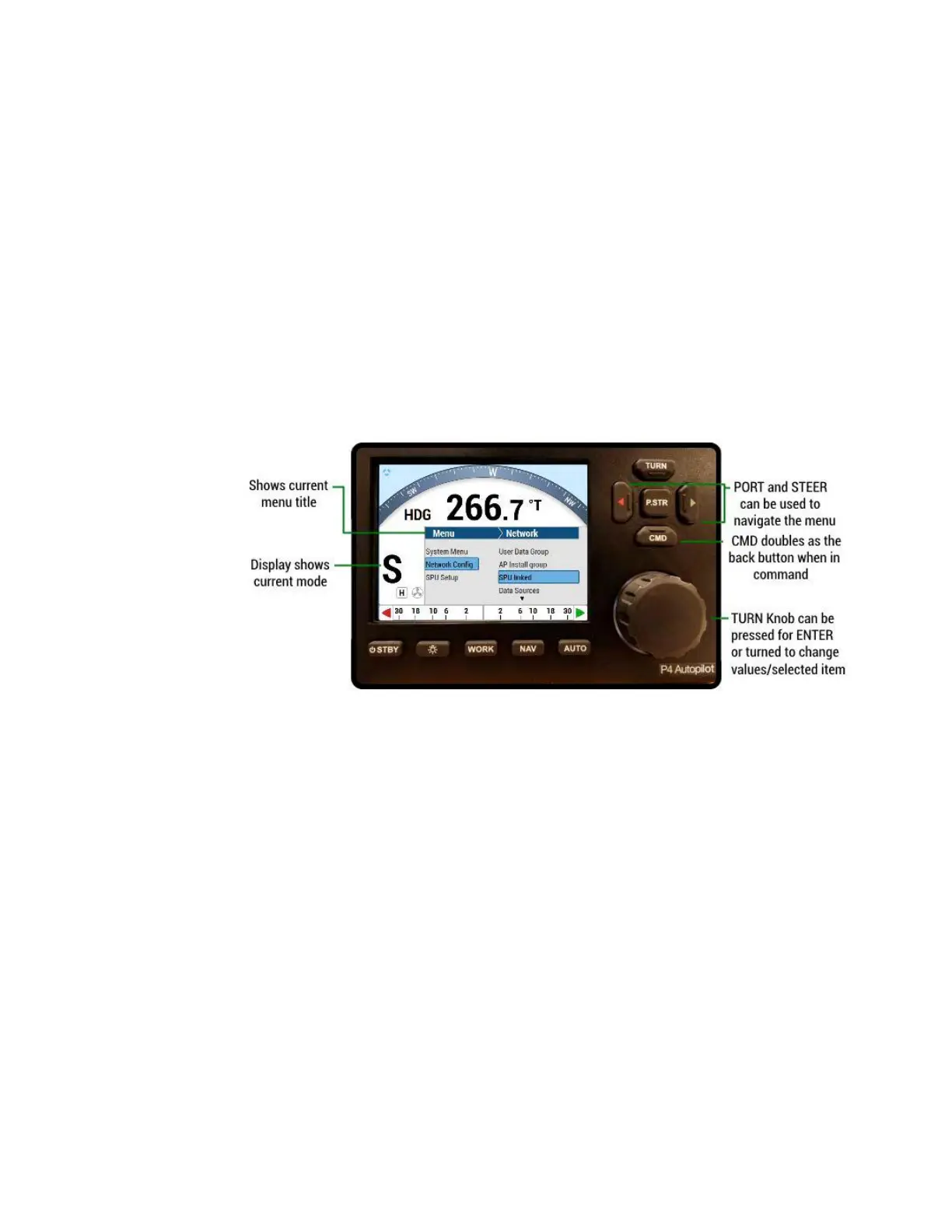
Figure 50 – A Typical Menu
All menus are arranged with the parameter names on the left side of the screen, and the
current value for each parameter on the right side.
Note that in each menu, one item is always highlighted, it indicates which parameter is
currently selected (for example “Network Config” is the highlighted line in Figure 50).
You can move the highlight to other items on the menu by pressing the PORT ARROW
button (moves the highlight up) or STARBOARD Arrow button (moves the highlight down).
Some menus have more items than can be shown on a single screen. In this case, when the
highlight has been moved to the last item on a screen, each subsequent press of the
STARBOARD button will cause the menu will scroll up by one item, revealing a new high-lit
item. Similarly, when the highlight has been moved to the first item on a screen, each
subsequent press of the PORT button will scroll the menu down one item. These long menus
are arranged in a circular fashion, so that the scrolling action can be carried on indefinitely.
Use the COURSE CHANGE knob to change the value of the currently high-lit parameter. For
parameters with numbered values, a clockwise turn of the knob will increase the value;
counter-clockwise movements will decrease the value. Non-numerical values are generally
arranged in a circular list for ease of use.



 To Next Page