ComNav P4 Installation and Operation Getting Started
Document PN 29010100 V1r0 - 75 -
Using the Control Head – LCD Screen and Buttons
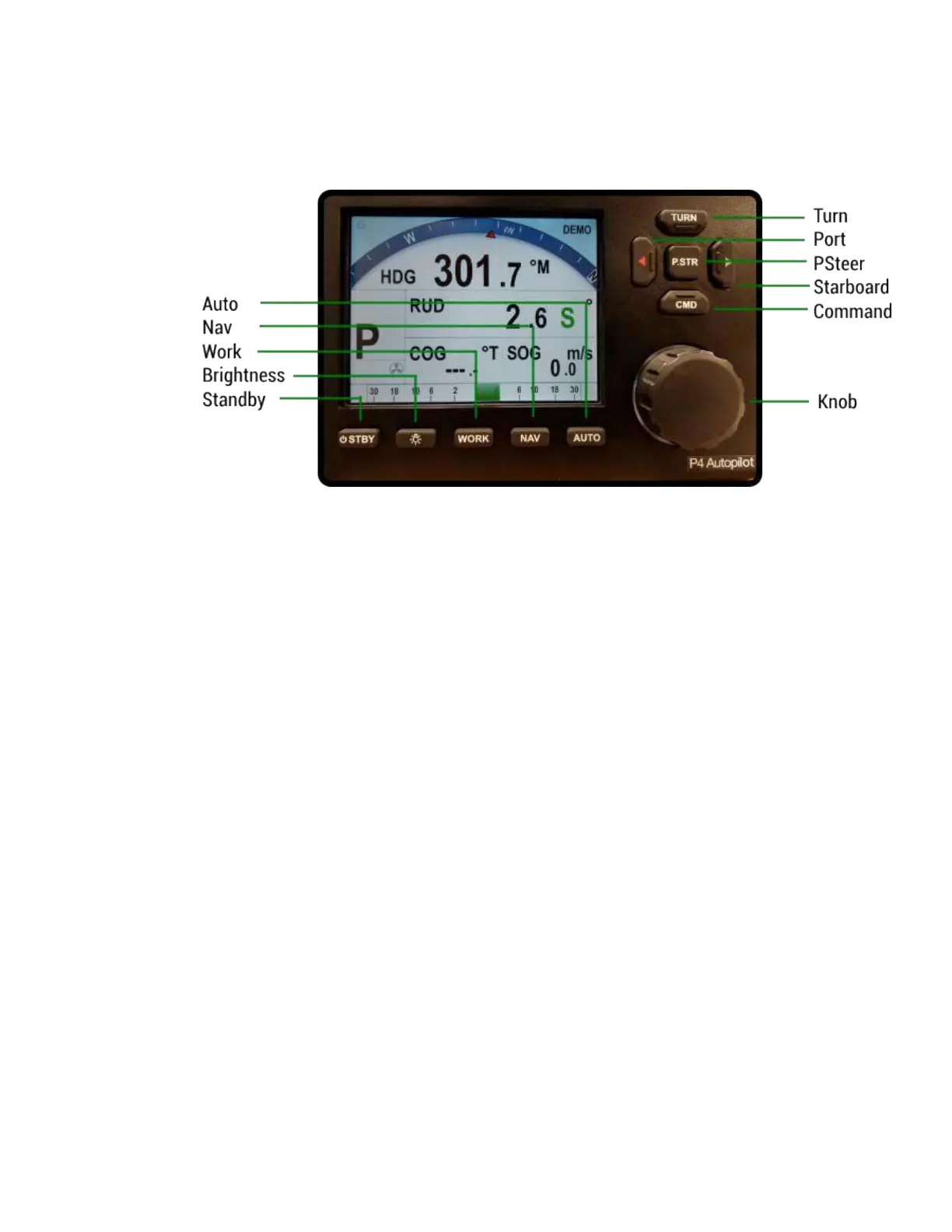
Figure 47 – Using the Control Head
The elements of the Control Head (with reference to the identifiers above) are:
1) LCD Screen. As long as the P4 system is powered on, the LCD screen normally
displays the compass heading, rudder angle, and mode of operation; it can also
be displaying desired heading, system status, other information, and various
menus. The overall set of items being displayed changes in response to the
various command buttons listed below (the screen shown above is the initial
screen, which appears for a few seconds after Power On).
2) STANDBY/ON/OFF button. To power on the system, press and hold this button
until the LCD screen lights up, and then release the button (the P4 can be put
into STANDBY mode anytime by pressing and holding this button for
approximately ½ second; it always powers up in STANDBY mode). While in
STANDBY mode, the autopilot will not exert any control over your vessel. This
button will also turn off the autopilot when pressed and held for approximately 2
seconds. During regular operation, double-pressing this button brings up (or
cancels) the Standby menu.
3) PORT ARROW button. Pressing and maintaining this button while in POWER
STEER mode moves the rudder to port for as long as the button is held. Pressing
and maintaining this button while in AUTO, NAV or WORK modes allows you to
avoid obstacles in the vessel’s path, by turning to port. Releasing the button
automatically recovers your original Heading or Track.
4) TURN button. Pressing this button once while in AUTO or WORK mode queues
the default pre-programmed turn. Subsequent presses of the TURN button scroll
through all of the available turn-types. The pre-programmed turn sequence is
then initiated by pressing either the PORT or STARBOARD ARROW button to
indicate the direction in which the turn will be executed. See the Default Turn
section for more details on setting the default turn from the Special Turns
available.
5) STARBOARD ARROW button. Pressing and holding this button while in
POWER STEER mode moves the rudder to starboard for as long as the button is



 To Next Page