INS_CNGE3FE8MS[POE][HO] Rev. 11.7.17 PAGE 101
INSTRUCTION MANUAL CNGE3FE8MS[POE][HO]
TECH SUPPORT: 1.888.678.9427
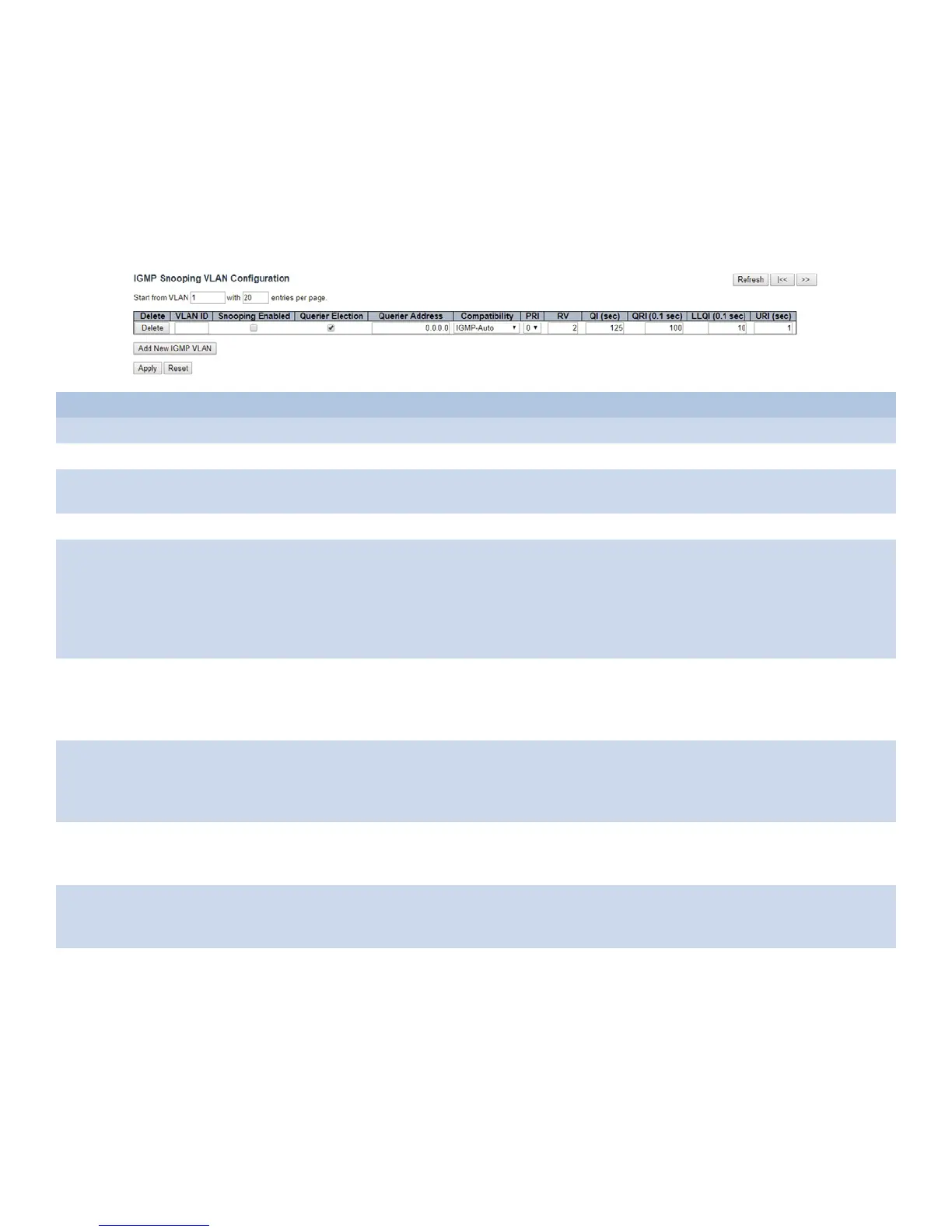
VLAN Configuration
Each page shows up to 99 entries from the VLAN table, default being 20, selected through the
“entries per page” input field. When first visited, the web page will show the first 20 entries from
the beginning of the VLAN Table. The first displayed will be the one with the lowest VLAN ID
found in the VLAN ID Table.
The “VLAN” input fields allow the user to select the starting point in the VLAN Table.
Object Description
Delete Check to delete the entry. The designated entry will be deleted during the next save.
VLAN ID The VLAN ID of the entry.
IGMP Snooping
Enabled
Enable the per-VLAN IGMP Snooping. Up to 32 VLANs can be selected for IGMP Snooping.
Querier Election Enable to join IGMP Querier election in the VLAN. Disable to act as an IGMP Non-Querier.
Querier Address Define the IPv4 address as source address used in IP header for IGMP Querier election.
When the Querier address is not set, system uses IPv4 management address of the IP interface
associated with this VLAN.
When the IPv4 management address is not set, system uses the first available IPv4 management
address.
Otherwise, system uses a pre-defined value. By default, this value will be 192.0.2.1.
Compatibility Compatibility is maintained by hosts and routers taking appropriate actions depending on the
versions of IGMP operating on hosts and routers within a network.
The allowed selection is IGMP-Auto, Forced IGMPv1, Forced IGMPv2, Forced IGMPv3, default
compatibility value is IGMP-Auto.
PRI Priority of Interface.
It indicates the IGMP control frame priority level generated by the system. These values can be
used to prioritize different classes of traffic.
The allowed range is 0 (best effort) to 7 (highest), default interface priority value is 0.
RV Robustness Variable.
The Robustness Variable allows tuning for the expected packet loss on a network. The allowed
range is 1 to 255, default robustness variable value is 2.
QI Query Interval.
The Query Interval is the interval between General Queries sent by the Querier. The allowed
range is 1 to 31744 seconds, default query interval is 125 seconds.
QRI Query Response Interval.
The Maximum Response Delay used to calculate the Maximum Response Code inserted into the
periodic General Queries. The allowed range is 0 to 31744 in tenths of seconds, default query
response interval is 100 in tenths of seconds (10 seconds).



 To Next Page