144 1.9 Special Function Settings
Control Devices
1.9 Special Function Settings
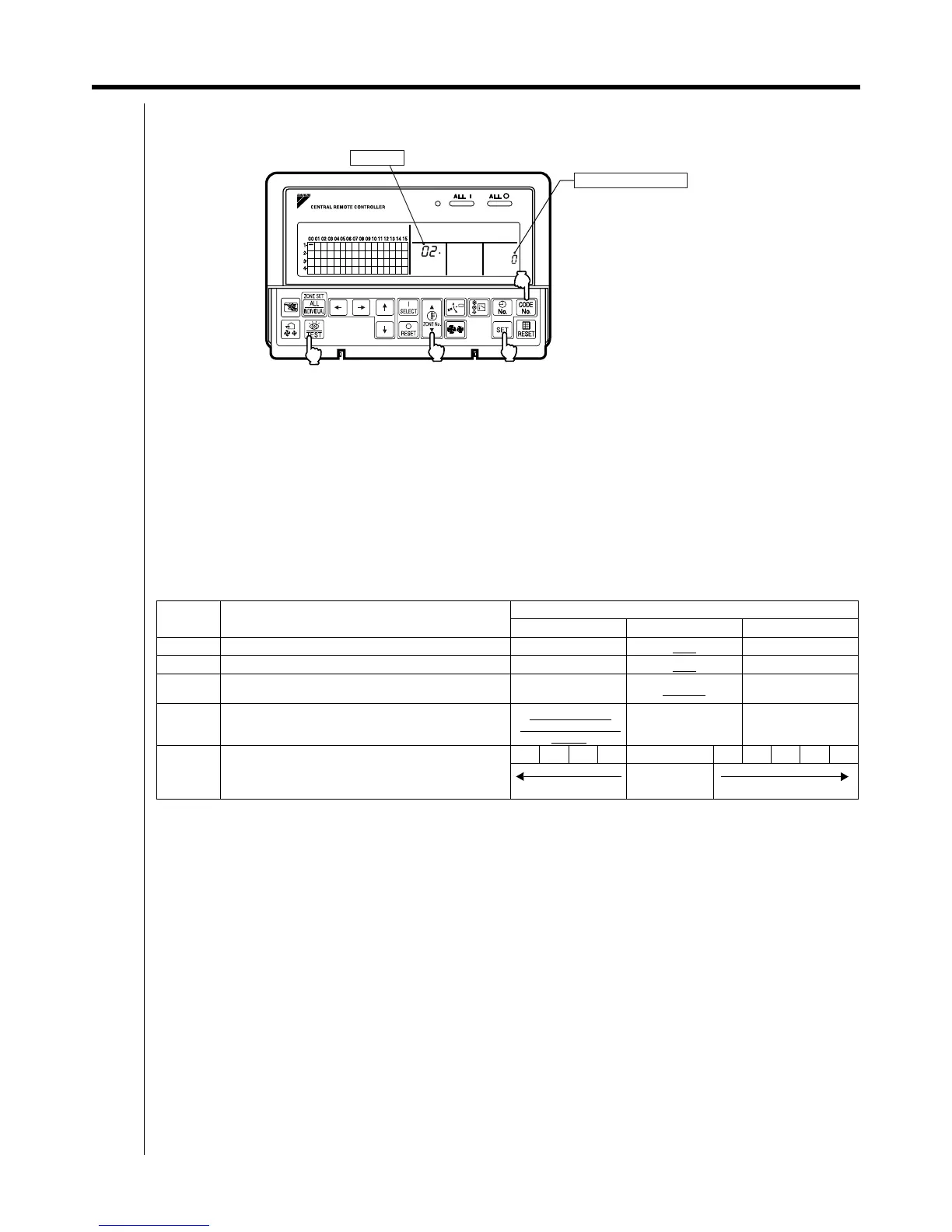
Special functions on the central control system can be changed while in FIELD SETTING mode.
Setting Procedure
1. Press and hold the INSPECTION/TEST RUN button for a period of four seconds or more to set the system to FIELD
SETTING mode.
2. Use the TEMPERATURE ADJUSTMENT button to select a desired Mode No.
: Press to increase the Mode No.
: Press to decrease the Mode No.
3. Press the CONTROL MODE (CODE No.) button to select a "Switch Setting No.".
4. Press the SET button to determine the content of the setting changed.
Upon determination, the blinking the "Switch Setting No." will turn ON.
5. Press the INSPECTION/TEST RUN button to return the system to NORMAL mode.
In this case, power supply is not needed to turn ON again.
Example: In case of no restriction items from the sub central remote controller while in double central control, make
setting of the Mode No. to "02" and the Switch Setting No. to "0".
Setting Contents and Setting No.
Items indicated by boldface represent the factory set for the No. of Switch Setting.
Do not make setting of any items not listed in the table above.
Refresh function
This function is used to automatically send "OPERATION MODE" and "TEMPERATURE SETTING" from the central
control system while in operation. In order to disable the refresh function, set the "No. of Switch Setting" to "0".
Restriction items from sub central remote controller while in double central control function
While in double central control function, no settings of zone interlock and operation code can be made from the sub
central remote controller. In order to disable the refresh function from the sub central remote controller, set the "No. of
Switch Setting" to "0".
Setting of area designation for forced OFF
• In order to stop all indoor units within the scope of control as a single unit using the entry of T1 and T2, set the "No.
of Switch Setting" to "1".
• In order to stop all indoor units within the scope of control with forced thermostat OFF using the entry of T1 and T2,
set the "No. of Switch Setting" to "2". With this parameter set to "2", no forced stop can be made on any indoor unit.
Mode No. Setting contents
No. of setting switch
012
00 Setting of sequential operation function NO YES
–
01 Setting of refresh function NO YES
–
02
Setting of restriction items from sub central remote
controller while in double central control function
Disabled Enabled
–
03
Setting of area designation for forced OFF
(Operation with T1 and T2 entered)
Forced OFF all
within the scope of
control
Forced OFF only
within the scope of
control
Forced thermostat
OFF with the scope
of control
04 LED contrast tuning
1234 5 678910
Low
Factory default
High
C
4
2
1.5
3
SET
Mode No.
Switch Setting No.



 To Next Page