2.1 System Outline 99
intelligent Touch Controller
2. System Configuration
2.1 System Outline
EM04A055A
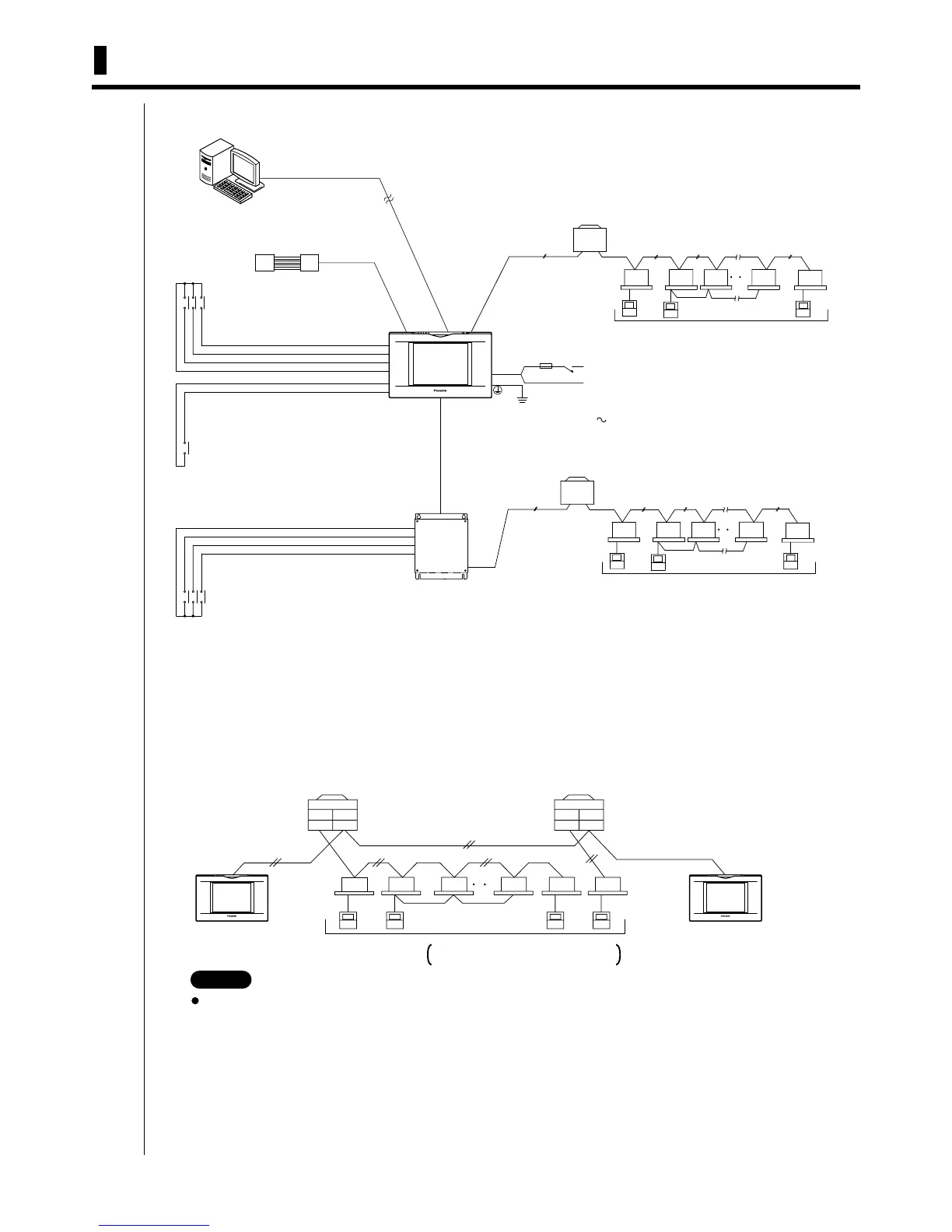
Connecting Unification adaptor allows using the contact for normal and abnormal operation signal and collective start/
stop with a contact. For details, contact the vendor you purchased the product from.
Also, by connecting DIII-NET Plus Adaptor, it is possible to operate and monitor the indoor units of 64 groups (intelligent
Touch Controller plus DIII-NET Plus Adaptor–128 groups in total) additionally.
2.2 Double intelligent Touch Controllers
Using two intelligent Touch Controllers allows central control of indoor units from different places.
Central monitoring panel
(Collective start, stop and
error monitoring with contact)
Monitoring from PC is possible by Web
E-mail functions.
(Optional intelligent Touch Controller Web Software is necessary)
Unification adaptor
for computerized control
CN2
LAN
F1,F2
F1,F2
F1,F2
F1,F2 F1,F2 F1,F2
F1,F2 F1,F2
DIII-NET Plus Adaptor
RS-232C
Outdoor unit
Outdoor unit
(The number of connectable indoor units is up to 64
units maximum, where the Power Proportional
Distribution Card as option is used.)
(The number of connectable indoor units is up to 64
units maximum, where the Power Proportional
Distribution Card as option is used.)
Up to 64 groups maximum
Up to 64 groups maximum
Up to 16 units maximum
Up to 16 units maximum
Force stop command
Measuring meter (max 3 units)
(Where Power Proportional
Distribution Card as option is used)
(Where Power Proportional
Distribution Card as option is used)
Measuring meter (max 3 units)
Power supply
100 - 240 VAC
50/60 Hz
L
N
L,N
(L1,L2)
switch
Fuse(10A)
Grounding work
F1, F2
F1, F2
F1, F2 F1, F2 F1, F2
Outdoor unit
In-Out Out-Out
F1, F2 F1, F2
Outdoor unit
In-Out Out-Out
F1, F2 F1, F2
F1, F2
Up to 16
Up to 64 groups
Remote control
When the optional power distribution function
is used, up to 64 indoor units can be connected.
For combination and settings for double intelligent Touch
controllers, be sure to consult the vendor.
NOTE



 To Next Page