PSS5000/TEMA/803046/05 109 of 152
PSS 5000 – Technical Manual
9 W&M (Menu W)
9.4 Program Upload Log (Menu W.4)
Description of the Upload
Log menu
The upload log menu provides a record of when the LAM and application soft-
ware were uploaded to the PSS 5000. Each record contains a date stamp, the
software version number and an ID of the user who made the upload.
To view upload log with
web service pages
This procedure describes how to use the Service Menu in the web browser to
view the upload log details.
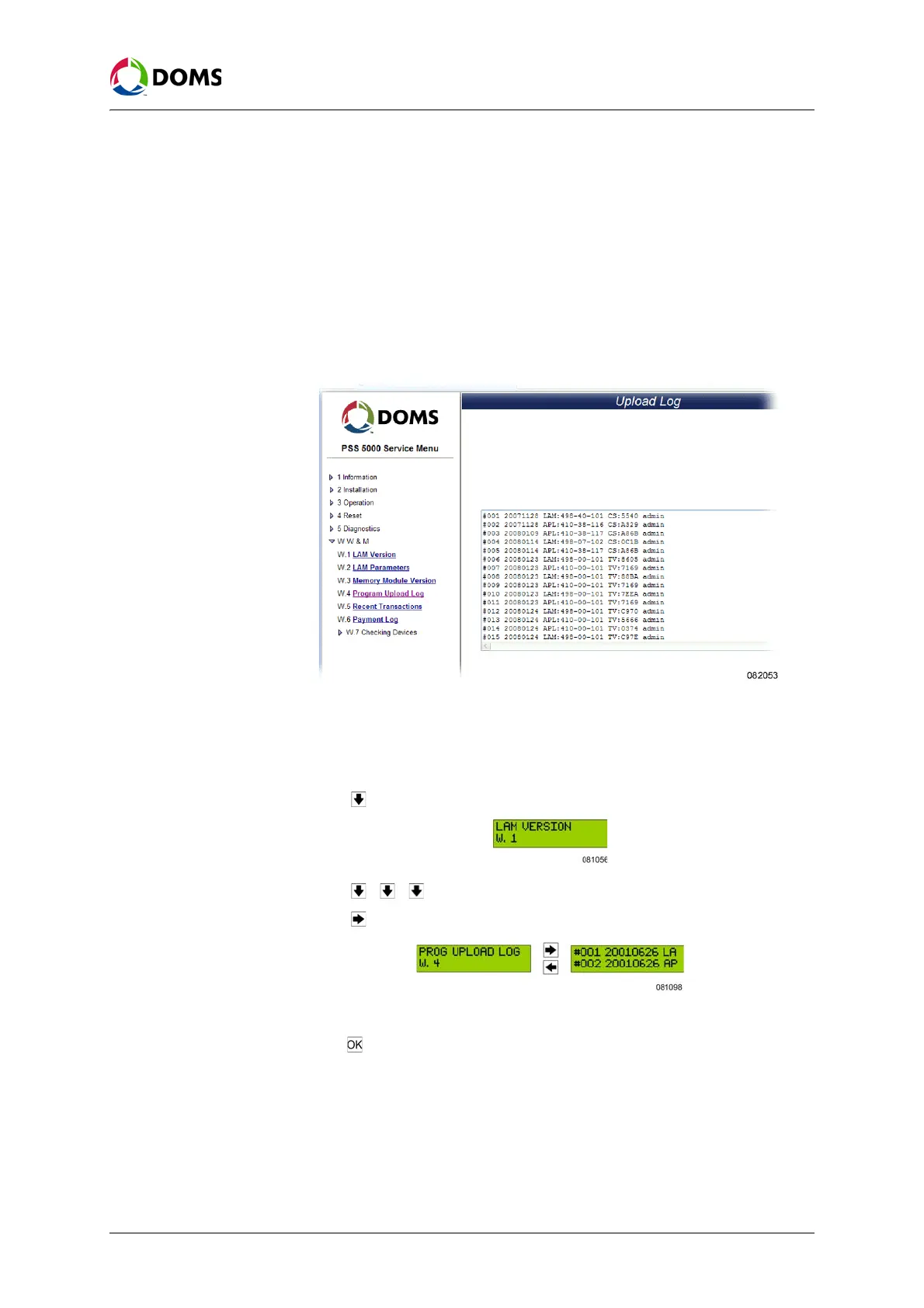
1. Select W W & M → W.4 Program Upload Log.
The
Upload Log page appears.
2. Use the list of upload entries to see when the uploads occurred.
To view the upload log
with local service panel
This procedure describes how to use the Service Menu in the local service pan-
el to view the upload log details.
1. Press to move to the LAM VERSION W.1 menu.
2. Press , , to move to PROG UPLOAD LOG W.4 menu.
3. Press to move to view the upload log data.
4. Use the 4 navigation buttons to move around upload log data.
5. Press to stop viewing the data and return to PROG UPLOAD LOG W.4.
See also For more information about viewing the details in the log, see:
• ‘Viewing data in the Local Service Panel display’ on page 22



 To Next Page