52 of 152 PSS5000/TEMA/803046/05
PSS 5000 – Technical Manual
5 Installation (Menu 2)
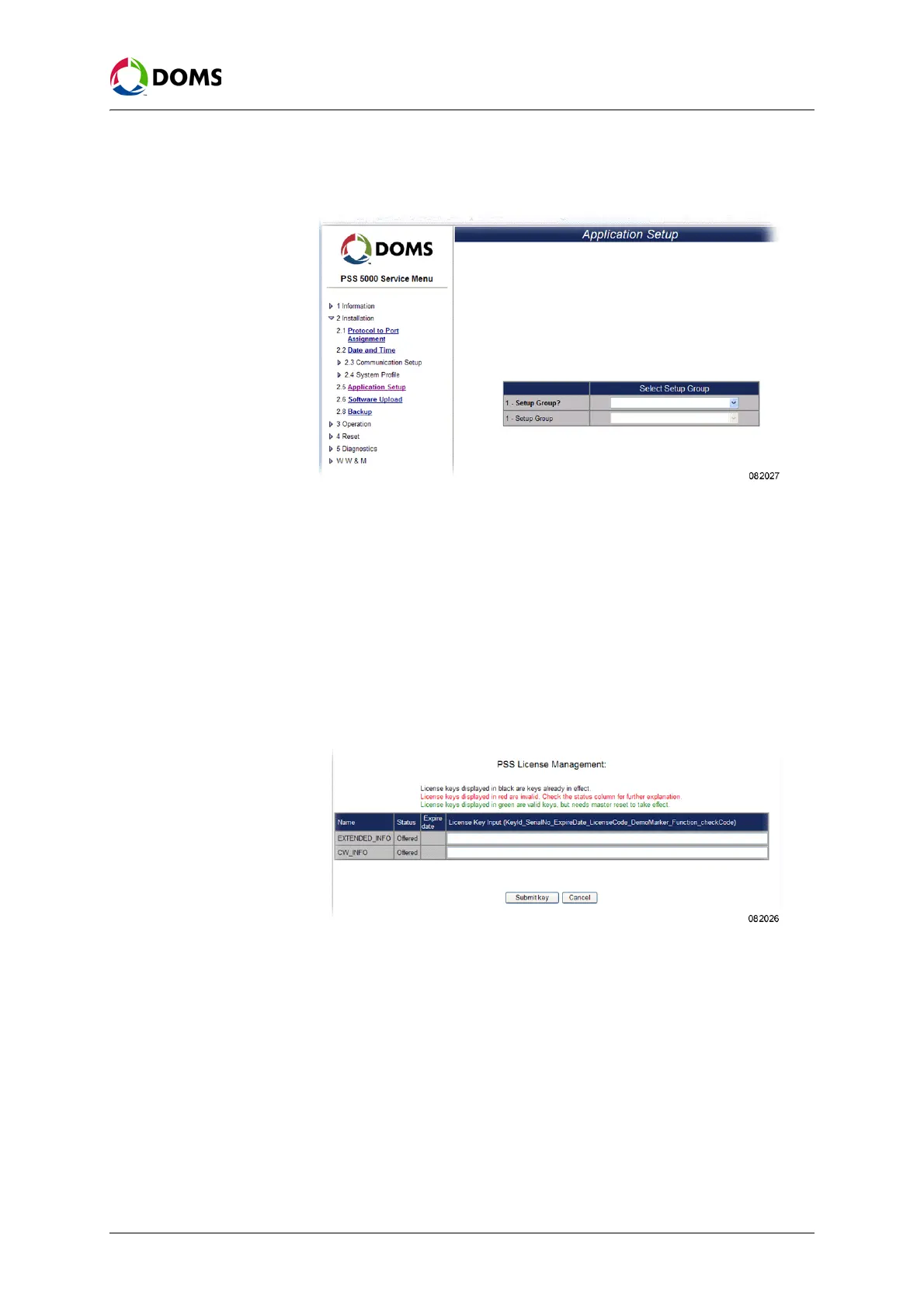
1. Select 2 Installation → 2.5 Application Software.
The
Application Setup page appears.
2. In the Select Setup Group table, open the Setup Group? drop-down list.
3. Select one of the following:
•
Forecourt Control Setup, go to Step 4.
•
Protocol Specific Setup, go to Step 9.
4. In the Forecourt Application drop-down list, select one of the following:
•
PSS License Management, go to Step 5.
•
Wet Stock Setup, go to Step 7.
5. In the PSS License Management page, type the License Key for the selected
application and click
Submit key.
6. Go to Step 11.
7. In the Wet Stock Setup page, select the required New Setup radio button.
8. Click one of the following and then go to Step 11.
•
Save
• Recall default settings
• Prev. Menu
9. In the Protocol? drop-down list, select the protocol that is to be configured.
10. In the page that appears, type in the specific configuration parameters and
click
OK.
11. Select a menu option to continue using the PSS 5000 Service Menu.



 To Next Page