PSS5000/TEMA/803046/05 63 of 152
PSS 5000 – Technical Manual
6 Operation (Menu 3)
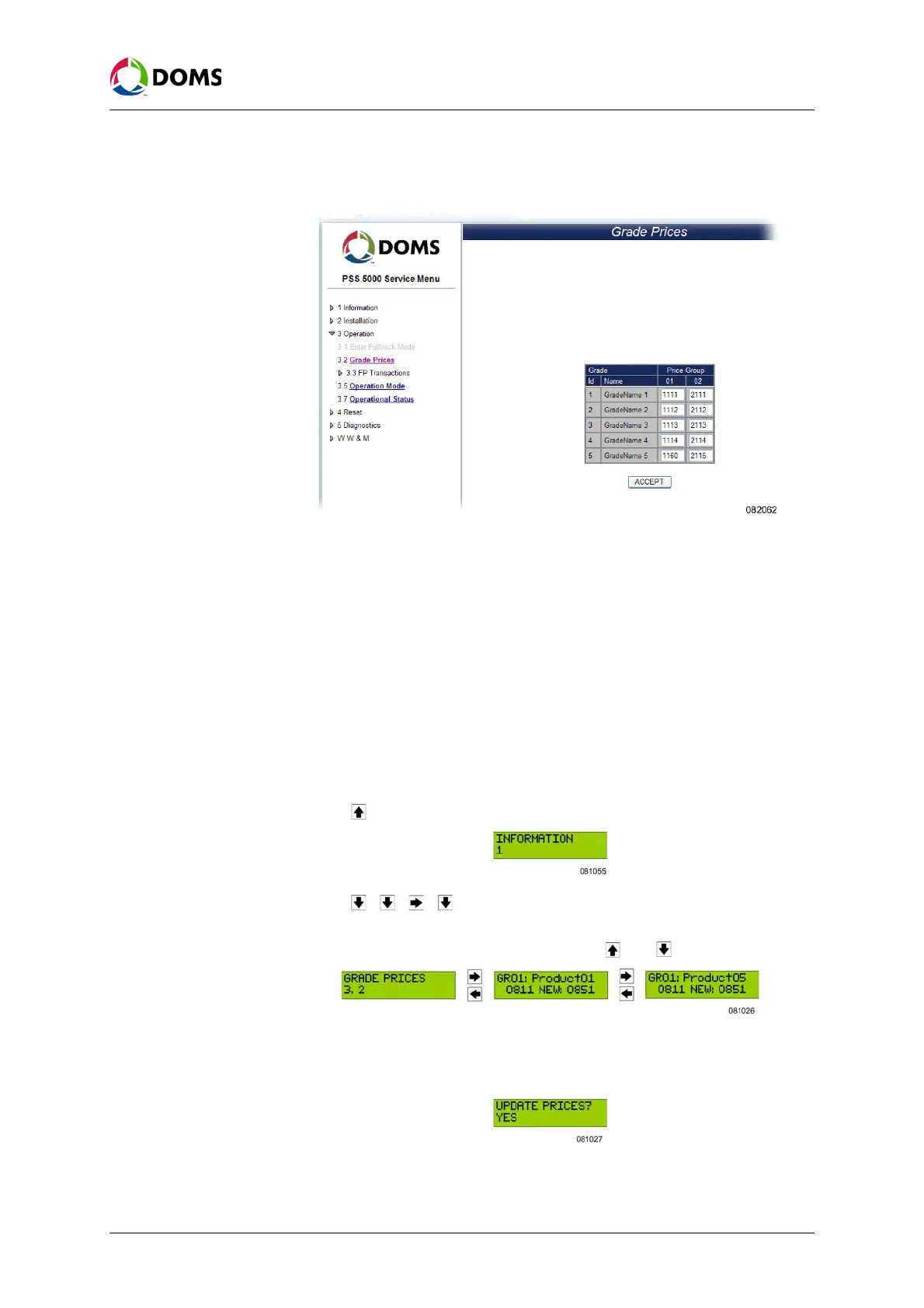
1. Select 3 Operation → 3.2 Grade Prices.
The
Grade Prices page appears.
2. Select the grade name and change the price(s) for the price group(s).
3. If the price of more than one grade needs to be changed, repeat Step 2.
4. Click ACCEPT.
5. Click OK when asked to accept the prices.
A confirmation that the changes grade prices are accepted appears and then
the page returns to the normal
Grade Prices page, which shows a list of
product grades and prices.
To view/change grade
prices with local service
panel
This procedure describes how to use the Local Service Panel to view/change
the grade prices in the PSS 5000.
Note: This function is not available for all Application Programs.
1. Press to move to the INFORMATION 1 menu.
2. Press , , , to move to the GRADE PRICES 3.2 menu.
3. Press the buttons in the sequence shown below to move to the sub-menus,
select the products and view the prices. Use and to change the prices.
4. To change the prices for the remaining products, repeat Step 3. When you
have changed the price for the last product, you are ready to update the pric-
es.
5. Press OK to set the new prices.



 To Next Page