Application Notes
Application Notes
A-1
A-1
How to prevent CPE's settings from being changed by the end-users?
How to prevent CPE's settings from being changed by the end-users?
Sometimes network administrator does not wish end-users to change the configuration of
CPE device.VigorACS (the administrator) server could use the KeepProfile Setting in the
Provision page to always keep the parameter as original.
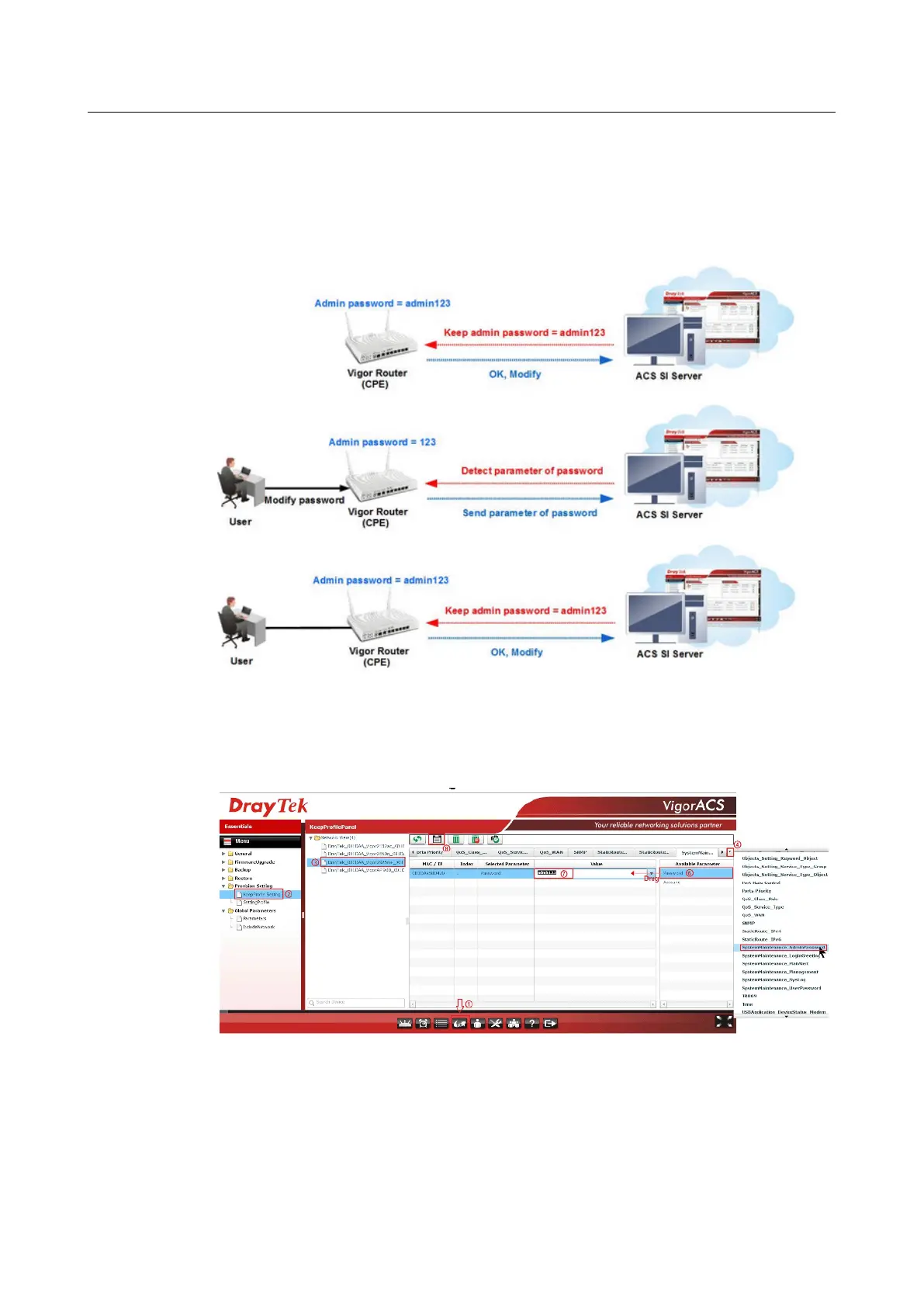
This document will demonstrate how to keep the admin123 as admin password via ACS SI.
Keep Profile Setup on VigorACS SI
Keep Profile Setup on VigorACS SI
1. Setup the parameter in KeepProfile Setting
Go to Provision page
Click Provision Setting >> KeepProfile Setting
From Network View, select the device which network administrator want to
keep the setting
Click on drop menu to select on the setting menu, and choose
SystemMaintenance _AdminPassword
Click Password parameter then drag it to left block
Vigor2762 Series User’s Guide










 To Next Page