I
I
I
I
.
.
C
C
o
o
n
n
f
f
i
i
g
g
u
u
r
r
i
i
n
n
g
g
t
t
h
h
e
e
L
L
A
A
N
N
S
S
e
e
t
t
t
t
i
i
n
n
g
g
s
s
After finished the WAN settings for IPv6, please configure the LAN settings to make the
router’s client get the IPv6 address.
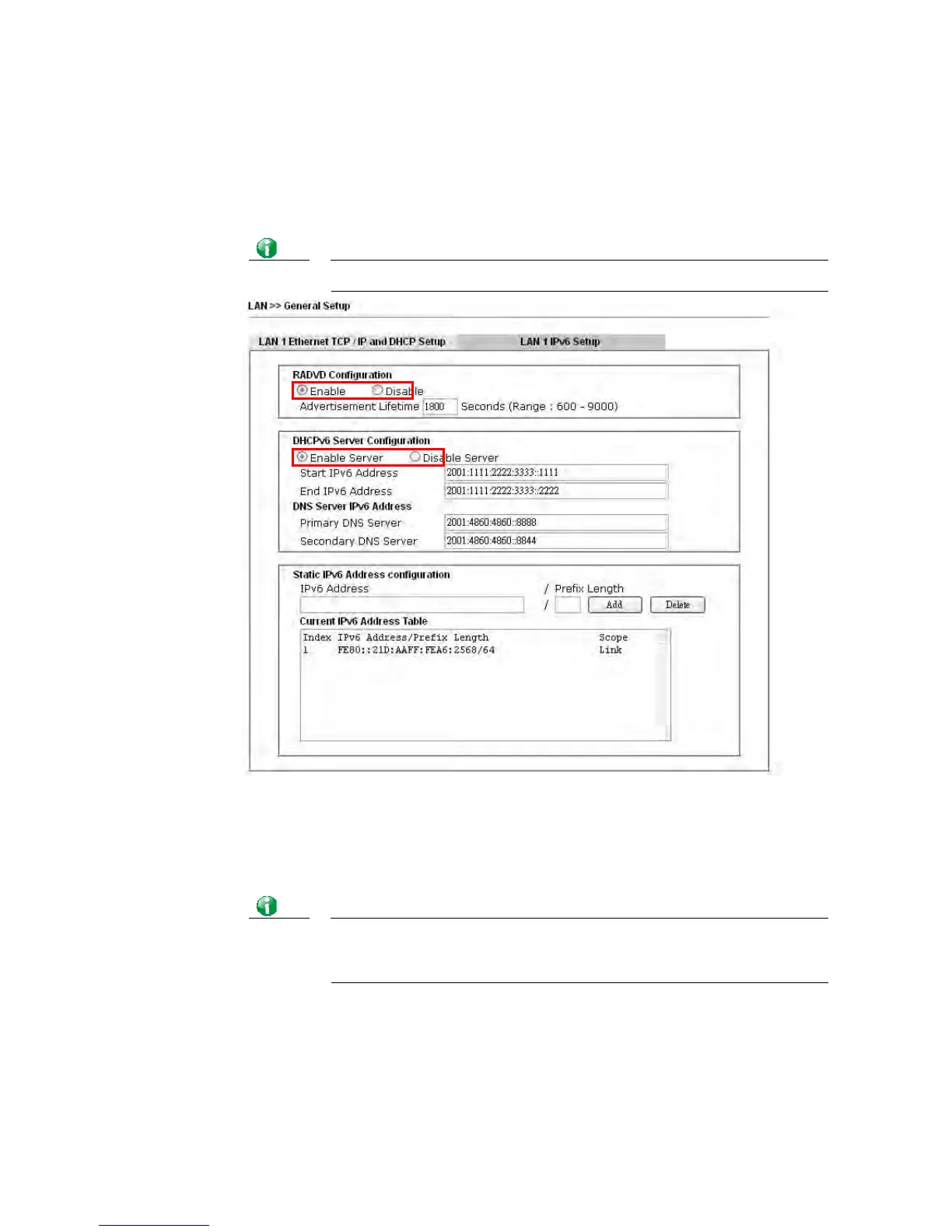
1. Access into the web user interface of Viogr2860. Open LAN>> General Setup. Click the
IPv6 button.
Info
Only the subnet of LAN1 supports IPv6 feature.
2. In the field of RADVD Configuration, the default setting is Enable. The client’s PC will
ask RADVD service for the Prefix of IPv6 address automatically, and generate an
Interface ID by itself to compose a full and unique IPv6 address.
3. In the field of DHCPv6 Server Configuration, when DHCPv6 service is enabled, you can
assign available IPv6 address for the client manually.
Info
When both mechanisms are enabled, the client can determine which
mechanism to be used (e.g., the default mechanism for Windows7 is
RADVD).














 To Next Page