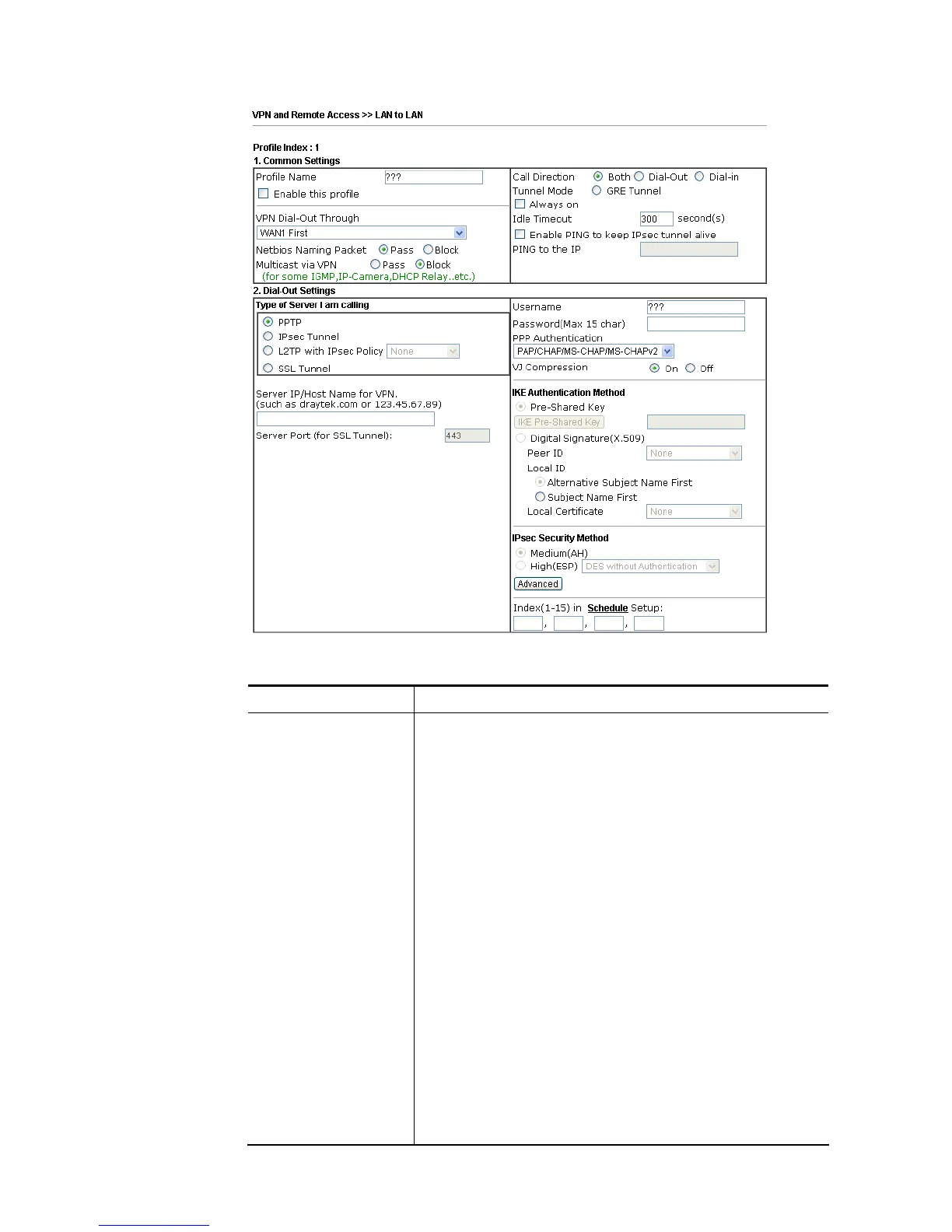
Available settings are explained as follows:
Item Description
Common Settings Profile Name – Specify a name for the profile of the
LAN-to-LAN connection.
Enable this profile - Check here to activate this profile.
VPN Dial-Out Through - Use the drop down menu to choose a
proper WAN interface for this profile. This setting is useful
for dial-out only.
WAN1 First/ WAN2 First/ WAN3 First /WAN4/LTE
First- While connecting, the router will use
WAN1/WAN2/WAN3/WAN4/LTE as the first channel for
VPN connection. If WAN1/WAN2/WAN3/WAN4/LTE
fails, the router will use another WAN interface
instead.
WAN1 Only /WAN2 Only/WAN 3 Only/WAN 4/LTE
Only- While connecting, the router will use
WAN1/WAN2/WAN3/WAN4/LTE as the only channel for
VPN connection.
WAN1 Only: Only establish VPN if WAN2 down - If
WAN2 failed, the router will use WAN1 for VPN
connection.
WAN2 Only: Only establish VPN if WAN1 down - If
WAN1 failed, the router will use WAN2 for VPN
connection.
Netbios Naming Packet














 To Next Page