Subnet Mask Type the subnet mask.
Gateway Type the IP address of gateway.
Back Click it to return to previous setting page.
Next Click it to get into the next setting page.
Cancel Click it to give up the quick start wizard.
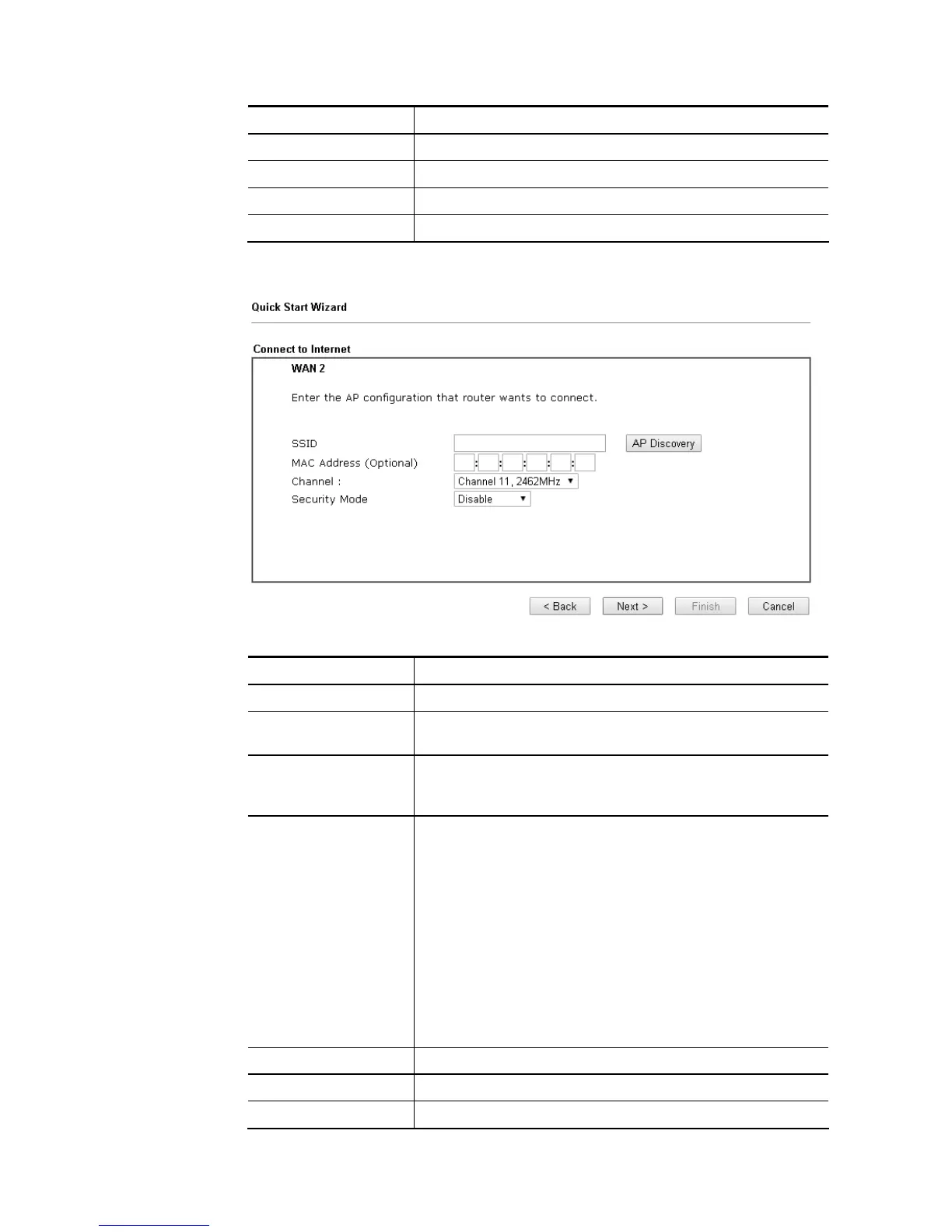
3. Please type in the IP address information according to the settings of your Wireless AP.
Then click Next for next step.
Available settings are explained as follows:
Item Description
SSID The identification of the Wireless AP.
MAC Address
(Optional)
The MAC Address of the Wireless AP.
Channel The channel of frequency of the Wireless AP. Please notice
that, if this setting is modified, the channel of Wireless LAN
(2.4GHz) would be also modified.
Security Mode The mode to connect to the Wireless AP.
Disable – The Router connects to the wireless AP
without any encryption mechanism.
WEP – The Router connects to the wireless AP as a WEP
client and the encryption key should be entered in WEP
Key.
WPA/PSK – The Router connects to the wireless AP as a
WPA client and the encryption key should be entered in
PSK.
WPA2/PSK – The Router connects to the wireless AP as a
WPA2 client and the encryption key should be entered
in PSK.
Back Click it to return to previous setting page.
Next Click it to get into the next setting page.
Cancel Click it to give up the quick start wizard.














 To Next Page