P
P
a
a
r
r
a
a
m
m
e
e
t
t
e
e
r
r
D
D
e
e
s
s
c
c
r
r
i
i
p
p
t
t
i
i
o
o
n
n
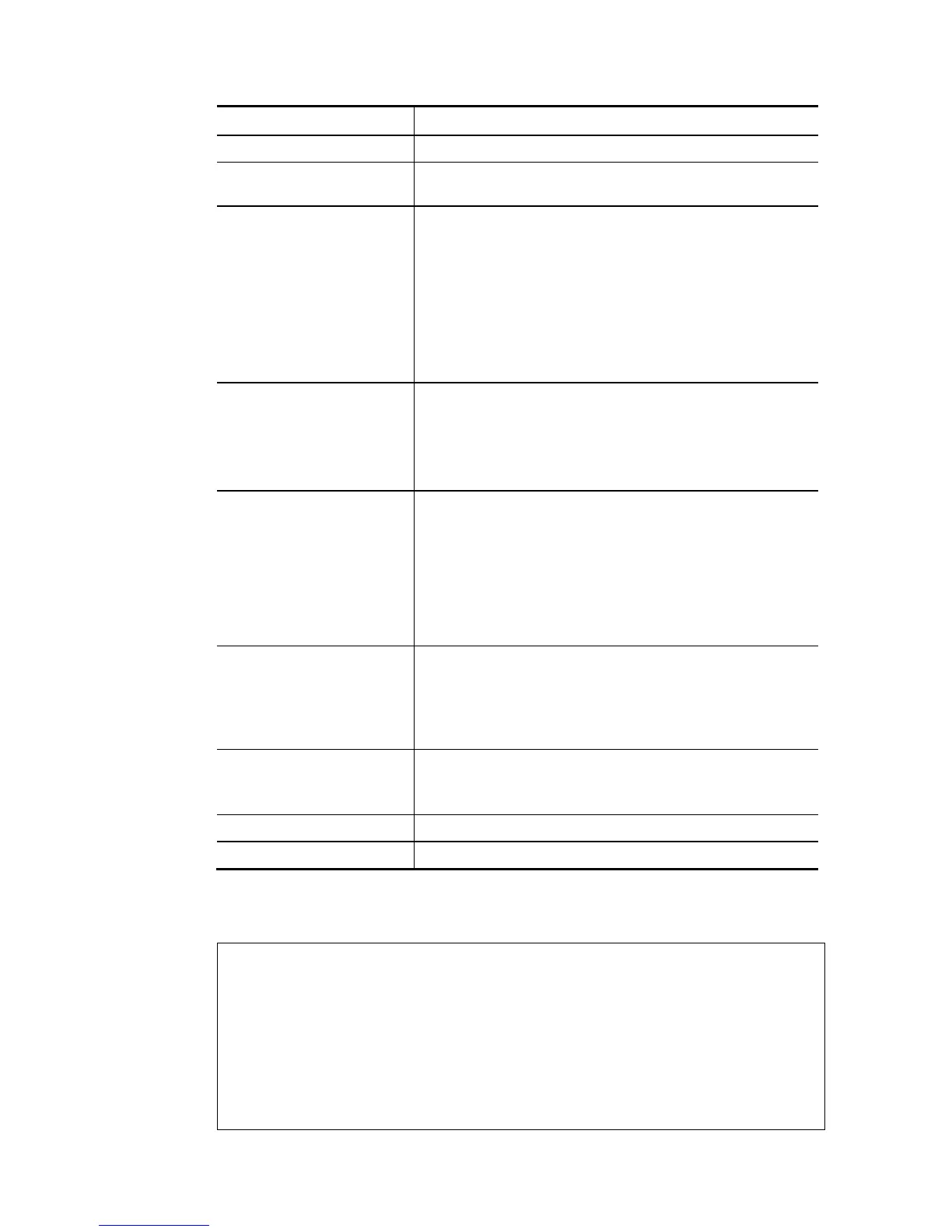
? Display the command syntax of “adsl ppp”.
pvc_no It means the PVC number and the adjustable range is from
0 (Channel-1) to 7(Channel-8).
Encap Different numbers represent different modes.
0 : VC_MUX,
1: LLC/SNAP,
2: LLC_Bridge,
3: LLC_Route,
4: VCMUX_Bridge
5: VCMUX_Route,
6: IPoE.
Proto It means the protocol used to connect Internet. Different
numbers represent different protocols.
0: PPPoA,
1: PPPoE,
2: MPoA.
Modu 0: T1.413,
2: G.dmt,
4: Multi,
5: ADSL2,
7:ADSL2_AnnexM
8:ADSL2+
14:ADSL2+_AnnexM.
acqIP It means the way to acquire IP address. Type the number to
determine the IP address by specifying or assigned
dynamically by DHCP server.
0 : fix_ip,
1: dhcp_client/PPPoE/PPPoA.(acquire IP method)
idle Type number to determine the network connection will be
kept for always or idle after a certain time.
1: always on, else idle timeout secs. Only for PPPoE/PPPoA.
Username This parameter is used only for PPPoE/PPPoA
Password This parameter is used only for PPPoE/PPPoA
You have to reboot the system when you set it on Route mode.
E
E
x
x
a
a
m
m
p
p
l
l
e
e
> adsl ppp o 35 8 1 1 4 1 -1 draytek draytek
pvc no.=0
vci=35
vpi=8
encap=LLC(1)
proto=PPPoE(1)
modu=MULTI(4)














 To Next Page