123
4
4
Other Functions
How to Set Batch Print / Sequential Batch Print
Proceed with steps 1 to 5 of the sequence described
in “Basic Printing”.
(“Basic Printing” → see p.27)
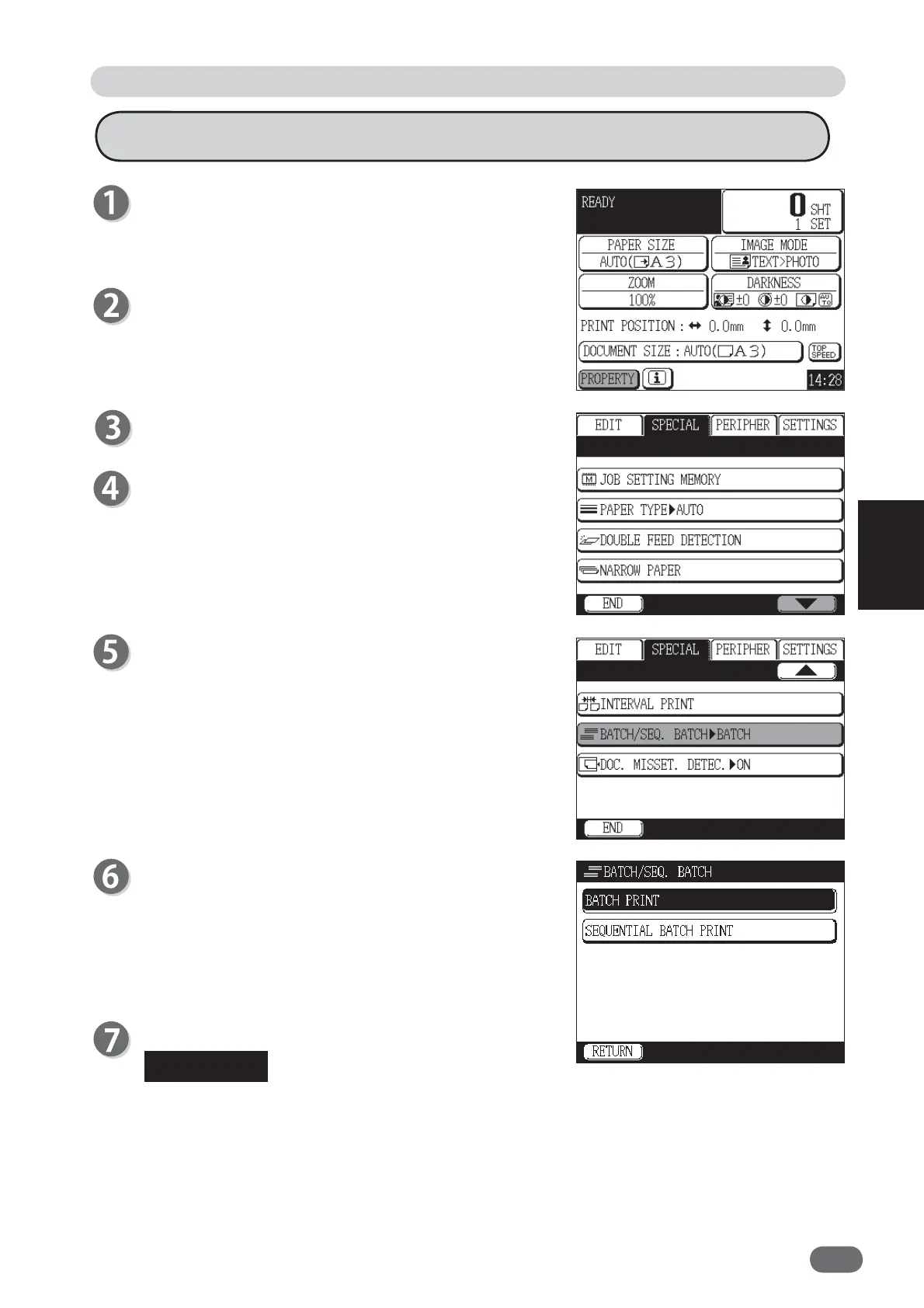
Touch "PROPERTY".
Touch "SPECIAL".
Touch the screen switch button in the lower right
corner of the screen twice.
Touch "BATCH/SEQ. BATCH".
Touch "BATCH PRINT" or "SEQUENTIAL BATCH
PRINT.
"BATCH PRINT" or "SEQUENTIAL BATCH PRINT" is
set.
Touch "END".
Special Function: Batch Print / Sequential Batch Print
When “BATCH/SEQUENTIAL BATCH PRINT” is set, the “BATCH/SEQUENTIAL BATCH
PRINT” icon appears at the bottom of the main screen. When you touch the icon, the setting
screen of “BATCH/SEQUENTIAL BATCH PRINT” appears and you can change the setting.
However, if fi ve shortcut icons are already displayed, the “BATCH/SEQUENTIAL BATCH
PRINT” icon will not appear.
REFERENCE










 To Next Page