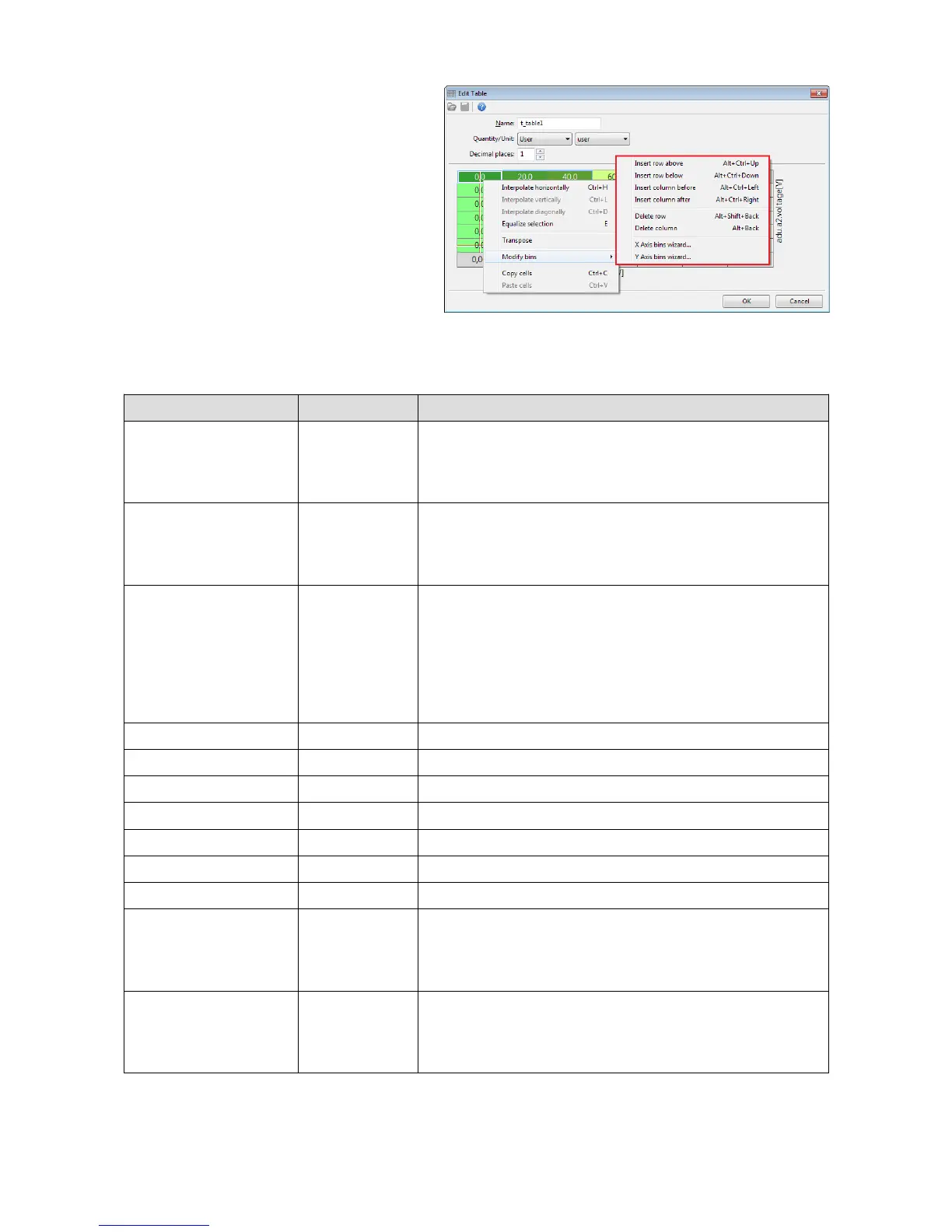
A table size (number of columns and rows)
can be changed any time by means of a
popup menu opened by right-clicking.
Description of the commands in the popup menu:
Command Shortcut key: Description:
Interpolate
horizontally
Ctrl+H Horizontal interpolation: the value of the cells inside the
selection is calculated as a linear interpolation of cells
on the left and right selection edge.
Interpolate vertically Ctrl+L Vertical interpolation: the value of the cells inside the
selection is calculated as a linear interpolation of cells
on the upper and lower selection edge.
Interpolate
diagonally
Ctrl+D Interpolation between apexes. You should define 4
corner points in the selection, and the remaining cells
will be calculated as a double linear interpolation. It
combines two commands - first the horizontal and then
vertical interpolation.
Equalize selection E Smoothing out the selected cells
Insert row above Alt+Ctrl+Up Inserting a row above the selected cell
Insert row below Alt+Ctrl+Down Inserting a row below the selected cell
Insert column before Alt+Ctrl+Left Inserting a column to the left of the selected cell
Insert column after Alt+Ctrl+Right Inserting a column to the right of the selected cell
Delete row... Alt+Shift+Back Deleting a row containing the selected cell
Delete column... Alt+Back Deleting a column containing the selected cell
X Axis bins wizard Starting the creator for the X axis allowing to define a
new number of columns and to generate the Y axis cells
according to the selected interpolation type.
Y Axis bins wizard Starting the creator for the Y axis allowing to define a
new number of columns and to generate the Y axis cells
according to the selected interpolation type.
Page 102/137


 To Next Page