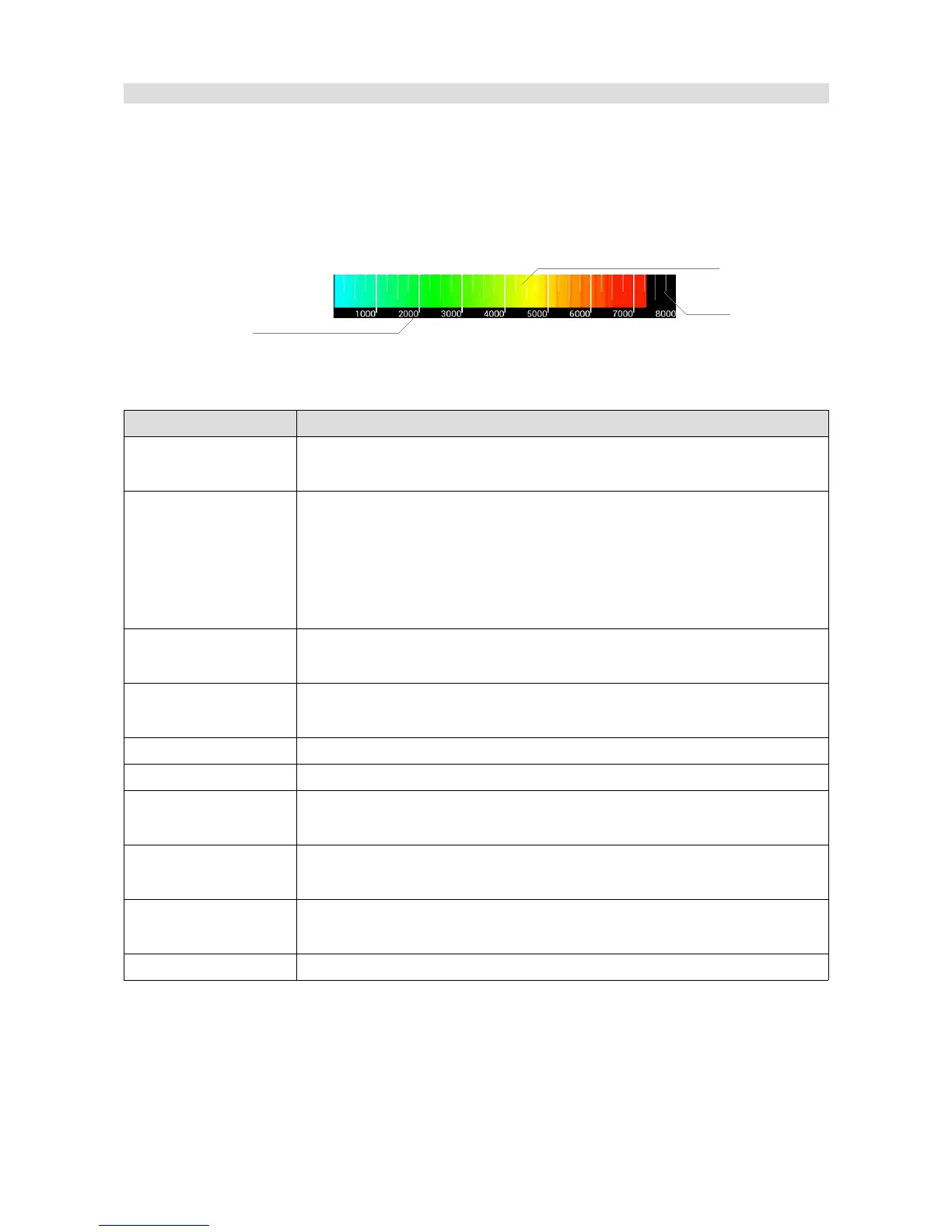
RPM Bar
This object allows you to display the engine speed in the form of a horizontal bar or a round
indicator.
Parameter Description
Position X,Y Object position on the page The reference point is the upper-left corner
of a rectangle around the object.
Type The type of engine speed indicator displayed:
Classic bar – displayed in the form of a “curved” bar
Bar – displayed in the form of a horizontal bar (as shown in the above
visualisation)
Round – displayed in the form of a round gauge
Color When using the Classic bar, this determines the colour of the bar
indicating the engine speed.
Color redline When using the Classic bar, this determines the colour of the indicator
bar above the Redline start value
Redline start A value specifying the beginning of the engine speed limit area .
Max rpm The maximum engine speed value displayed on the indicator
Color preset When using a Bar type indicator, this determines the colour gradient that
will be used for
RPM x 1000 When using a Bar type indicator, this determines whether the engine
speed is displayed in the legend in full or divided by one thousand
Display ticks When using a Bar type indicator, this determines if additional division
lines (Ticks) are to be displayed
Channel RPM A channel or a function containing the current engine speed
Page 65/137
RPM indicator
Object
description
RPM bar
Ticks
Inactive
Legend


 To Next Page