Outputs
The ADU device is equipped with two low-side outputs rated at 2A each. Additionally, an analogue
output with a signal ranging from 0 to 5V is available, which can be used to send a voltage signal
to another device.
Low side output
Configuration of low side outputs is available in the Outputs panel. You can choose between two
output channels Aux1.channel and Aux2.channel, where you can define the variables/functions
that will control the output. When their value equals 0, a given output is inactive (open), when the
value differs from 0, the output is active (connected to ground)
Analogue output
The analogue output control channel is available in the Outputs panel as AOut.channel.
It should be assigned a variable representing a value in V with a 0.001V accuracy, resulting in the
actual value ranging from 0 to 5000 (0-5V).
The following example shows how to change a signal from the 0-5V analogue input to a 5-0V
signal and how to set the voltage at the Analog output.
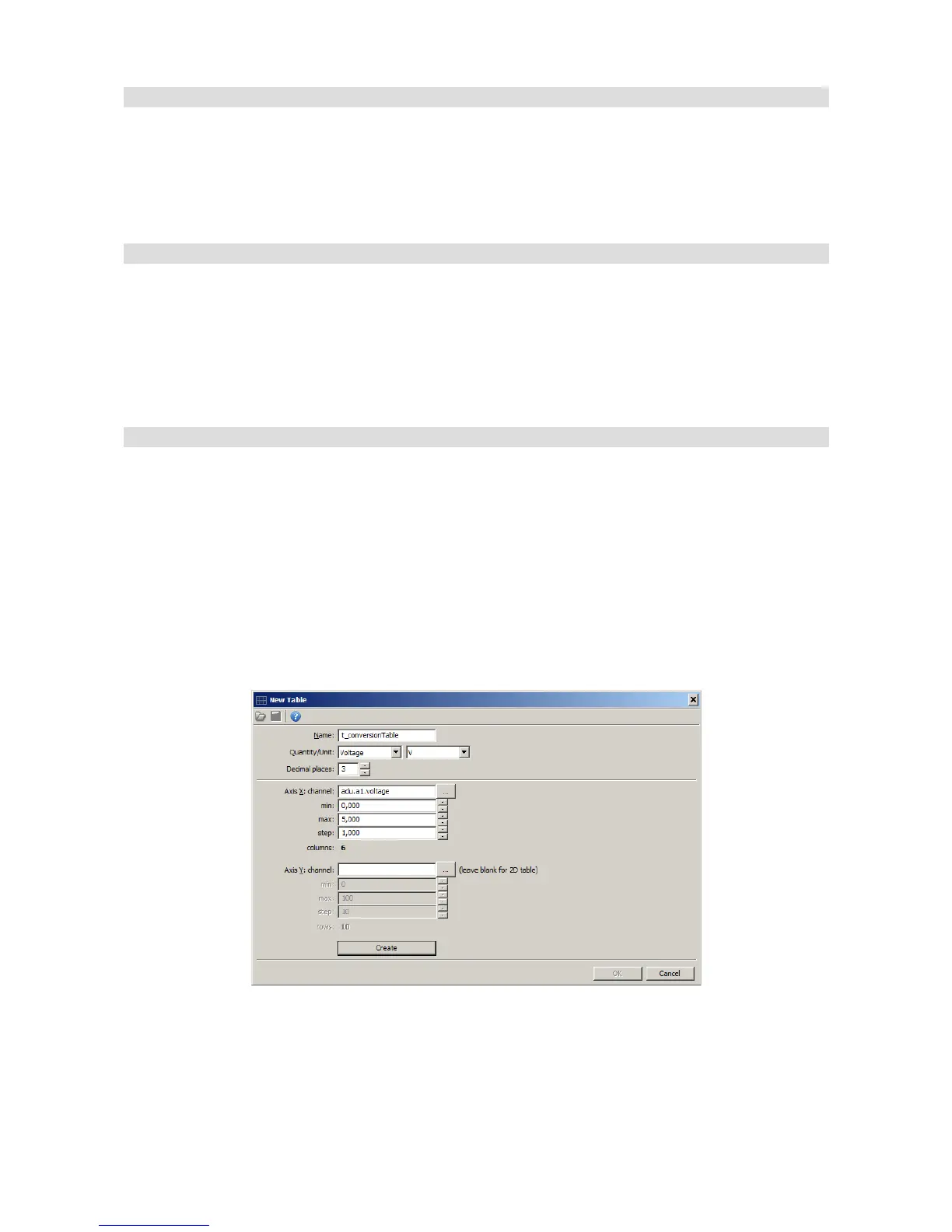
We will use a 2D map for this purpose. In order to create it in the project, select the Add button
and then Table. The configuration dialogue should look as follows:
A 2D Table will be created after pressing the Create button. The table should be modified so that
0V from the table is 5V, and for 5V - 0V.
Page 84/137


 To Next Page