Logging channels
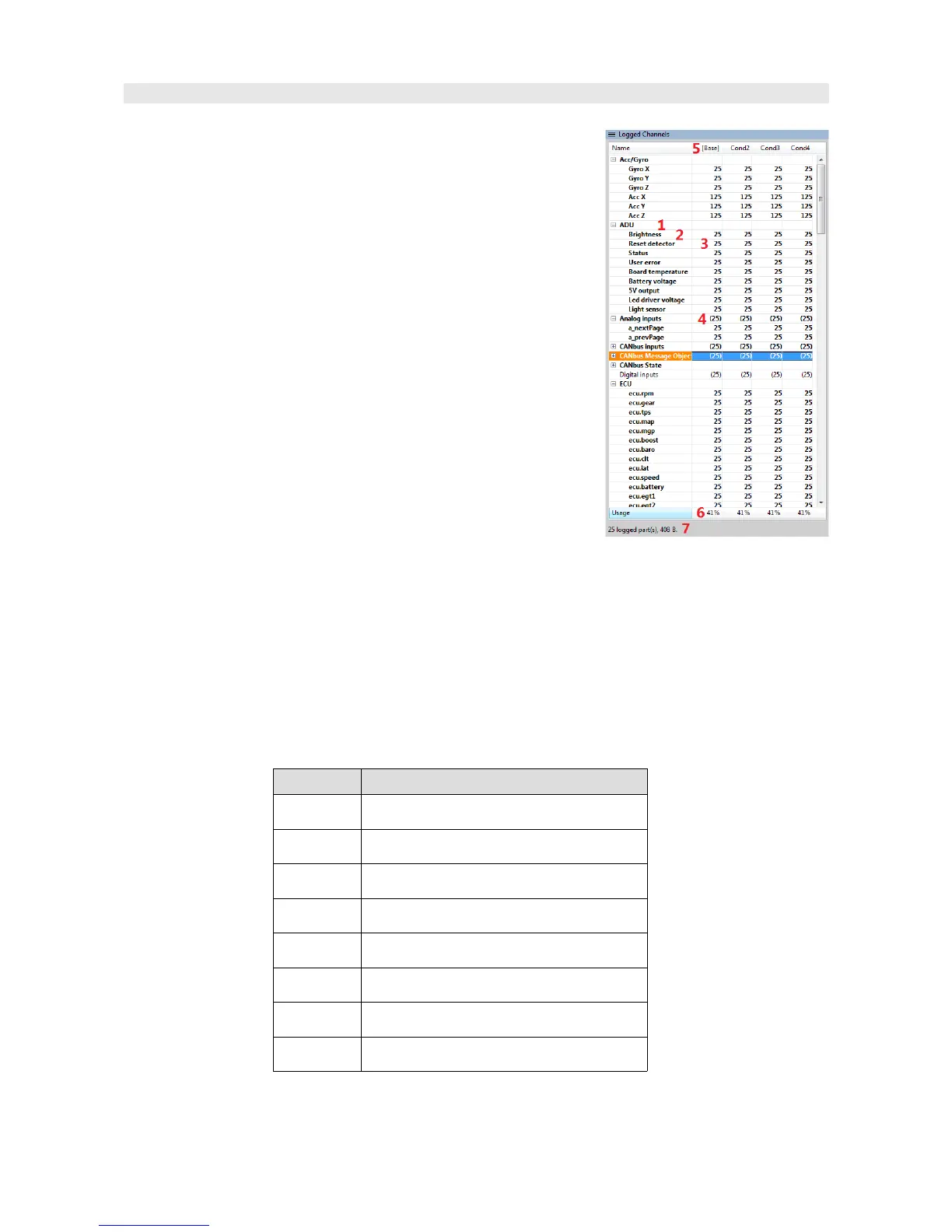
The Logged Channels pane defines the logging frequencies for
various channels. These values are expressed in Hz.
It is worth noting that the same frequencies are used for both
logging to the USB memory and for logging directly to the ADU
Client programme on your PC.
- Groups (1)
- Channels (2)
- Channel logging frequencies (3)
- Default logging frequencies for new elements(4). When a
new element is created (e.g. Analog Input), this frequency will be
assigned to its channel.
- Selected Log condition (out of four available) (5).
- The logging bandwidth budget used expressed in [%] for
particular Log conditions (6).
– The logging bandwidth budget used expressed in bytes (7)
Logging configuration may be performed using a pop-up menu or by using the shortcut keys shown
below. If the keyboard shortcut is used in a log group, it will change the frequency of all channels in
the group. If the shortcut is used in a channel, it will change the frequency of just that channel.
You can also change an individual Log condition or all of them, depending on the selected
column.
Key Logging frequency
Alt+~ Deactivation of channel/group logging
Alt+1 1 Hz
Alt+2 5 Hz
Alt+3 25 Hz
Alt+4 50 Hz
Alt+5 125 Hz
Alt+6 250 Hz
Alt+7 500 Hz
Page 115/137


 To Next Page