EnGenius EOC1650 Wireless Access Point / Client Bridge Version 2.0
25
Name:Specifyausernameintothefirstfield.
Password: Specify a password into this field and then re‐type the password into the Confirm
Passwordfield.
ClickontheApplybuttontosavethechanges.
4.5.3 SNMPSettings
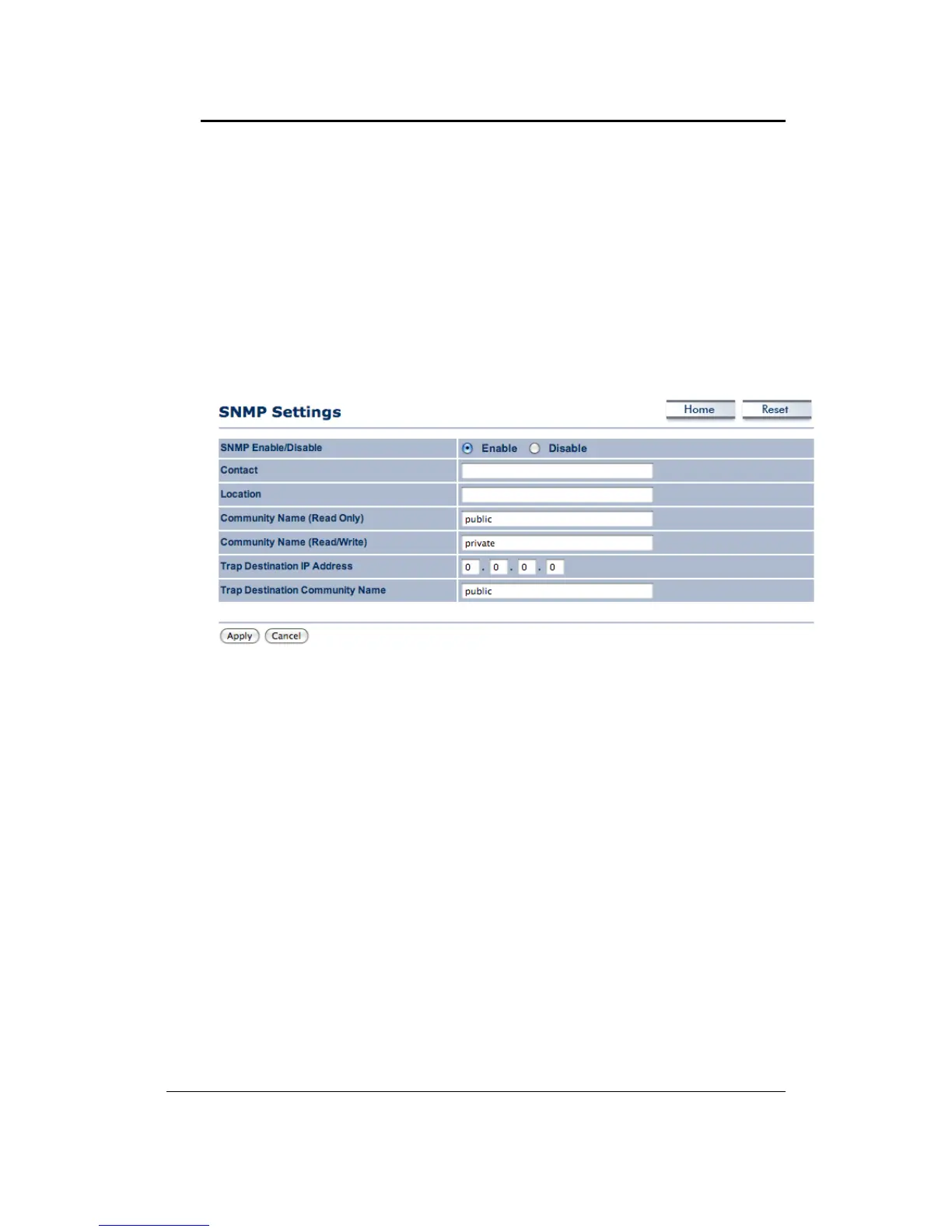
ClickontheSNMPSettingslinkundertheManagementmenu.Thisoptionallows youtoassign
the contact details, location, and community name and trap settings for SNMP. This is a
networking management protocol used to monitor network‐attached devices. SNMP allows
messages (called protocol data units) to be sent to
various parts of a network. Upon receiving
these messages, SNMP‐compatible devices (called agents) return data stored in their
ManagementInformationBases.
SNMPEnable/Disable:ChoosetoenableordisabletheSNMPfeature.
Contact:Specifythecontactdetailsofthedevice.
Location:Specifythelocationofthedevice.
Read‐Only Community Name: Specify the password for access the SNMP community for read
onlyaccess.
Read‐Write
Community Name: Specify the password for access to the SNMP community with
read/writeaccess.
SendSNMPTrap:SpecifytheIPaddressofthecomputerthatwillreceivetheSNMPtraps.
TrapCommunityName:SpecifythepasswordfortheSNMPtrapcommunity.
ClickontheApplybuttontosavethechanges.
4.5.4 Backup/Restoresettings,Resettofactorydefaultsettings
Click on the Backup/Restore Setting link under the Management menu. This option is used to
savethecurrentsettingsofthedeviceinafileonyourlocaldiskorloadsettingsontothedevice
from a local disk. This feature is very handy for administrators who have several
devices that
needtobeconfiguredwiththesamesettings.



 To Next Page