EnGenius EOC1650 Wireless Access Point / Client Bridge Version 2.0
17
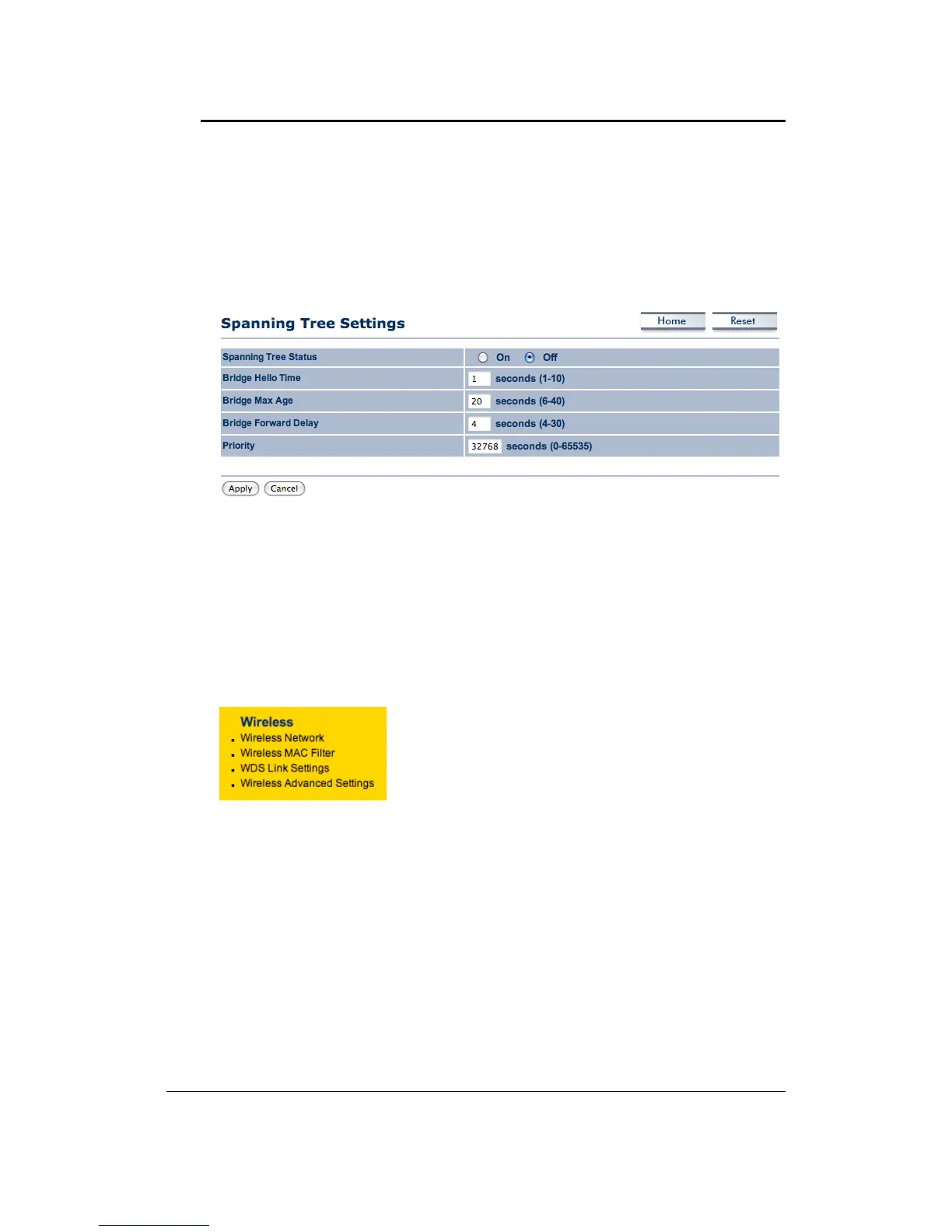
4.3.3 SpanningTreeSettings
ClickontheSpanning Tree link undertheSystemdrop‐down menuSpanning‐TreeProtocol is a
linkmanagementprotocolthatprovidespathredundancywhilepreventingundesirableloopsin
thenetwork.
SpanningTreeStatus:Choosetoenableordisablethespanningtreefeature.
BridgeHelloTime:Specifythenumberofsecondsforthehellotime.
BridgeMaxAge:Specifythenumberofsecondsforthemaxage.
BridgeForwardDelay:Specifythenumberofsecondsfor
thebridgeforwarddelay.
Priority:Specifythenumberofsecondsforthepriority.
ClickontheApplybuttontosavethechanges.
4.4 Wireless
Click on the Wireless link on the navigation drop‐down
menu. You will then see fouroptions: wirelessnetwork,
wireless MAC filter, WDS link settings, and wireless
advancedsettings.Eachoptionisdescribedbelow.
4.4.1 WirelessNetwork
The Wireless Network page allows you to configure the wireless mode, channel, SSID, and
securitysettings.



 To Next Page