EnGenius EOC1650 Wireless Access Point / Client Bridge Version 2.0
65
7.5.2 WirelessSecurity
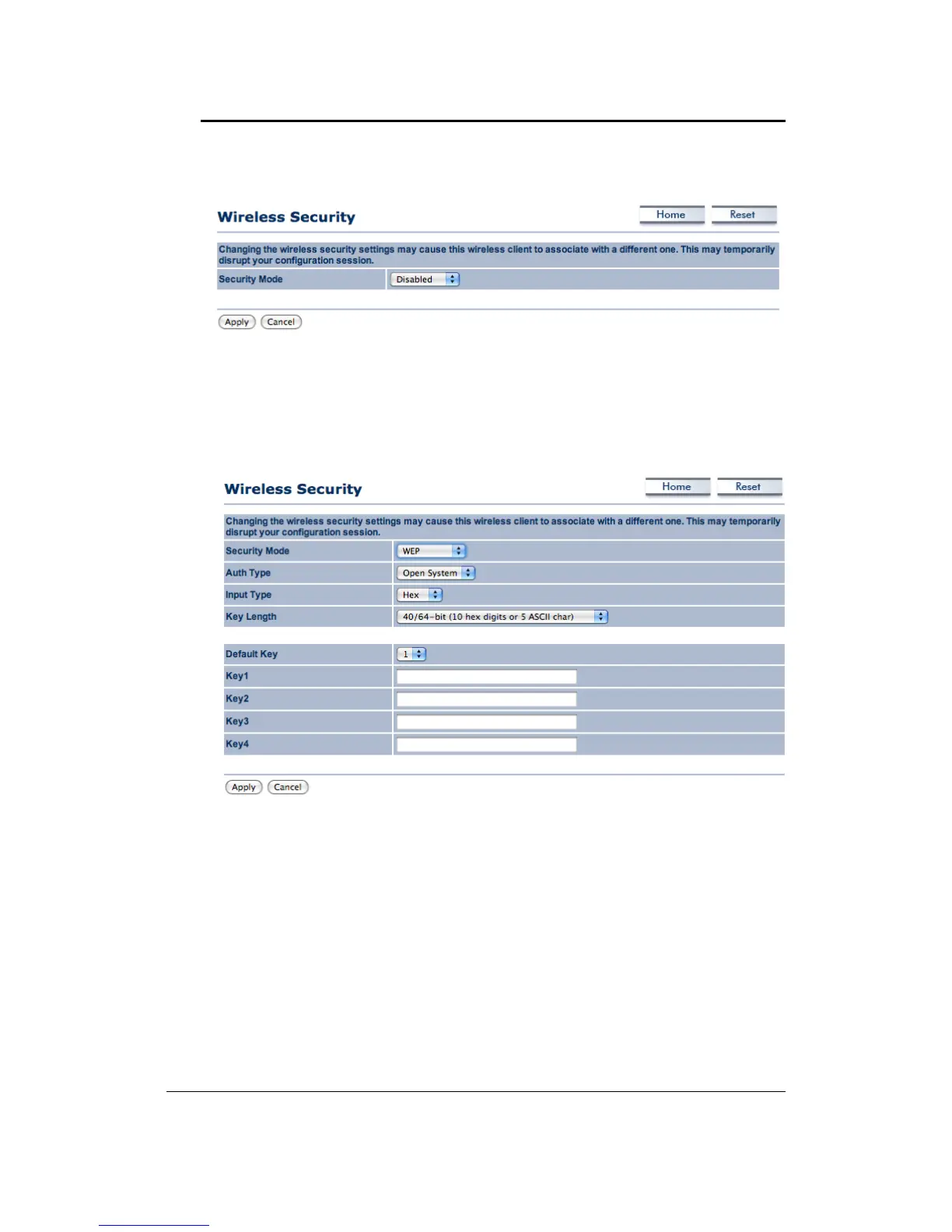
7.5.2.1 WirelessSecurity:WEP
Security Mode: Select WEP from the drop‐down list if your wireless network uses WEP
encryption.WEPisan acronymforWiredEquivalentPrivacy,andisasecurityprotocolthat
providesthesamelevelofsecurityforwirelessnetworksasforawirednetwork.
Authentication Type: Select an authentication method. Options available are Open Key,
SharedKey.Anopensystemallowsanyclienttoauthenticateaslongasitconformstoany
MAC address filter policies that may have been set. All authentication packets are
transmitted without encryption. Shared Key sends an
unencrypted challenge text string to
any device attempting to communicate with the Access Point. The device requesting
authentication encrypts the challenge text and sends it back to the Access Point. If the
challenge text is encrypted correctly, the Access Point allows the requesting device to
authenticate.Itisrecommendedto
selectAutoifyouarenotsurewhichauthenticationtype
isused.
InputType:SelectHexorASCIIfromthedrop‐downlist
Key Length: Select a key format from the drop‐down list. 64bit‐hex keys require 10
characters,whereas 128‐bit keys require 26 characters.
A hex key is defined as anumber
between0through9andletterbetweenAthroughFandathroughf.



 To Next Page