EnGenius EOC1650 Wireless Access Point / Client Bridge Version 2.0
29
5 ClientBridgeOperatingMode
5.1 LoggingIn
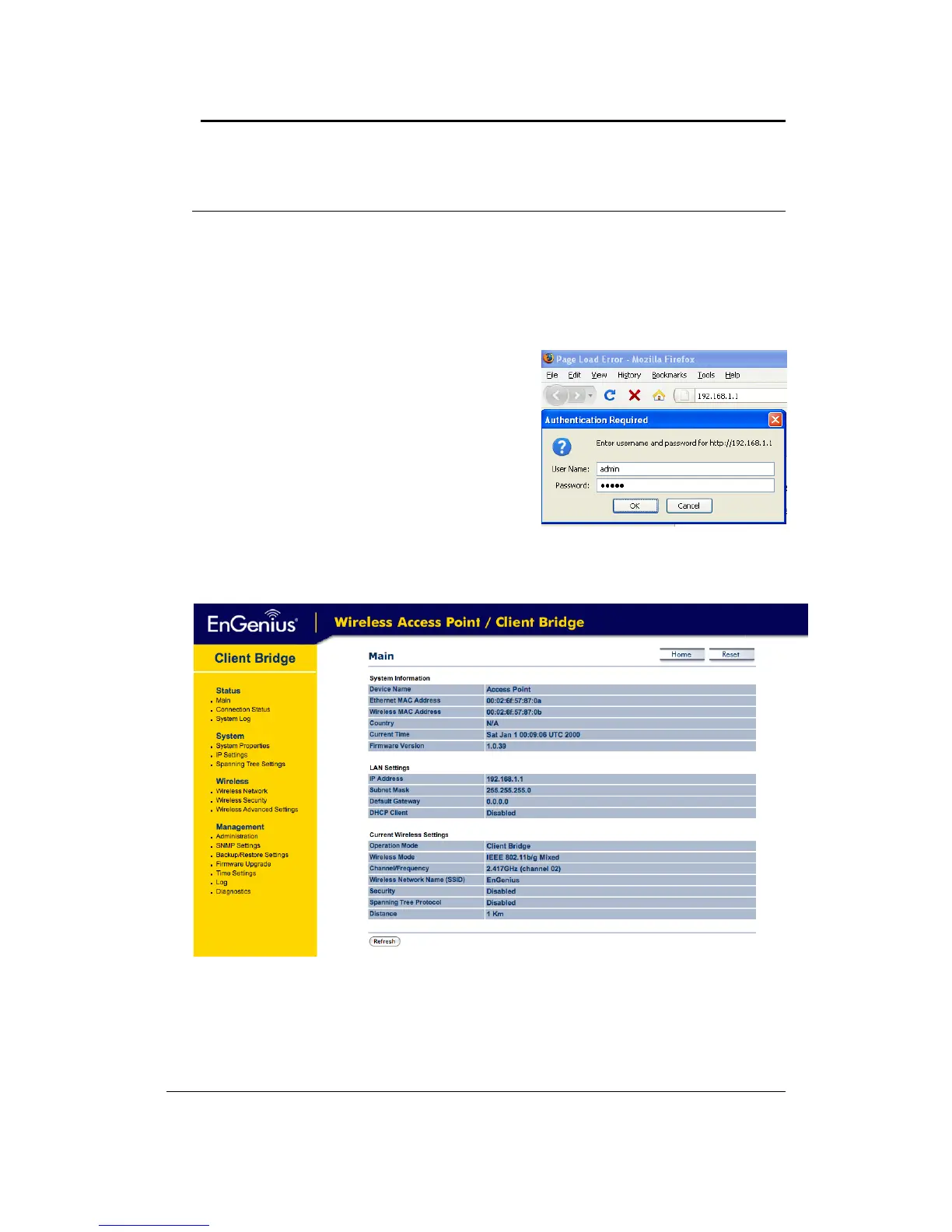
To configure the device through the web‐browser, enter the IP address of the device (default:
192.168.1.1)intotheaddressbaroftheweb‐browserandpressEnter.
Make sure that the device and your computers are configured on the same subnet. Refer to
Chapter2inorder
toconfiguretheIPaddressofyourcomputer.
AfterconnectingtotheIPaddress,theweb‐browser
willdisplaytheloginpage.
Specifyadminforboththeusernameandpassword.
Afterlogginginyouwillgraphicaluserinterface(GUI)
of the device. The navigation drop‐down
menu on
leftisdividedintofoursections:
1. Status: Displays the overall status, connection
status,andsystemlog.
2. System: Thismenuincludesthesystemproperties,
IPandSpanningTreesettings.
3. Wireless:Thismenuincludesnetwork,securityand
advancedsettings.
4. Management: This menu includes the admin
setup, SNMP, firmware upgrade, time settings,
diagnosticsandsave/restorebackup.



 To Next Page