EnGenius EOC1650 Wireless Access Point / Client Bridge Version 2.0
32
5.3 System
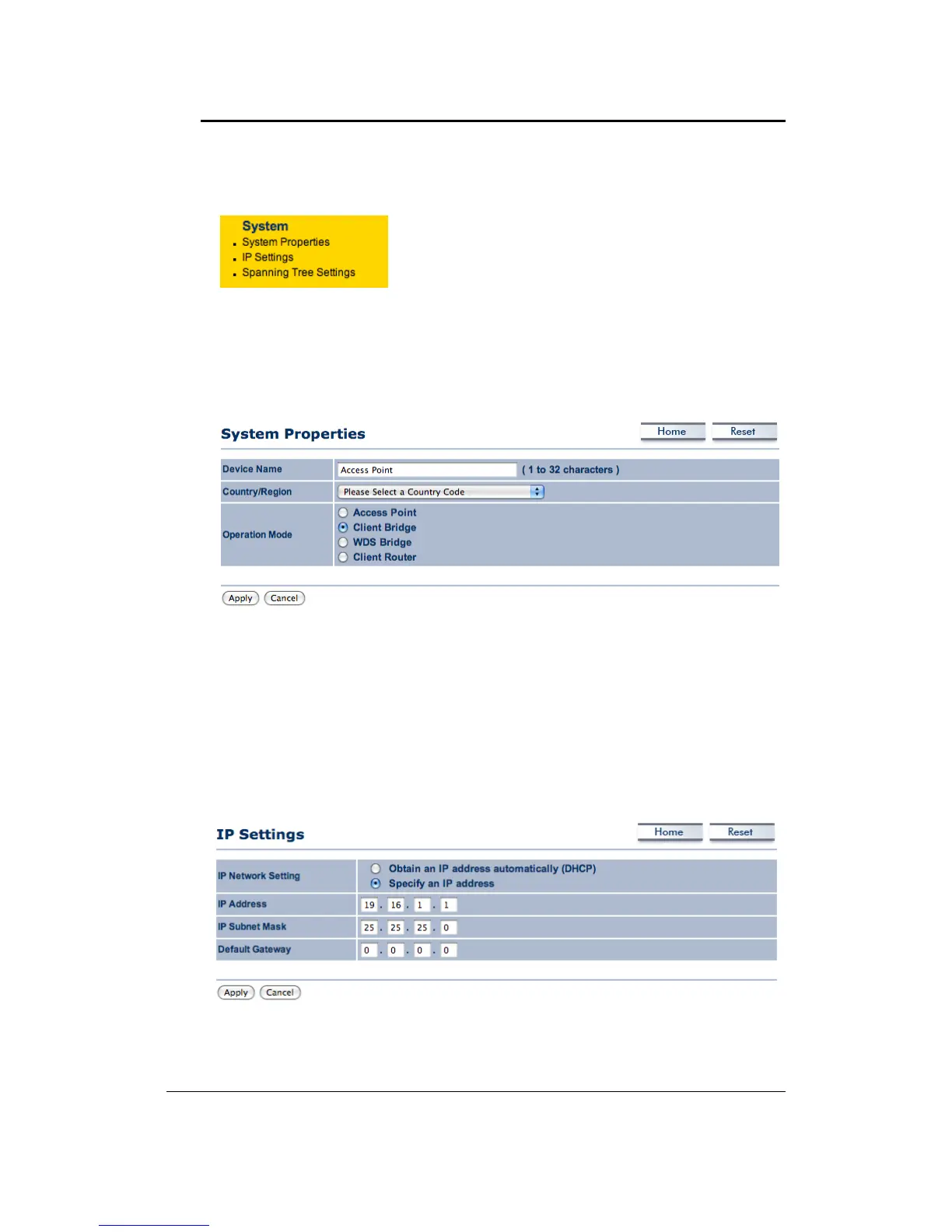
Click on the System link on the navigation drop‐down
menu. You will then see three options: System
Properties, IP Settings,and SpanningTreeSettings.Each
optionisdescribedindetailbelow.
5.3.1 SystemProperties
ClickontheSystemPropertieslinkundertheSystemdrop‐downmenu.Thispageallowsyouto
switch the operating mode of the device, as well as specify a name and select the operating
region.
DeviceName:Specifyanameforthedevice(thisisnottheSSID),
Country/Region:Selectacountryfromthedrop‐downlist.
Operating Mode: Select and operating mode. Configuration for each operating mode is
describedintheirrespectivechapters.
ClickontheApplybuttontosavethechanges.
5.3.2 IPSettings
ClickontheIPSettingslinkundertheSystemdrop‐downmenuThispageallowsyoutoconfigure
thedevicewithastaticIPaddressoraDHCPclient.
IPNetworkSetting:SelectObtainanIPaddressautomatically(DHCP)radiobuttoniftheAccess
PointisconnectedtoaDHCPserver.ThiswillallowtheAccessPointtopassIPaddressestothe
clientsassociatedwithit.YoumayselectSpecifyanIPAddressradiobuttonifyou
wouldlikethe



 To Next Page