EnGenius EOC1650 Wireless Access Point / Client Bridge Version 2.0
34
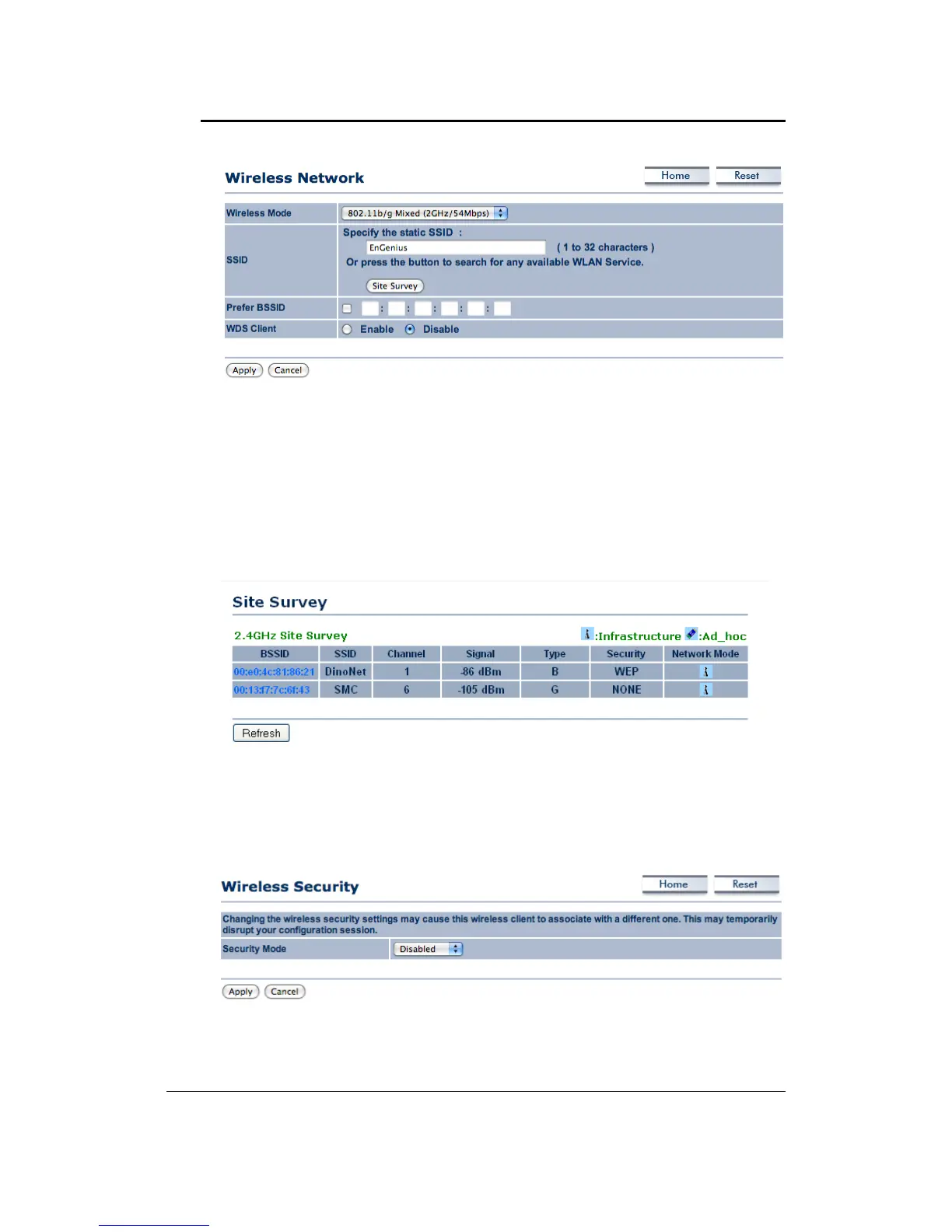
Wireless Mode: Depending on the type of wireless clients that are connected to the network,
youmayselectB,G,orB/G‐mixed.Ifyouarenotsureaboutwhichclientswill beaccessingthe
wirelessnetworks,itisrecommendedthatyouselectB/G‐mixedforthebest
performance.
SSID:TheSSIDisauniquenamedsharedamongstallthepointsofthewirelessnetwork.TheSSID
mustbeidenticalonallpointsofthewirelessnetworkandcannotexceed32characters.Youmay
specifyanSSIDorselectonefromtheSiteSurvey.
Site Survey: Click on the Site Survey button in order to scan the2.4GHz frequency for devices
that broadcast their SSID. Click on the BSSID link to connect to the Access Point. Click on the
Refreshbuttontore‐scanthefrequency.
5.4.2 WirelessSecurity
You can chang th wireless security settings may cause this wireless client to associate with a
differentone.Thismaytemporarllydisruptyourconfigurationsession.
WirelessSecurity:WEP



 To Next Page