Rev. A Disassembly, Assembly, and Adjustments 5-41
TM-U950/U950P Technical Manual
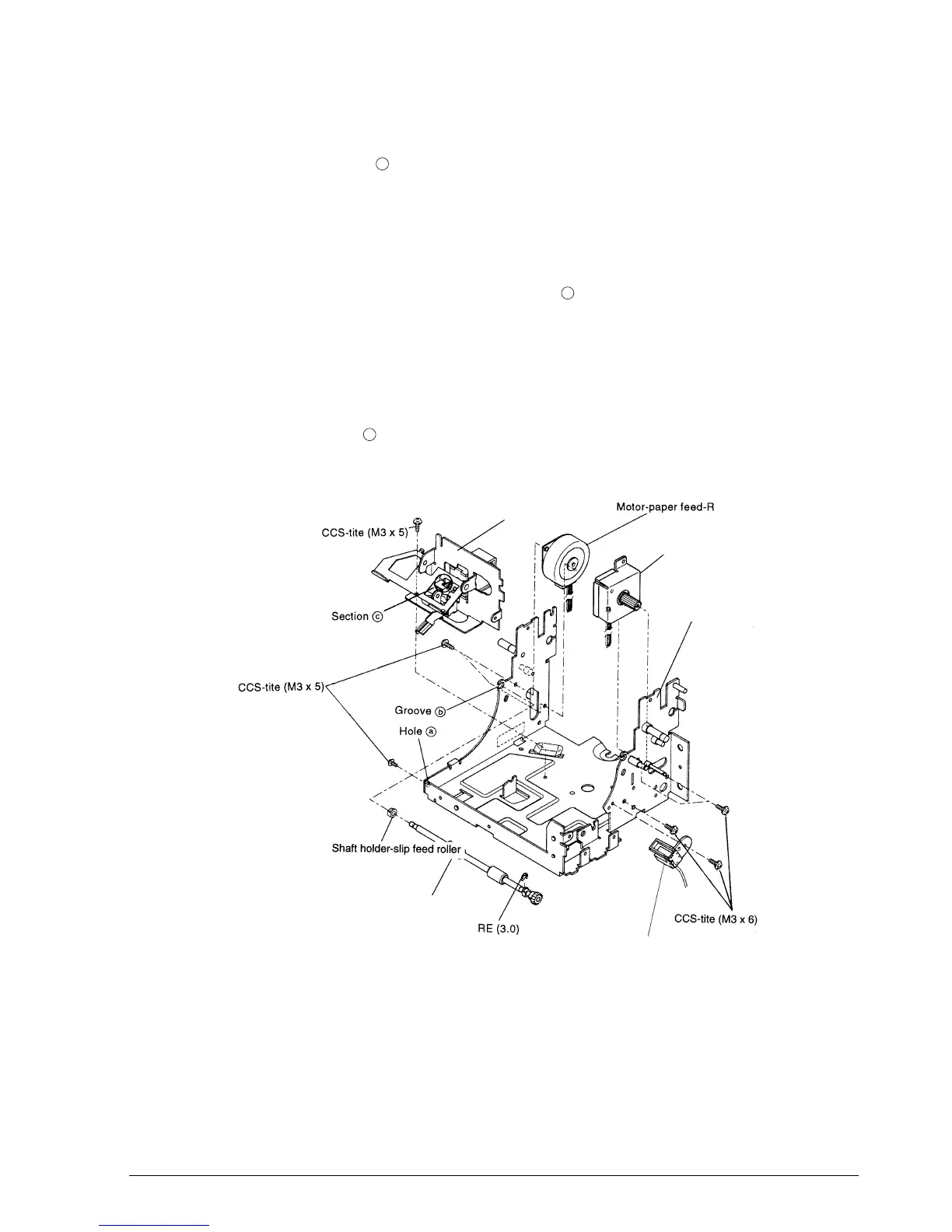
Main Assembly 1-1-(2): Frame-Main Unit Assembly (for printers with a MICR reader)
1.* Mount the screw in hole .
2. Attach the frame-inner assembly and secure it with the screw.
3. Attach the motor-paper feed-J assembly (the larger assembly) and R assembly (the smaller
assembly), and secure them with the screws.
4.* Fit the shaft holder-slip feed roller into the groove , attach the roller-slip paper feed
assembly, and secure it with the RE fittings.
5. Mount the detector-slip paper insertion assembly and fasten it with the screw.
✔
Checkpoints
Be careful that the motor-paper feed-J and R assemblies are attached correctly.
Make sure that section on the frame-inner is properly seated. (For details see the
Checkpoint on page 5-35.)
a
b
c
Detector-slip paper insertion assembly
Roller-slip paper feed assembly B
Frame-main assembly
Motor-paper feed-J assembly
Frame-inner assembly
CONFIDENTIAL


 To Next Page
 Loading...