Operating of the Machine
4-84 © Essemtec AG Paraquda Startup & Safety
0000003/11 / November 4, 2014
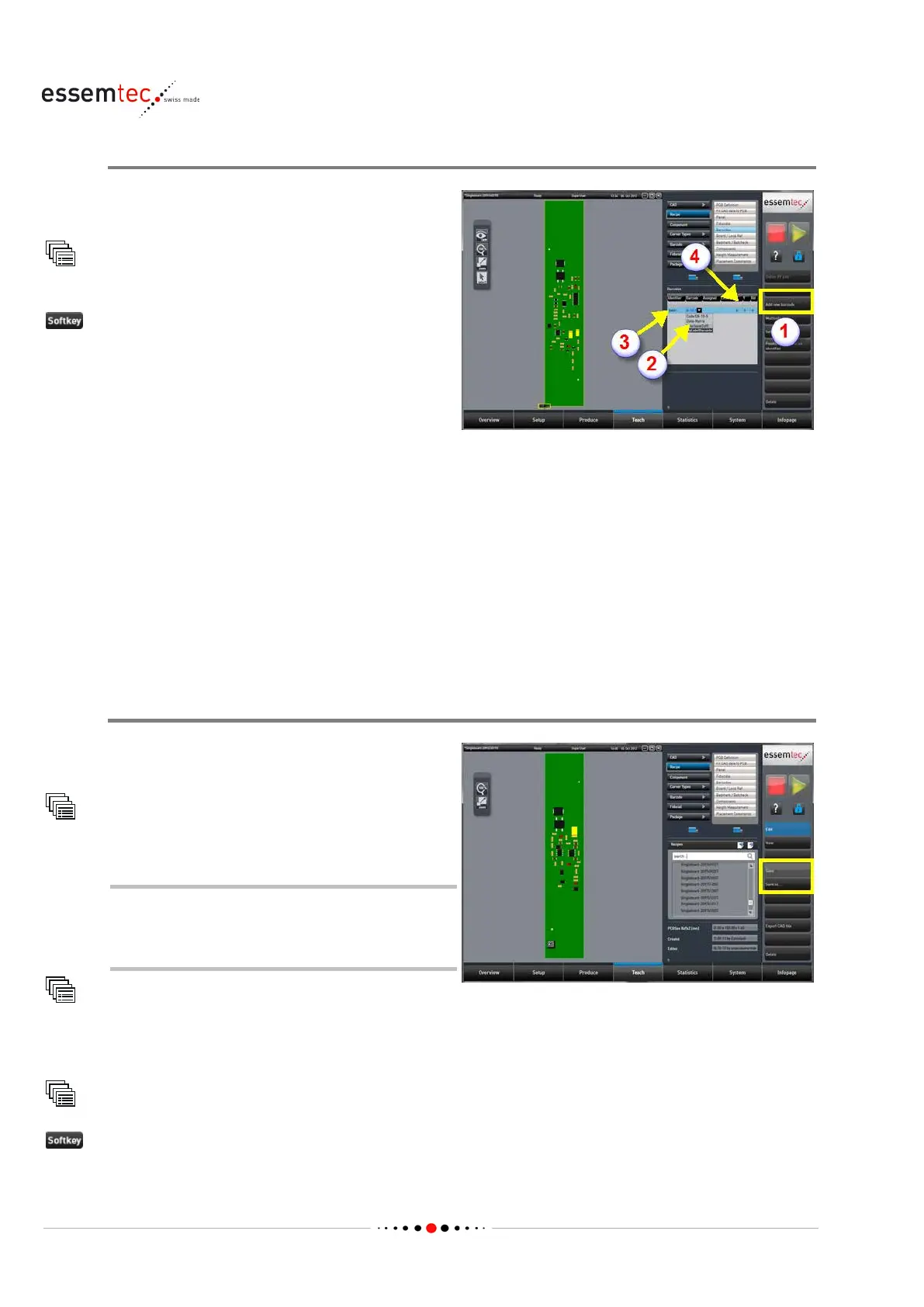
Add Barcode to Recipe
Add the barcode to the recipe, assign it a
s PCB
ID and link it to the identifier of this component.
Recipe
Barcode
(1) to add the barcode to the
barcode list and to define the location of the
barcode on the PCB.
Out of the column 'Barcode' (2), select the
created label
barcode.
In the column 'Identifier' (3), type in the desired
identifier (e.g. BAR2).
In the column 'Assigned', select PCB ID.
In the column 'Linked', select the name of the
label identifier (e.g. LBL1). Among other things,
this will automatically set th
e correct position of
the barcode (4). That means, the columns 'X', 'Y',
'Rot' are set automatically.
The recipe will be stored in a later step.
Completing Recipe Data
If needed, define the process sequences and
constraints.
Recipe
Process Sequences
The identifier of the component which
represents the label does not need to be
deselected from any process sequences.
Recipe
Placement Constraints
To finalize the recipe, go back to:
Recipe
or Save as... to save the recipe.



 To Next Page