Test Setup - Test Configurator, Timer, and System
212 88000 Series
FlexE Group
PHY n (Port n)
A PHY (Port) grid is presented for each enabled port displaying and
allowing edition (see Assign/Unassign/Mode above) of the client
assignation per slot of 5 Gbit/s.
Assigned clients are identified by their client ID number.
Unassigned clients are identified by the U letter.
Restore < Test Application > Defaults
Reverts the current test application to its default factory settings.
To assign or unassign slots:
1. Select a client from the Client Assignation Status table.
2. Select Assign or Unassign.
3. From the PHYn (Port n) slot matrix on the right, select the slot(s);
slots are assign/unassign as follows according to the selected
Mode:
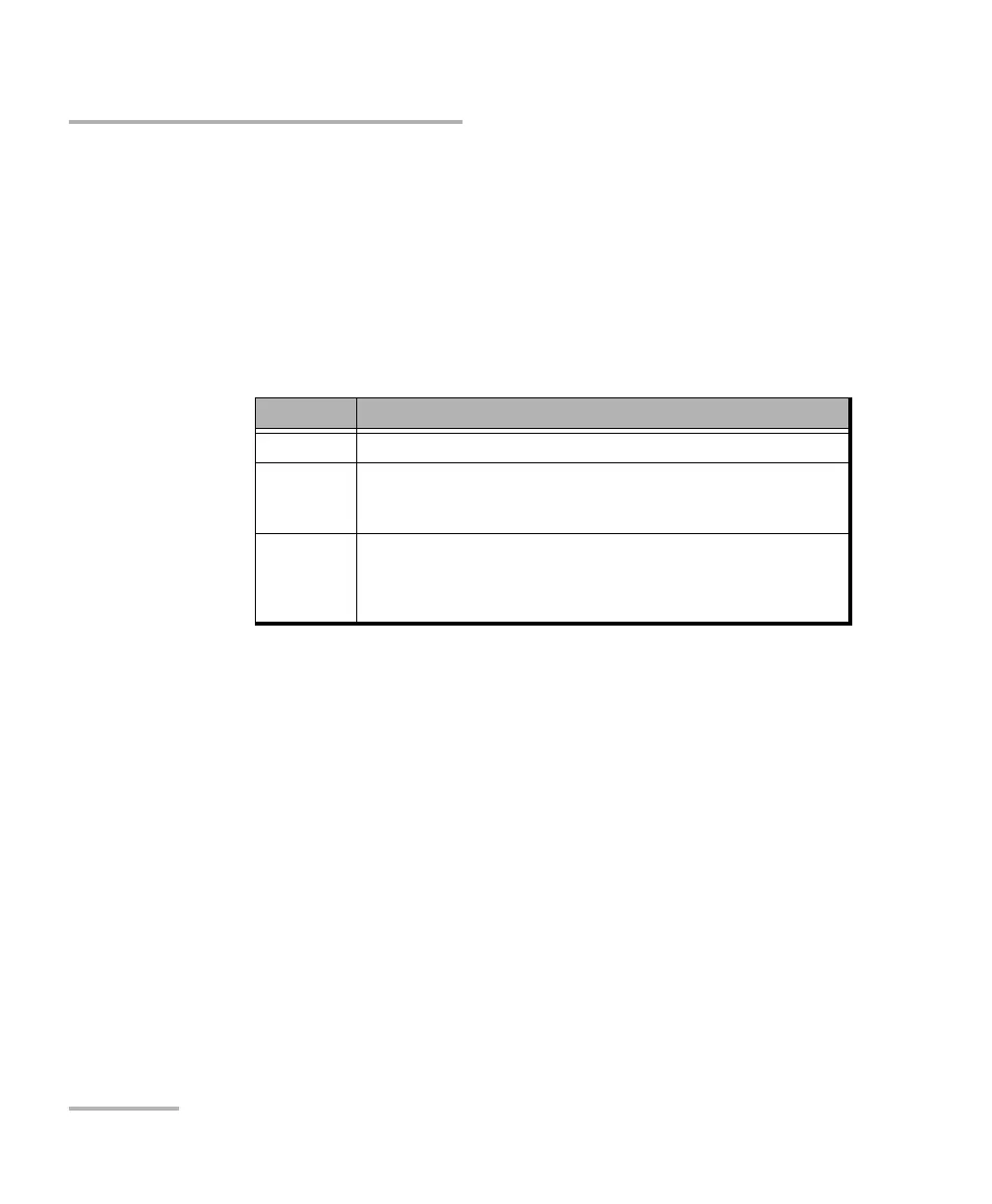
Mode Description
Slot Assigns/unassigns a single slot.
Client Assigns/unassigns all slots for a specific client. After selecting a first
slot for a client having more than one slot, subsequent tributary slots
are automatically assigned/unassigned.
All Clients Assigns/unassigns all slots to/from a client and this is repeated for all
clients. After selecting the first slot for a client having more than one
slot, subsequent slots are automatically assigned/unassigned. This is
repeated for all clients in order.




 To Next Page