FARO
®
Laser Scanner Manual
28
Chapter 6: Getting Started
3. Attach mount plate
underneath the
scanner
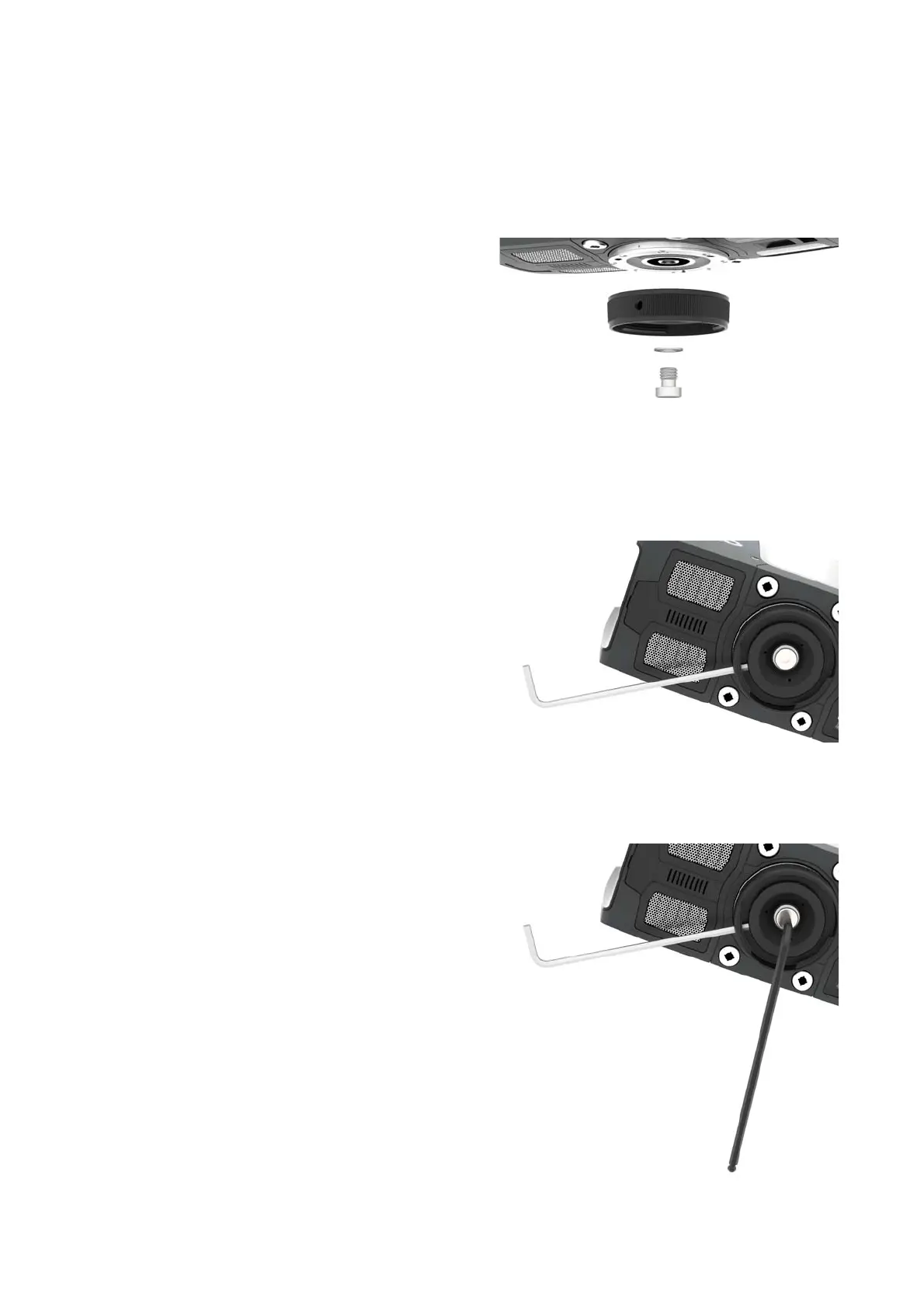
The mount plate of the Quick Release has a central 3/8” screw for mounting it
underneath the scanner. The threaded collar has three openings which are
used in combination with the six openings of the inner ring to interlock the
mount plate while tightening it.
1. Attach the mount plate to the
scanner, using the central
3/8” screw. Do not tighten
firmly in this first step.
2. Put the S3 hex key (shown
here in silver) as an interlock
into one of the three
openings of the threaded
collar. Slightly turn the collar
and find a spot where the
hex key fits into one of the
six openings of the inner
ring. Make sure that the hex
key actually went into one of
the six openings of the inner
ring.
3. Tighten the central 3/8”
screw with the
corresponding hex key,
while holding the interlock
steady. Do not use the
interlock as a lever.



 To Next Page