Electrical installation 87
Connecting a PC
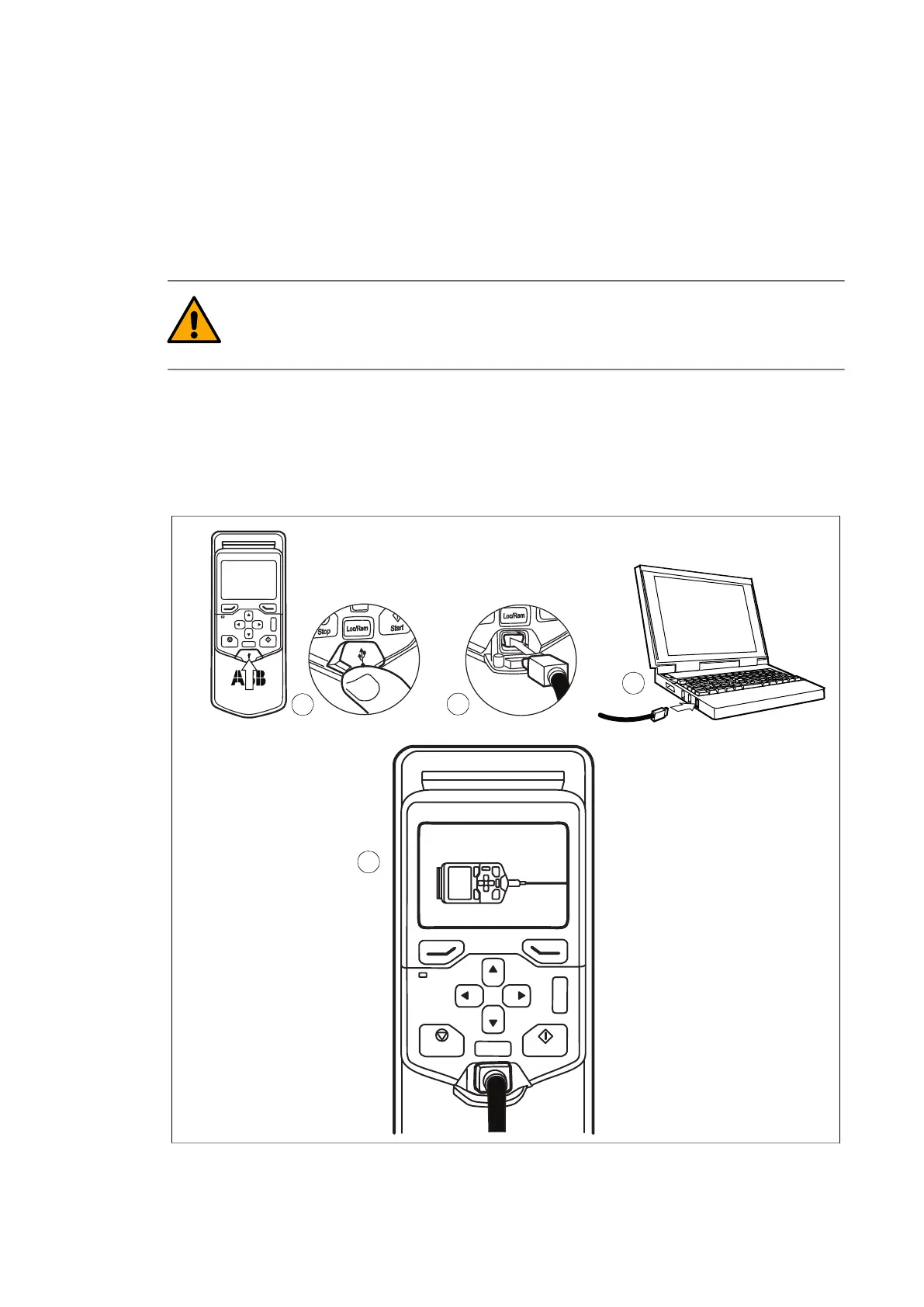
You can connect a PC (for example, using the Drive composer PC tool) to the inverter as
follows:
1. Connect an ACS-AP-I control panel to the inverter control unit either with an Ethernet
cable, or by inserting the control panel into the panel holder, if the control panel is not
in place.
WARNING! Do not connect the PC directly to the control panel Ethernet
connector of the inverter. The RJ45 connector on the control panel does not
support Ethernet communication.
2. Open the USB connector cover on the front of the control panel.
3. Connect a USB cable (Type A to Type Mini-B) between the USB connector on the
control panel (3a) and a free USB port on the PC (3b).
4. The panel will display an indication when the connection is active.
Refer to the documentation of the PC tool for setup instructions. Refer to ACS-AP-x
assistant control panels user’s manual (3AUA0000085685 [English]) for instructions on
using the control panel.
?
Start
Stop
Loc/Rem
USB connected
3a
3b
2
4



 To Next Page