Section 4: Using the Model 9500B — Pulse Width Function 4.18-1
Final Width = 215mm
Descriptions assume 9500B/1100
4.18.5 Pulse Width Operation
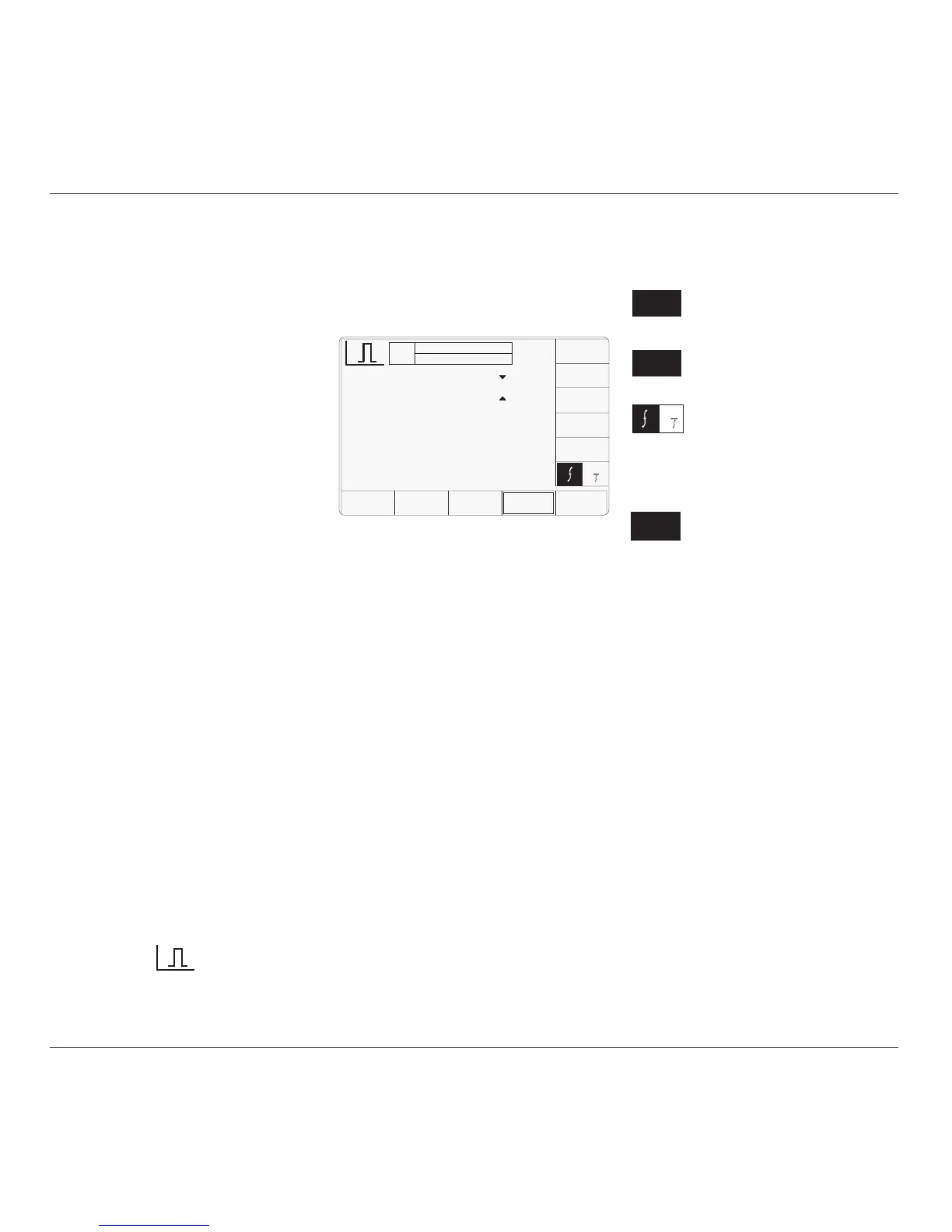
4.18.5.1 Right Side Screen Keys
Increases Pulse Width or Frequency
by a factor of 10 within max. and
min. limits
Decreases Pulse Width or
Frequency by a factor of 10 within
max. and min. limits
Press to toggle the display
waveform Frequency or Period
4.18.5.2 Bottom Screen Keys
Permits the screen signal set-up to
be routed to any of the five heads.
4.18 Pulse Width Function
4.18.1 Introduction
This sub section is a guide to the use of the
9500B to generate variable width pulses for
the testing trigger timing circuitry within an
Oscilloscope.
For those users who require more detailed
instructions for interconnections, and
manipulating the front panel controls, refer to
sub-sections 4.2, 4.3 and 4.4.
4.18.2 Trigger Qualification
Timer Tests
Modern digital Oscilloscopes often feature
sophisticated trigger circuitry capable of
distinguishing events within a time window,
e.g. detection of a pulse narrower (or wider)
than a user determined time. The Oscilloscope
will use its internal (sampling) clock to measure
the time between, in this case rising and falling
edges of the trigger waveform. However, in
many cases the resolution of this measurement
is extended by a short duration analogue timer.
It is this timer that demands independent
verification, and sometimes adjustment, using
a short duration pulse of known width.
With the 9500B “Auxiliary” Pulse Width
function selected a narrow pulse of suitable
and known width can be set up using the front
panel controls and applied to the UUT input.
4.18.3 Default Settings
When Manual mode is selected the system
defaults into the DC/Square function and shows
the DC/Square function initial menu screen.
The Pulse Width function is accessed by first
pressing the “Aux” key on the right of the
“OSCILLOSCOPE CALIBRATOR” panel,
then pressing the soft key on the lower
right of the screen.
Whenever the Pulse Width menu screen is
opened, except on recovery from a standby
period, it will appear with the following default
settings.
The above default screen has selected a 50ns
Pulse Width at a frequency of 1MHz.. Output
amplitude is fixed at 1Vpk-pk into 50Ohm.
4.18.4 Menu Selections
Signal Channel selection operates in the same
way as in DC/Square function, Refer to paras
4.5.3. There is no Trigger Output or selection
associated with this function.
4.18.4.1 Retained Channel Memory
Refer to Para 4.5.3.6
4.18.4.2 Direct Mode Only
This function supports Digit Edit, Numeric
Entry within Direct Mode only; Scope Mode
entry is not available. Refer para 4.4.2
1
÷ 1Ø
x 1Ø
SIGNAL
CHANNEL
➞
➞
TODAY'S DATE TIME
OFF
SIGNAL CH£ 50Ω
SIGNAL
CHANNEL
x 1Ø
÷ 1Ø
Pulse Width = 50.000 ns
O/P
Amplitude
= 1.ØØØØ V
pk-pk
Frequency
= 1.ØØØØ kHz
1
➞
➞


 To Next Page