Section 4: Using the Model 9500B — Edit Facilities 4.4-1
Final Width = 215mm
Descriptions assume 9500B/1100
4.4.1.1 Subject Contents
Sub-section 4.4 is divided into the following
paragraphs:
Page
4.4.1 Introduction .................................................... 4.4-1
4.4.1.1 Subject Contents ............................ 4.4-1
4.4.1.2 Methods of Adjustment .................. 4.4-1
4.4.1.3 Adjustment Modes ......................... 4.4-1
4.4.1.4 Use of the Tab Key ......................... 4.4-1
4.4.1.5 Scope Mode is the Default ............. 4.4-1
4.4.2 Direct Mode .................................................... 4.4-1
4.4.2.1 Introduction .................................... 4.4-1
4.4.2.2 Cursor Control ............................... 4.4-1
4.4.2.3 Direct Mode - Digit Edit ................. 4.4-2
4.4.2.4 Direct Mode - Numeric Entry ......... 4.4-2
4.4.2.5 Return to Scope Mode.................... 4.4-3
4.4.3 Scope Mode ................................................... 4.4-4
4.4.3.1 Introduction .................................... 4.4-4
4.4.3.2 Cursor Controls ............................. 4.4-4
4.4.3.3 Use of Sequence Scroll .................. 4.4-4
4.4 Edit Facilities
4.4.1.3 Adjustment Modes
In addition to the three methods, there are two
modes, selected by the right-most soft key on
the bottom row beneath the screen, which
toggles between 'Scope' mode
1
2
5
1.Ø
and
'Direct' mode
5
2
1
1.Ø
. These are not major
modes of the same magnitude as Manual mode,
but identify specific means of making selections
or entering changes on the screen.
1. 'Scope Mode'; which relates to the way
that oscilloscopes are ranged in sequences.
Scope mode mainly uses Sequence Scroll,
but also includes limited use of Digit Edit
and Numeric Entry Edit. This is indicated
by the bottom right corner key label:
1
2
5
1.Ø
4.4.1 Introduction
4.4.1.4 Use of the Tab Key
In all editing, the Tab key
is used to select
the required variable for adjustment.
4.4.1.5 Scope Mode is the Default
Scope Mode is the default mode, which will
always be forced at power-on and when
changing modes. However, we shall discuss
Direct mode first because Sequence Scroll is
excluded.
In order to enter Direct mode, the bottom right-
most soft key must be toggled so that its label
changes to:
5
2
1
1.Ø
4.4.2 Direct Mode
4.4.2.1 Introduction
In Direct mode, once the
key has selected
the required variable, the cursor can take only
one form: 'triangular'. A pair of triangles,
pointing at a single digit, indicate that the
digit's value can be scrolled continuously in
integer increments.
Note that the Units/division and multiplier
fields are not used, and the 'barred' cursor seen
on the default screen is missing.
4.4.2.2 Cursor Control
The cursor controls used in Direct mode are
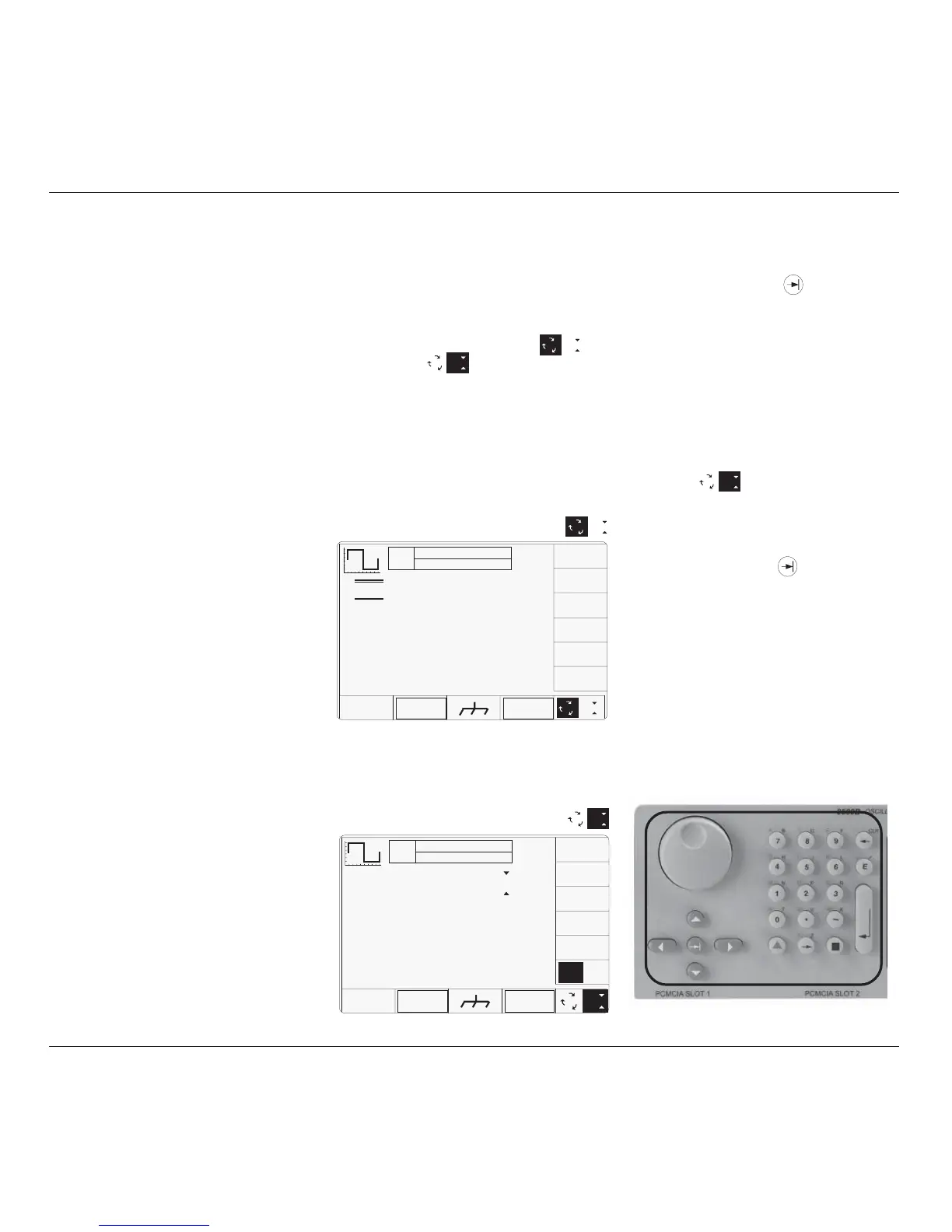
shown highlighted in Fig. 4.4.3.
TODAY'S DATE TIME
1
2
5
1.Ø
Fig. 4.4.1 Typical Screen in Scope Mode
OFF
SIGNAL CH1 50Ω
TRIGGER NONE
∆ = Ø
5.ØØ mV/div x4 = 2Ø.ØØØ mV
pk-pk
Deviation
= ØØ.ØØ %
O/P
Amplitude
= 2Ø.ØØØ mV
pk-pk
Frequency
= 1.ØØØØ kHz
WAVE
FORM
CHANNEL
SELECT
x 1Ø
÷ 1Ø
2. 'Direct Mode'; which permits access to all
contributing parameters using only Digit
Edit and Numeric Entry Edit, indicated by
the bottom right corner key label:
5
2
1
1.Ø
continued overleaf
→
Fig. 4.4.2 Typical Screen in Direct Mode
TODAY'S DATE TIME
OFF
SIGNAL CH1 5ØΩ
TRIGGER NONE
∆ = Ø
Amplitude = 2Ø.ØØØ mV
pk-pk
Deviation
= ØØ.ØØ %
O/P
Amplitude
= 2Ø.ØØØ mV
pk-pk
Frequency
= 1.ØØØØ kHz
∆% ∆V
WAVE
FORM
CHANNEL
SELECT
5
2
1
1.Ø
4.4.1.2 Methods of Adjustment
Before looking at displays for the functions,
we need to know how to alter the values
displayed on the screen. There are three main
methods used to change values:
• 'Digit Edit'; in which values can be scrolled
digit by digit, using a 'triangular' cursor
and associated controls.
• 'Sequence Scroll'; in which values can
only be changed by scrolling through a
sequence of values, using a 'barred' cursor
and associated controls. One of two
common sequences can be selected using
the 'Pref' facility.
• 'Numeric Entry Edit'; where a complete
new value is written in place of the existing
selected value, using the 'triangular' cursor
and the numeric keypad.



 To Next Page