keys move the cursor along
the number to select the digit to be scrolled.
Except for Deviation, where the resolution
cannot be changed, movement of the cursor off
the end of the number will cause the resolution
to change to accommodate an extra digit, until
no further resolution change is possible.
The two shift keys
or
can be used as a
short cut to change the number's resolution.
Pressing either of the shift keys before a
key is pressed.
(for Deviation, the resolution cannot be
changed, so use of a shift key is ineffective.)
4.4.2.4
Direct Mode — Numeric Entry
Introduction
Numeric Entry is not a default state. Digit Edit
will always be forced at power-on, and when
changing modes and functions.
Each method has its own advantages, which
will become apparent with experience of using
the front panel controls.
Numeric Entry facility employs the numeric
keypad to enter whole values, where this is
more convenient than operating on individual
digits in 'Digit Edit' facility.
Cursor Control
The tab
key is used to pass the cursor from
one parameter to another, but the
keys and spinwheel play no part
in setting the value.
4.4.2 Direct Mode
(Contd.)
Form of Cursor
Numeric Entry can be used to alter only those
parameter values which are accessed by the
triangular form of cursor. The cursor can sit
on any digit in the number, and Numeric Entry
will have the same effect.
Value Editing
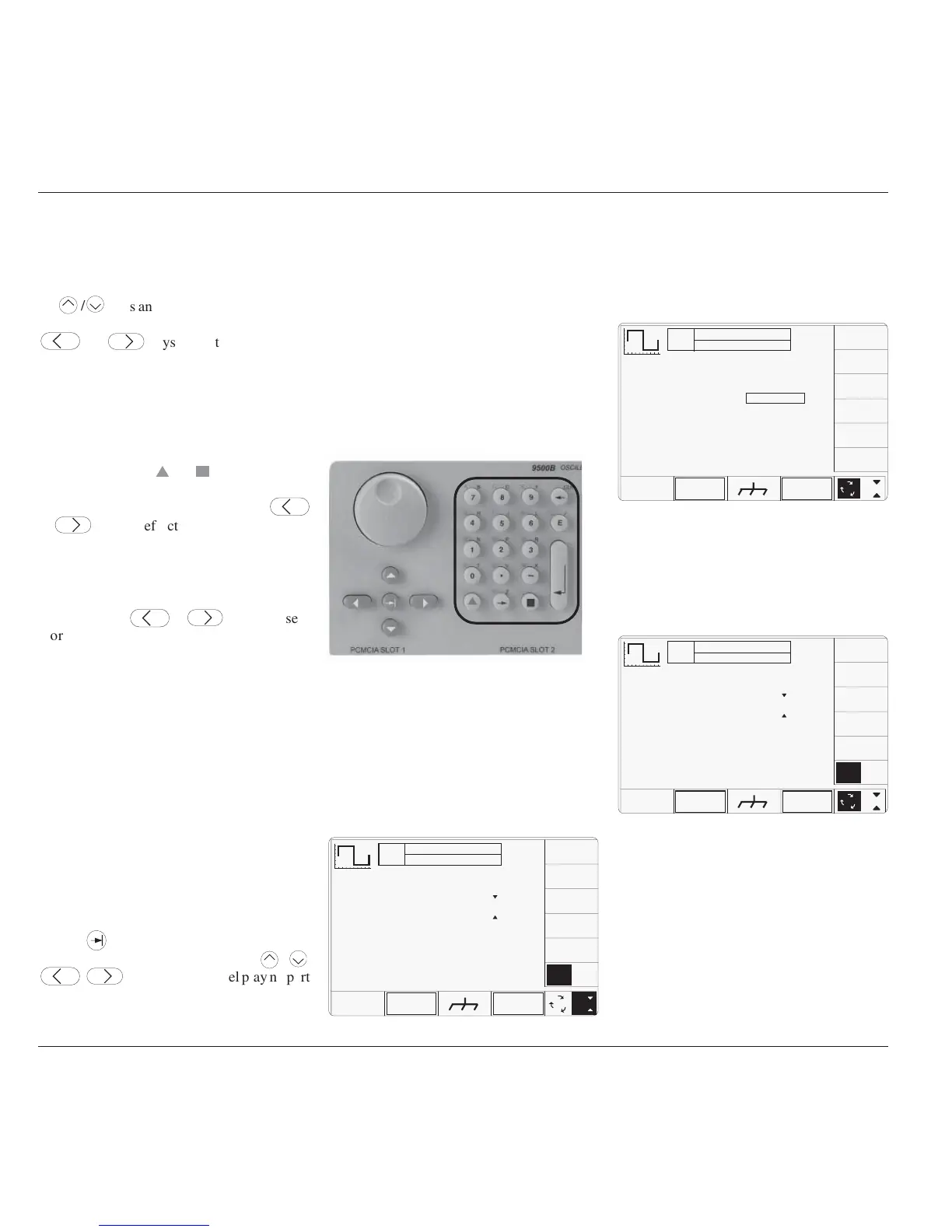
The controls for Numeric Entry to alter the
value are the numeric keys of the alpha numeric
keypad, highlighted in Fig. 4.4.4.
Value Entry Box
Once a numeric key is pressed, an enclosed
area (box) will be provided on the screen,
below a reduced-size version of the value to be
changed. The box can be seen in Fig. 4.4.6.
Numeric Entry Action
Assume that the tab key has placed the cursor
on the Deviation value, in this case ØØ.ØØ%.
The cursor can be seen in Fig. 4.4.5.
Fig. 4.4.6 Numeric Entry — Effect on
Deviation Value and Screen Key Labels
TODAY'S DATE TIME
OFF
SIGNAL CH1 5ØΩ
TRIGGER NONE
%
Amplitude = 2Ø.ØØØ mV
pk-pk
Deviation
=
O/P
Amplitude
= 2Ø.ØØØ mV
pk-pk
Frequency
= 1.ØØØØ kHz
1
2
5
1.Ø
ØØ.ØØ %
1Ø
WAVE
FORM
CHANNEL
SELECT
The new value is implemented by pressing the
↵ (Enter) key on the keypad, or '%' at the top of
the right screen keys. The display then changes
to that shown in Fig. 4.4.7.
Fig. 4.4.7 Result of Pressing ↵ (Enter)
TODAY'S DATE TIME
OFF
SIGNAL CH1 5ØΩ
TRIGGER NONE
∆ = Ø
Amplitude = 2Ø.ØØØ mV
pk-pk
Deviation
= +1Ø.ØØ %
O/P
Amplitude
= 2Ø.ØØØ mV
pk-pk
Frequency
= 1.ØØØØ kHz
1
2
5
1.Ø
∆% ∆V
WAVE
FORM
CHANNEL
SELECT
Fig. 4.4.5 Numeric Entry Starting Point
TODAY'S DATE TIME
OFF
SIGNAL CH1 5ØΩ
TRIGGER NONE
∆ = Ø
Amplitude = 2Ø.ØØØ mV
pk-pk
Deviation
= ØØ.ØØ %
O/P
Amplitude
= 2Ø.ØØØ mV
pk-pk
Frequency
= 1.ØØØØ kHz
∆% ∆V
WAVE
FORM
CHANNEL
SELECT
5
2
1
1.Ø
By typing the number '10' (for +10%) on the
numeric keypad, the value entry box appears
on the display as shown in Fig. 4.4.6.
Note that the 9500B has assumed that the typed
characters '10' represent a deviation of +10.00%
in this context. For a deviation of -10.00%,
type the characters '-10' using the keypad
hyphen as a negative symbol.
Parameter Context
If the Deviation units had been changed to ∆V
(absolute voltage) instead of the relative ∆%,
then instead of Fig. 4.4.5, this would be
indicated as shown in Fig. 4.4.8



 To Next Page