page | 10
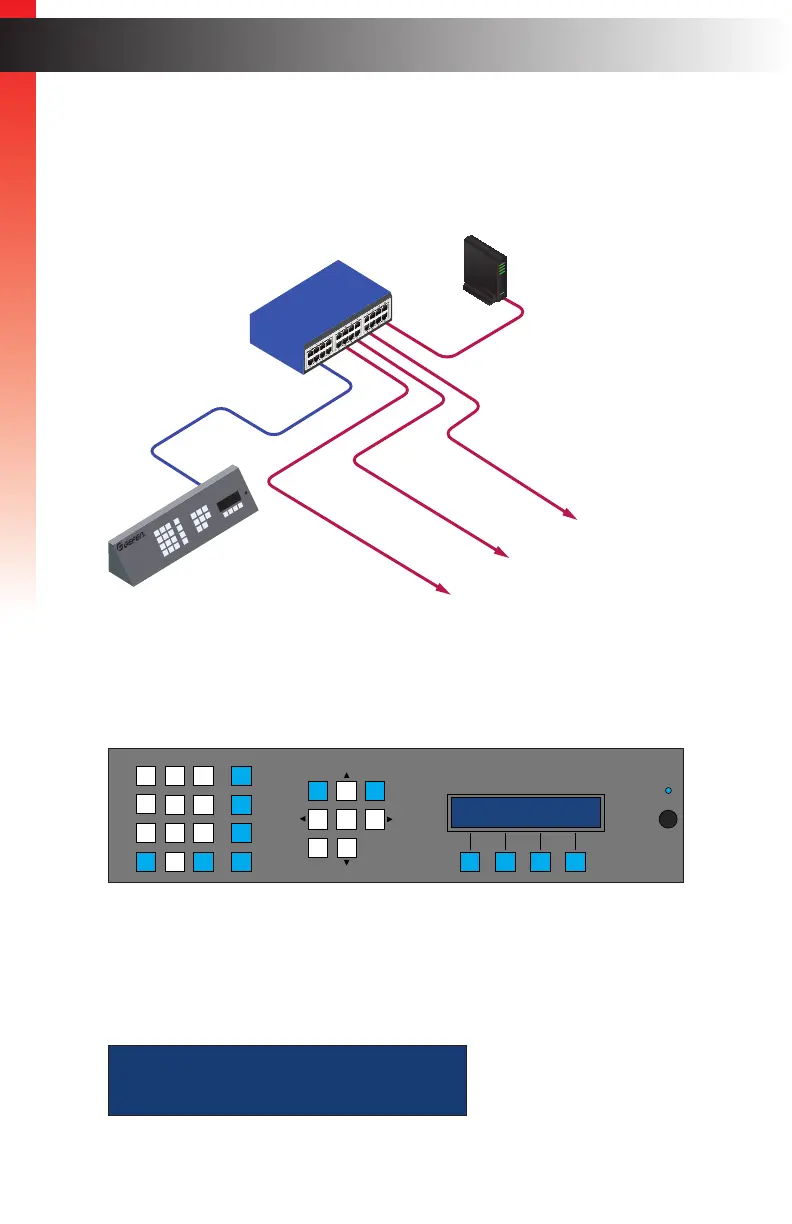
2. Connect a shielded CAT-5e (or better) cable from the LAN 1 port on the Matrix
Controller to the same network where the Gefen KVM over IP units are connected.
3. Connect the included power supply to the 5V DC power receptacle on the rear panel
of the Matrix Controller. Connect the power cord to an available electrical outlet.
4. The Matrix Controller will begin the initialization process. This may take several
seconds.
5. After the Matrix Controller has completed the initialization process, the following
message will appear in the LCM display on the front panel. The default passcode
used to access the front panel is 123456.
To change this passcode, see Editing Users (page 34).
Page TitleInstallation
Getting Started
EXT-CU-LAN
Matrix Controller
LAN 1
EXT-CU-LAN
to Gefen
KVM over IP
Devices
Managed
Switch
Router
LAN
POE
5V DC
1 2
Matrix Controller
Status
IR
Power
Menu
1 2 3
4 5 6
7 8 9
In 0 Out Set
Clear
Mask
Preset
Back
OK
Lock
ext-cu-lan
initializing...
ENTER PASSCODE:
Getting Started



 To Next Page