X1D II 50C USER GUIDE www.hasselblad.com
INTRODUCTION
Contents
15
1.11 CHARGING THE BATTERY
BATTERY CHARGER
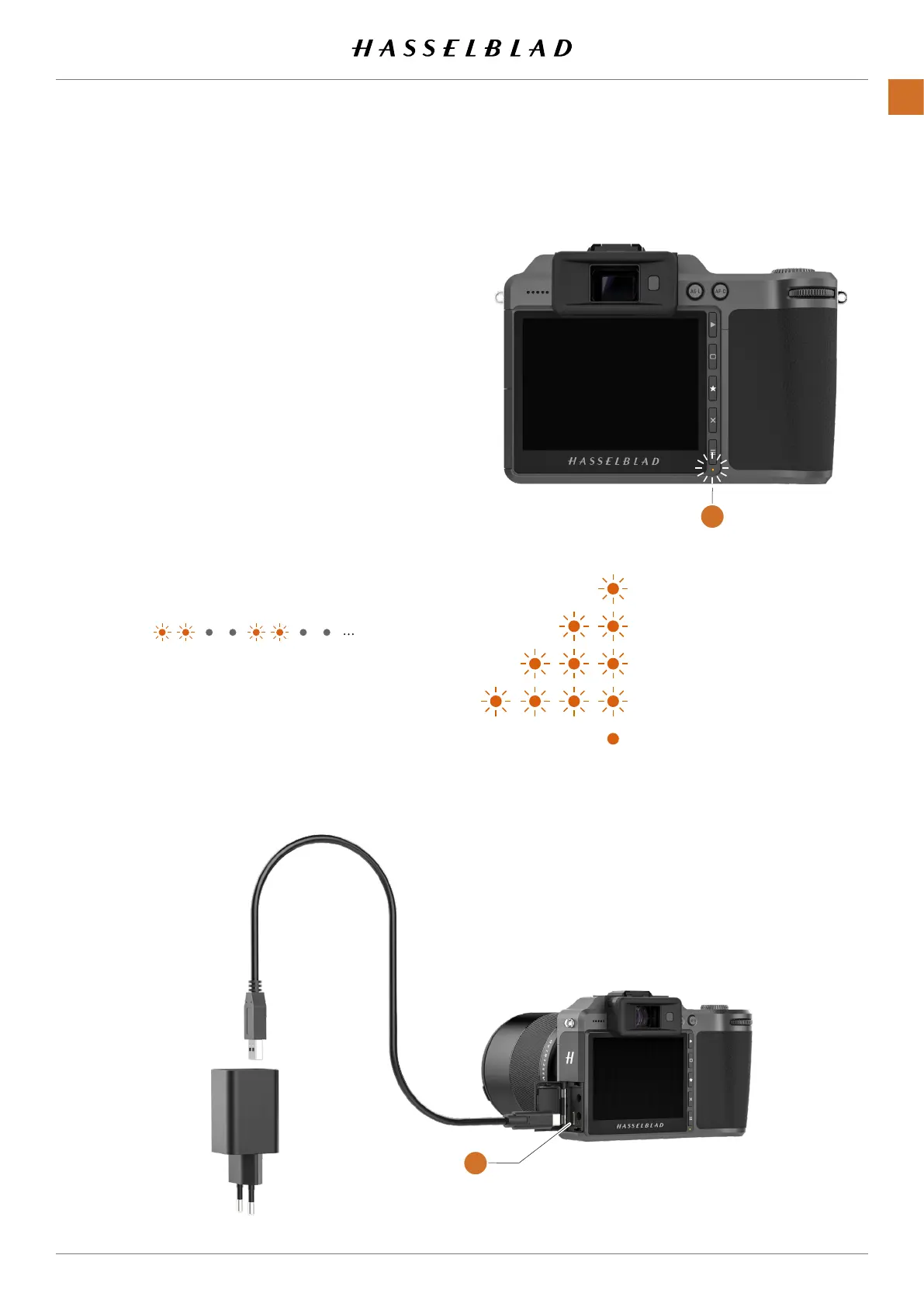
The X1D II is supplied with a USB power adapter for charging
the camera battery through the USB port of the camera.
CHARGE THE BATTERY
Turn off the camera and insert the USB-C plug from the
battery charger into the USB socket on the camera
(A)
. Insert
the battery charger into a standard (100–240V~ /50–60 Hz)
domestic socket.
CHARGING FROM THE USB PORT
When the battery is charging, the Status Led
(B)
indicates
the current charge level by blinking with Orange color. See
illustration to the right. E.g. if the battery has about 50%
charge level, the LED will blink two times and then be turned
off for a short period. The blinking sequence is repeated.
See also Battery Charging Hub accessory on page 137.
One blink = 0% to 25%.
Two blinks = 26% to 50%.
Three blinks = 51% to 75%.
Four blinks = 76% to 95%.
Steady light, 4 sec. = 95% to 100%
A
B



 To Next Page
 Loading...






