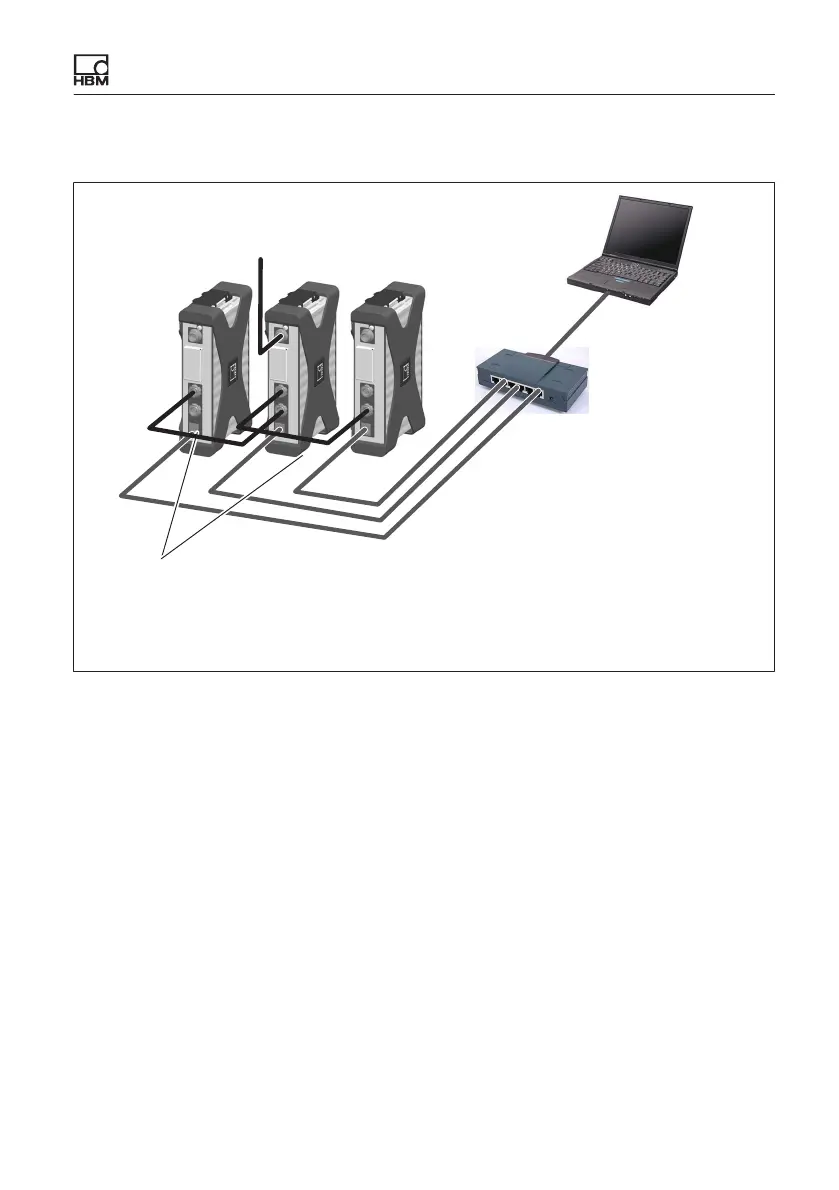
Connecting individual QuantumX modules
QuantumX A03031_24_E00_01 HBM: public 59
7.2.3 Multiple Ethernet connection and FireWire synchronization
TCP/IP, 100 Mbps
Patch cable
Patch cable
10 V ... 30 V DC
FireWire connection
1-KAB272-x: Connection cable with various lengths (x m)
Basic rule: X102 -> X01 -> X102… to acceptor (PC, data recorder)
Standard
Ethernet‐Switch
Fig. 7.4 Example of multiple connection via Ethernet with FireWire synchronization
The supply voltage for the modules is looped through FireWire in the configura
tion shown above (max. 1.5 A through FireWire; for power consumption of the
modules, see Chapter 7).
7.2.4 Connecting one or more QuantumX modules to the PC
Modules can be connected to a standard PC via Ethernet (up to 100 m) or via
EtherCAT.
The following must be noted for TCP/IP communication via Ethernet:
S We recommend that you retain the default setting (DHCP/APIPA), so that
the software can find the modules that are in the network, or directly con
nected. You can, of course, also parameterize the modules with a fixed,
static IP address. This also applies to the PC or notebook. Advantage: this









 To Next Page