4.19 Battery Assembly
Chapter 4: Removal, Replacement, and Adjustment Procedures
Page 4 - 48 Affinity® Three Birthing Bed and Affinity® Four Birthing Bed
Service Manual (MAN272 REV 4)
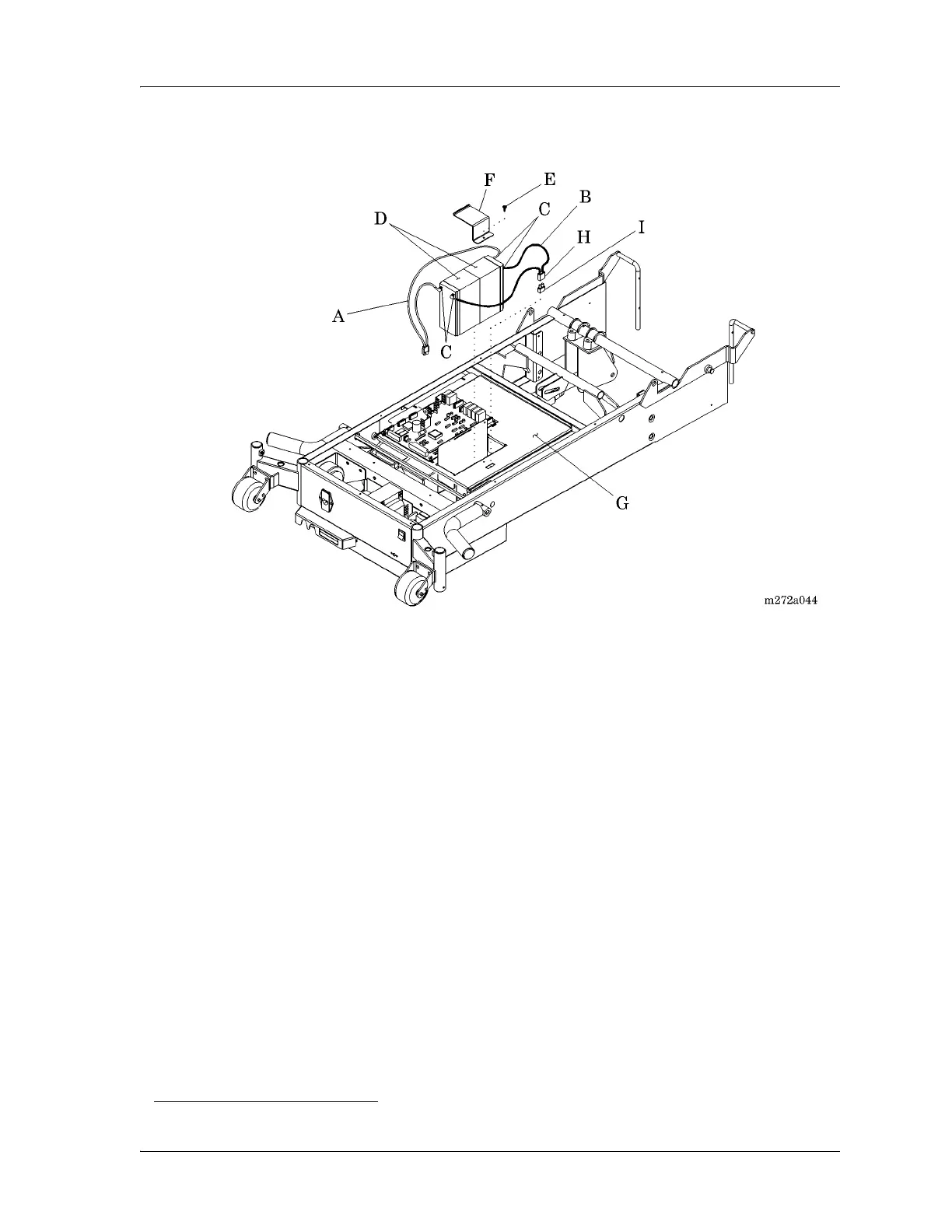
Figure 4-24. Battery Assembly
9. Using a ratchet and T25 Torx®
1
head bit, remove the screw (E) that secures
the battery holder bracket (F) to the electronics plate weldment (G).
10. Remove the two batteries (D) from the electronics plate weldment (G).
Replacement
1. To install the replacement batteries (D), reverse the removal procedures.
2. Do the “Function Checks” on page 2-4.
Battery Fuse
Removal
1. Carefully pull the battery fuse housing (H) from the electronics plate
weldment (G).
2. Remove the battery fuse (I) from the battery fuse housing (H).
1. Torx® is a registered trademark of Textron, Inc.














 To Next Page