4.21 Air System Manifold Assembly
Chapter 4: Removal, Replacement, and Adjustment Procedures
Page 4 - 54 Affinity® Three Birthing Bed and Affinity® Four Birthing Bed
Service Manual (MAN272 REV 4)
4.21 Air System Manifold Assembly
Tools required: Phillips head screwdriver
Removal
1. Remove the air system assembly (refer to procedure 4.20).
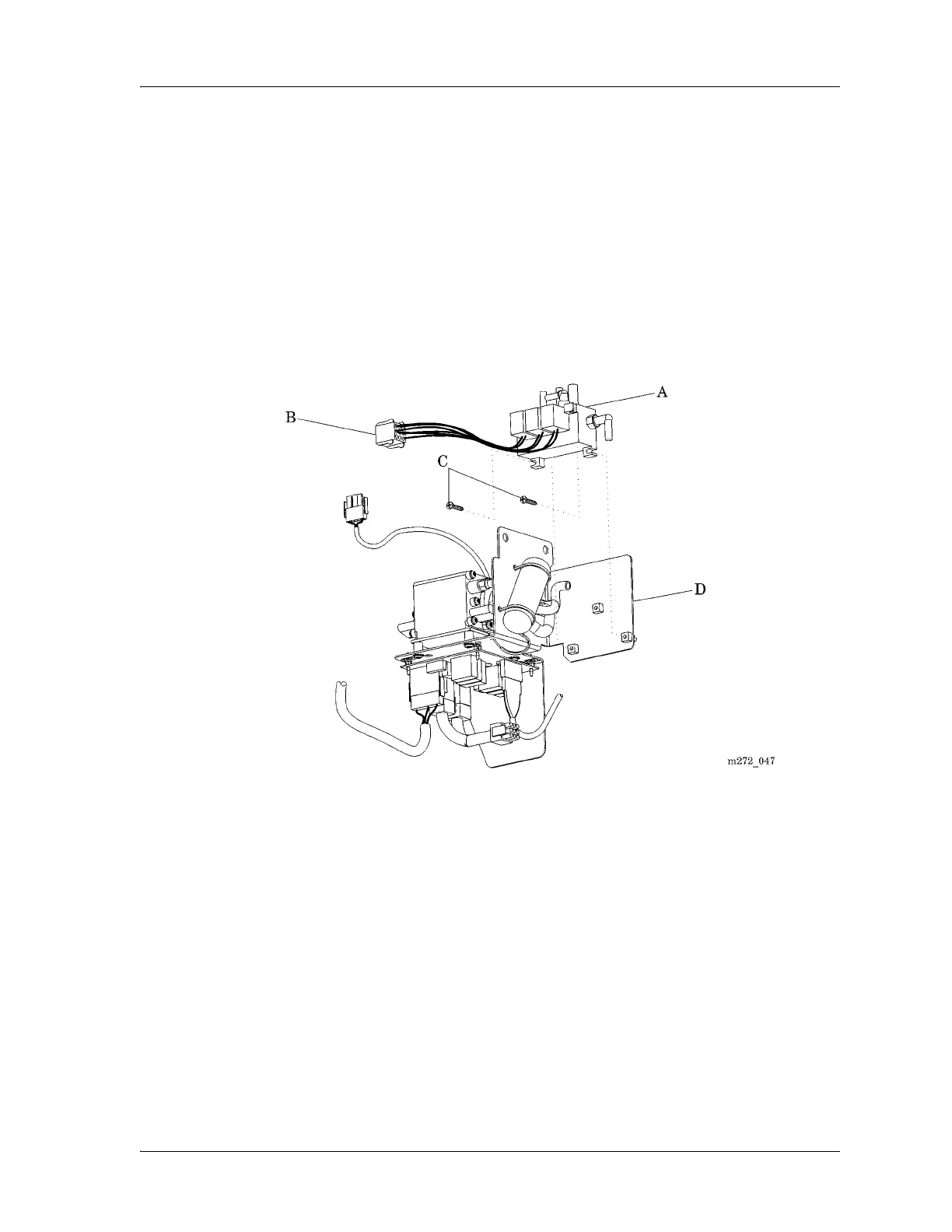
2. Disconnect the air hoses from the manifold assembly (A) (see figure 4-28
on page 4-54).
Figure 4-28. Air System Manifold Assembly
3. Identify and disconnect the wiring connectors (B) from the manifold
assembly (A).
4. Using the phillips head screwdriver, remove the two screws (C) that secure
the manifold assembly (A) to the mounting plate (D).
Replacement
1. To install the replacement manifold assembly (A), reverse the removal
procedure.
2. Do the “Function Checks” on page 2-4.














 To Next Page