4.12 Foot Support Module
Chapter 4: Removal, Replacement, and Adjustment Procedures
Page 4 - 34 Affinity® Three Birthing Bed and Affinity® Four Birthing Bed
Service Manual (MAN272 REV 4)
4.12 Foot Support Module
Tools required: 5/32" Allen™
1
wrench 7/16" wrench
T25 Torx®
2
head bit Ratchet
Removal
1. Set the brake/steer pedal to the brake position.
2. Ensure that the bed is out of the Trend-Like position.
3. Remove the foot section from the bed. Refer to “Foot Section (Lift Off)”
on page 4-41 or “Foot Section (Slide Off)” on page 4-43.
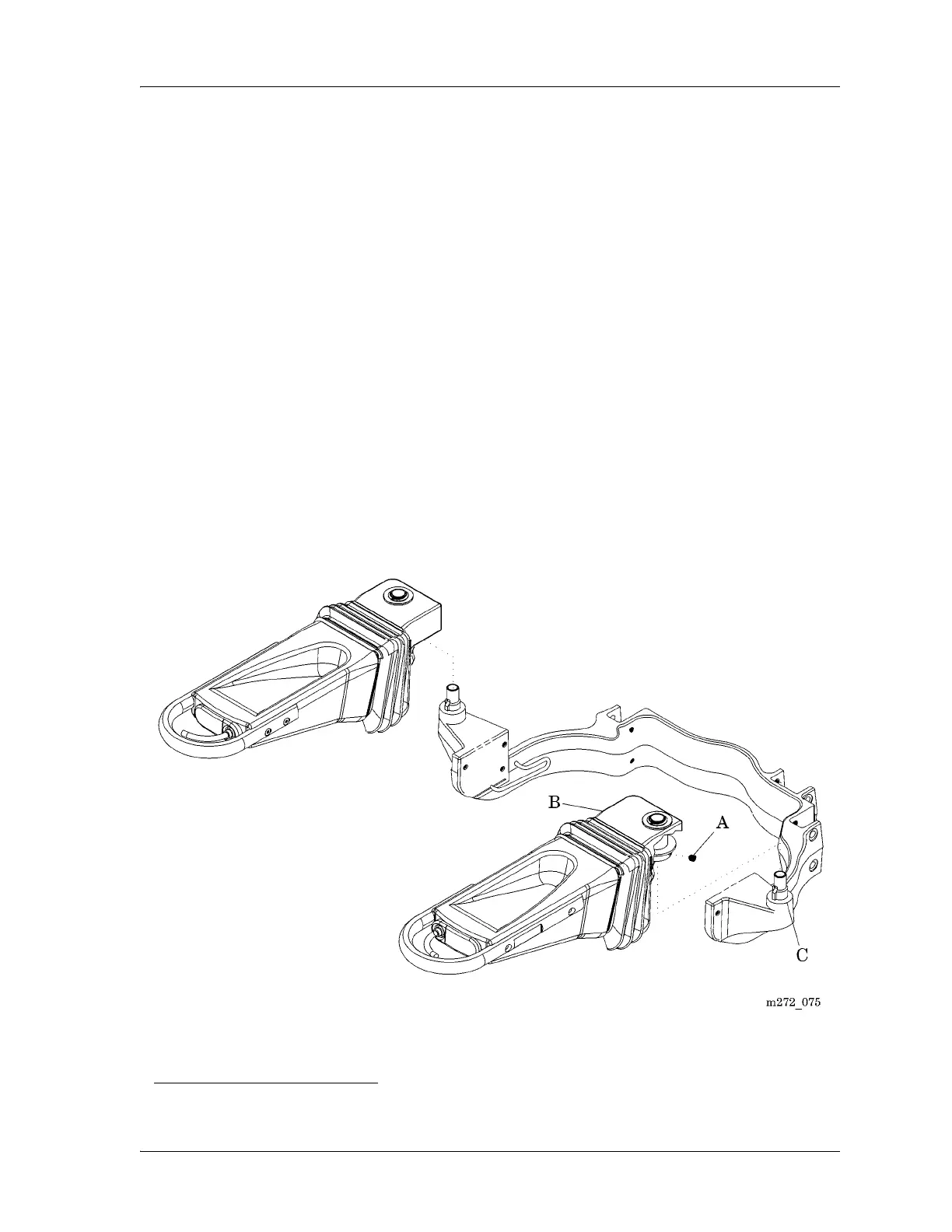
4. Using the Allen™ wrench, remove the set screw (A) that secures the foot
support module (B) to the yoke assembly (C) (see figure 4-16 on
page 4-34)
5. Remove the foot support module (B) from the yoke assembly (C).
Figure 4-16. Foot Support Module
1. Allen™ is a trademark of Industrial Fasteners, Inc.
2. Torx® is a registered trademark of Textron, Inc.














 To Next Page