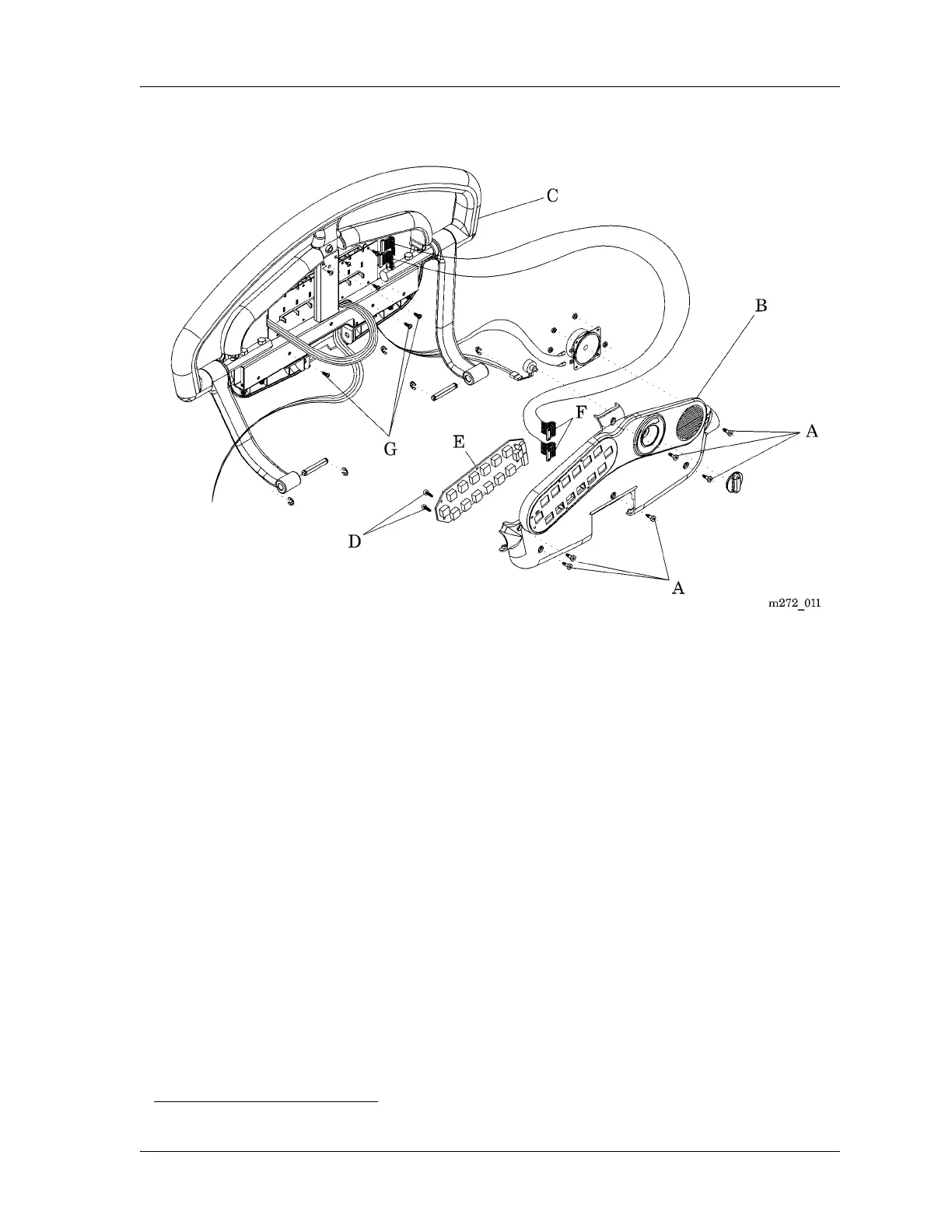
4.28 Patient Siderail (Inboard) P.C. Switch Board
Chapter 4: Removal, Replacement, and Adjustment Procedures
Page 4 - 70 Affinity® Three Birthing Bed and Affinity® Four Birthing Bed
Service Manual (MAN272 REV 4)
Figure 4-37. Patient Siderail (Inboard) P.C. Switch Board
9. Using the ratchet and T10 Torx®
1
head bit, remove the four screws (D) that
secure the P.C. switch board (E) to the patient siderail cover (B).
10. Slide the P.C. switch board (E) off the patient siderail cover (B) tabs, and
remove it from the patient siderail cover (B).
11. Disconnect the two SideCom® Communication System cable assemblies
(F) from the P.C. switch board (E).
Replacement
1. To install the replacement P.C. switch board (E), reverse the removal
procedures.
2. Do the “Function Checks” on page 2-4.
1. Torx® is a registered trademark of Textron, Inc.














 To Next Page