1-88
OPERATOR'S STATION
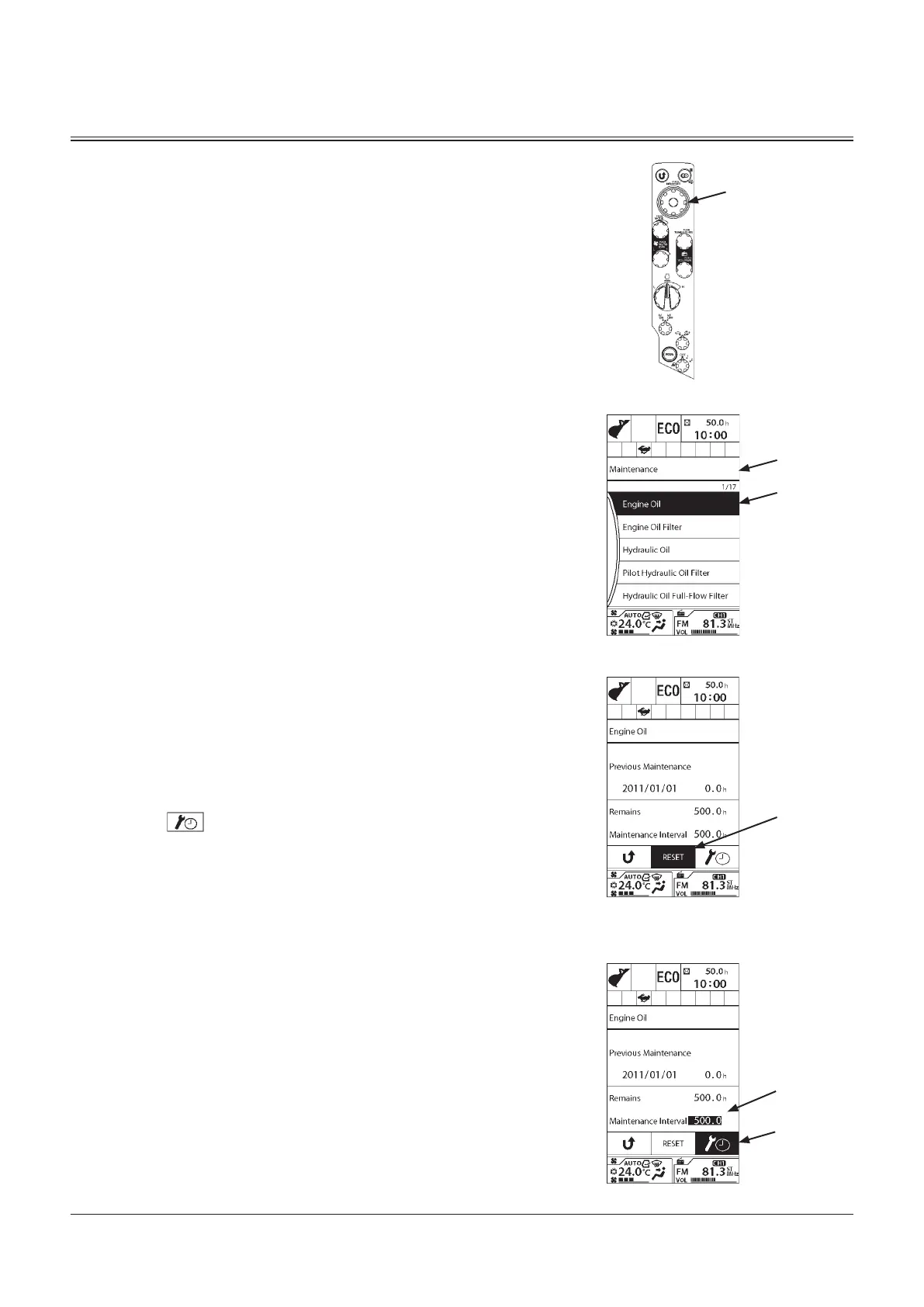
5. Push selector knob (2) to display Maintenance screen (7).
6. Rotate selector knob (2) to highlight a Maintenance Item
to be checked (8). (In the example on the right, Engine
Oil is selected.)
7. Push selector knob (2) to display the time remaining for
the selected maintenance item.
Resetting Data
To reset the remaining time data, rotate selector knob (2) to
highlight RESET (9), and then push selector knob (2).
The value of the remaining hours is reset to that of the
change interval. The previous change date/hour is updated
with the current date and time.
Maintenance Interval Setting
To change the maintenance interval, rotate selector knob (2)
to highlight (11), and then push selector knob (2).
The background color of Maintenance Interval (10) changes,
then rotate selector knob (2) to adjust the time, and then
push selector knob (2) to enable the change.
9
7
8
MDAA-01-336EN
MDAA-01-210EN
10
11
MDAA-01-212EN
2
MDCD-01-026


 To Next Page
 Loading...