40
7
1
2
3
4
5
6
Quick Reference
8
9
10
11
12
13
14
15
16
17
7
DSC OPERATION
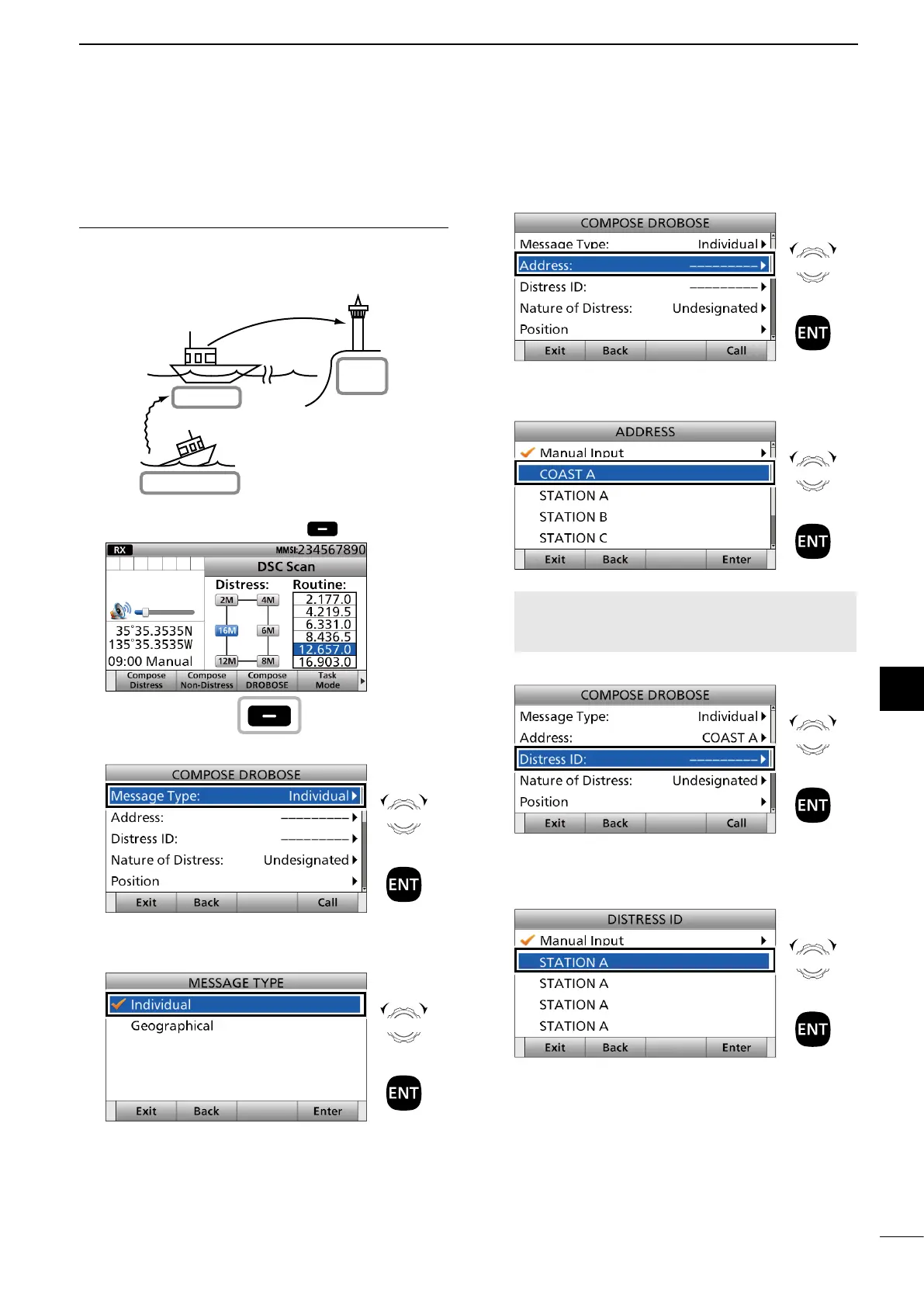
To transmit the Distress Relay call with
“Distress Call Log”:
You can relay a distress call after receiving the
distress call.
Your ship
Coast
Station
Distress Relay Transmission
Ship in Distress
Distress Transmission
1. Push [Compose DROBOSE] .
2. Select “Message Type.”
3. Select a message type.
(Example: Individual)
4. Select “Address.”
5. Select a coast station address or “Manual Input.”
(Example: COAST A)
NOTE: When you select “Manual Input” in
this step, push the keypad to manually enter an
Individual ID.
6. Select “Distress ID.”
7. Select a Distress ID from the list.
Distress Call Log is displayed after receiving the
Distress Call.
► Continued on the next page.
Push
Rotate
+
Push
Rotate
+
Push
Rotate
+
Push
Rotate
+
Push
Rotate
+
Push
Rotate
+
Push



 To Next Page