Model 250
Printer Applicator
Operators/Technical Manual Section 3B
Section 3B Page 7 of 9
Specifications of the (1) Solid State relay cont…
Mechanical Specifications:
Weight - 0.15 oz. (4.3g)
Encapsulation - Thermally Conductive Epoxy
General Notes:
All parameters at 25º C unless otherwise specified.
Dielectric and insulation resistance are measured between input and output.
Inductive loads should be diode suppressed.
Tools required for the installation:
Screw Drivers; Philips and Flat. Used to remove the connectors from the
back of the electronic module. (Flat for Printer, Beacon, Photo Cell) (Philips
for the status output plug during install)
Wire Cutters
Wire strippers
Needle-nose pliers
Soldering iron
Ensure power is off and remove cable.
Ensure power plug is removed from the electronics module
Remove all connectors from the
Electronics Module of the 250.
That would include the product detector,
Flashing Beacon, and Printer Connector.
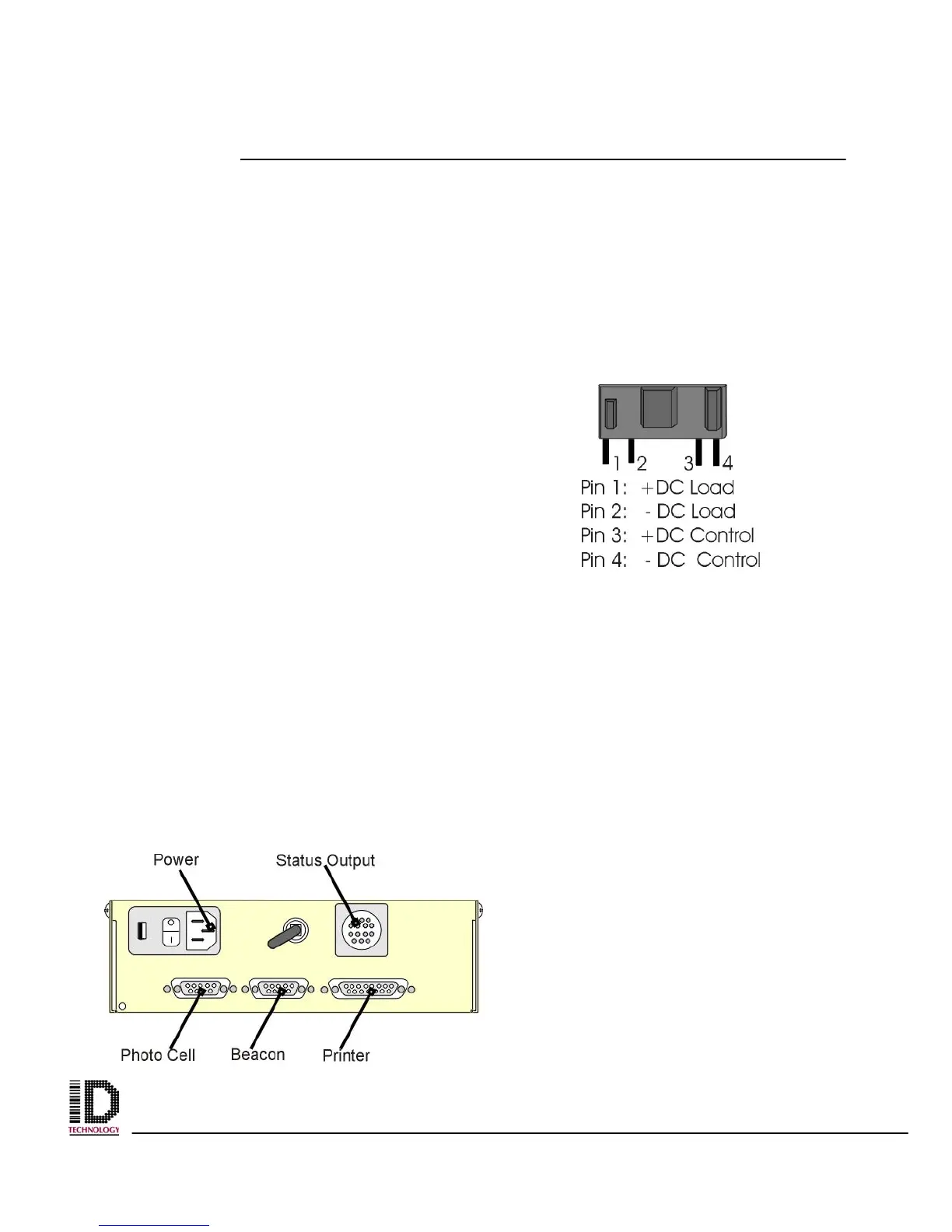
Fig 3b –2 Solid State Relay Pin Out



 To Next Page