- 244 - - 245 -
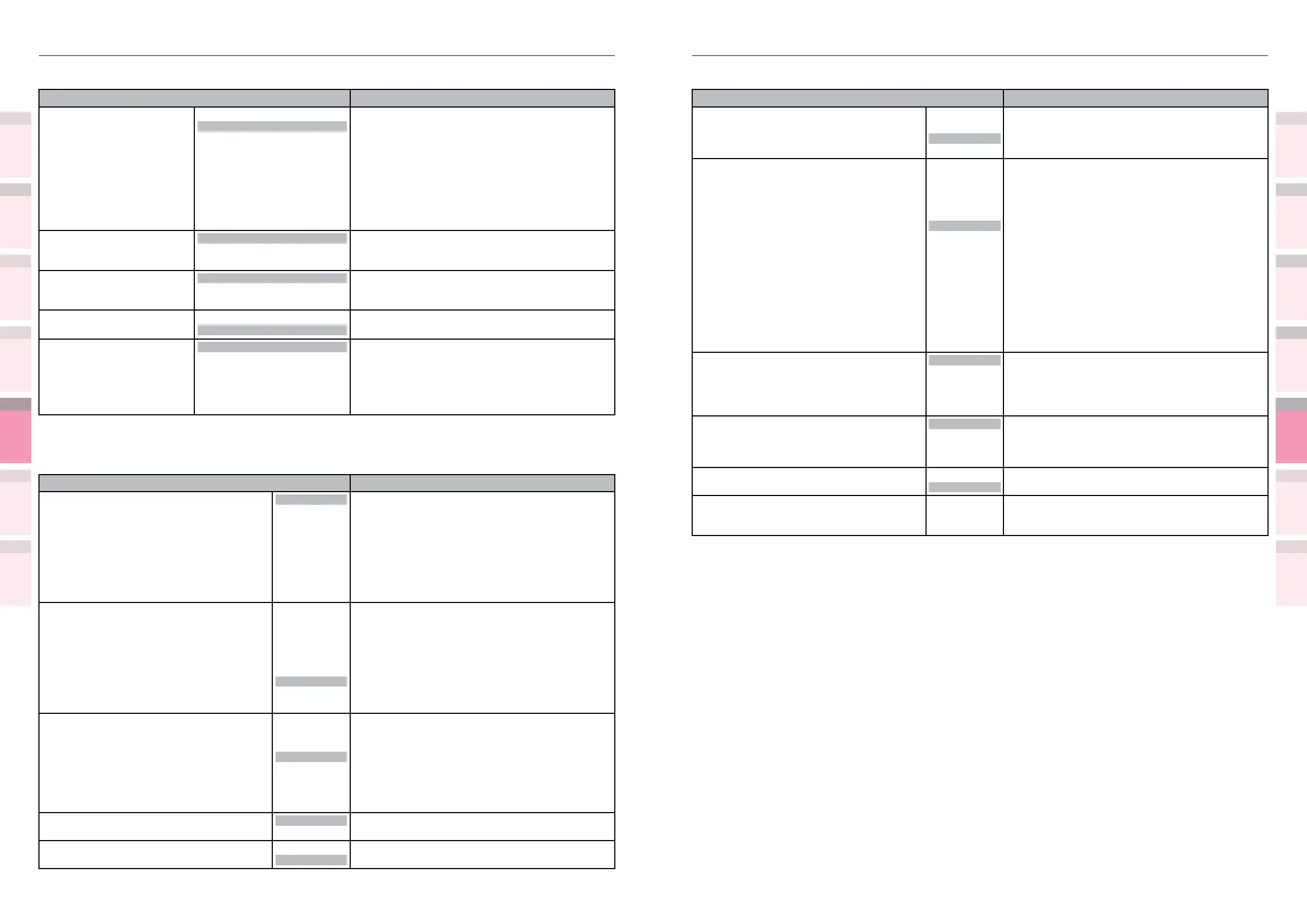
Table of setting items in the device setup screen Table of setting items in the device setup screen
1
2
3
5
4
1
2
3
5
4
Convenient print
functions
Appendix Index
Checking and
Changing Printer
Settings Using
the Control Panel
Network
Setup
Matching
Colors
Using Utility
Software
Convenient print
functions
Appendix Index
Checking and
Changing Printer
Settings Using
the Control Panel
Network
Setup
Matching
Colors
Using Utility
Software
z
Shaded areas are factory-set values.
Item Details
Manual Timeout Off
30 seconds
60 seconds
Sets the time to wait for the paper feed during
manual feed.
If paper is not set within the specied time, the job
is canceled.
Timeout print
Off
5 seconds
10 seconds
20 seconds
30 seconds
40 seconds
50 seconds
60 seconds
90 seconds
120 seconds
150 seconds
180 seconds
210 seconds
240 seconds
270 seconds
300 seconds
Sets the time from loss of the receipt of data until
force-printing.
With PS, the job is canceled without printing being
implemented.
Low Toner
Continue
Stop
Sets the printer operations when toner is detected.
Continue:
Print continuation is possible while online.
Stop:
Device is ofine.
Jam Recovery
On
Off
Sets whether to implement jam recovery print
when a jam occurs.
Setting [Off] cancels jobs that include pages to
which the jam occurs.
Error Report
On
Off
Sets whether to print error reports when an error
occurs in PCL and PS.
Hex Dump Execute Prints the received data in hexadecimal format.
Turns OFF the power when the hexdump print
nishes.
z
Shaded areas are factory-set values.
Item Details
Paper Feed MPTray
Tray1
Tray2
*1
Tray3
*1
Tray4
*1
Tray5
*1
*1: The optional expansion
tray unit is displayed when
mounted.
Species the feed paper tray.
Auto Tray Switch
On
Off
Sets whether to switch automatically to another
tray when the paper in the current printing tray
runs out.
Tray Sequence
Down
Up
Paper Feed
Species the selection order of the tray when using
auto tray selection or auto tray switching.
Unit of Measurement
inch
millimeter
Species the units for custom paper sizes.
Duplex Last Page
Skip Blank Page
Always Print
Skip Blank Page:
Prints the nal page as 1-sided when using
2-sided printing on odd-numbered data pages.
Always Print:
Implements regular 2-sided printing.
Not operable with some applications.
System Adjust
z
Shaded areas are factory-set values.
Item Details
Power Save Time 1 minute
2 minutes
3 minutes
4 minutes
5 minutes
10 minutes
15 minutes
30 minutes
60 minutes
Sets the time until the printer enters power save
mode.
Sleep Time
1 minute
2 minutes
3 minutes
4 minutes
5 minutes
10 minutes
15 minutes
30 minutes
60 minutes
Sets the time until the printer enters sleep mode
from power save mode.
Auto Power Off Time
1 hour
2 hours
3 hours
4 hours
8 hours
12 hours
18 hours
24 hours
Sets the time until the printer enters OFF mode
from standby status.
Clearable Warning
ONLINE
Job
Sets the time until clearable warning display turns
OFF.
Auto Continue
On
Off
Sets whether to implement auto printer recovery
when a memory overow or tray request occurs.



 To Next Page