- 248 - - 249 -
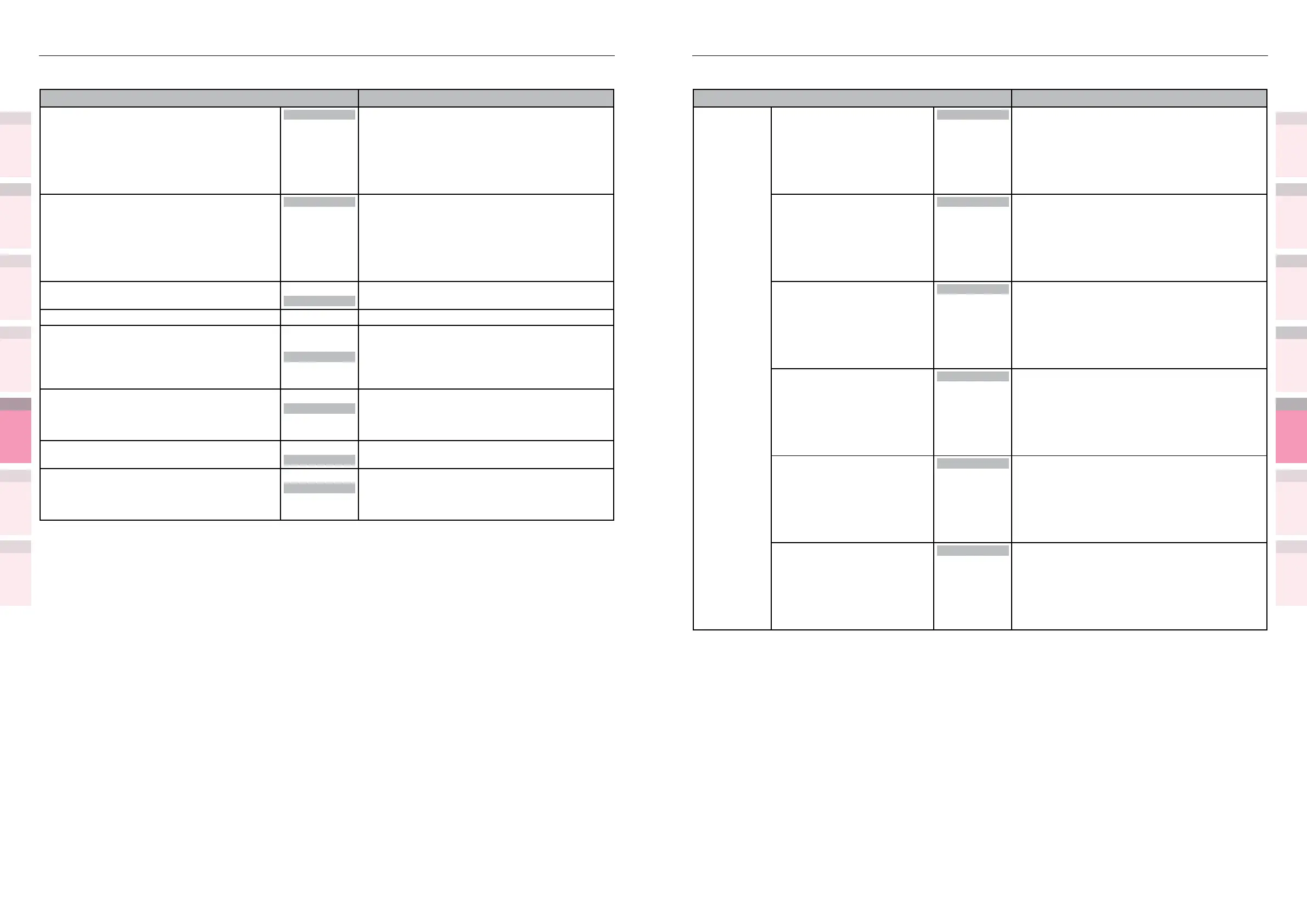
Table of setting items in the device setup screen Table of setting items in the device setup screen
1
2
3
5
4
1
2
3
5
4
Convenient print
functions
Appendix Index
Checking and
Changing Printer
Settings Using
the Control Panel
Network
Setup
Matching
Colors
Using Utility
Software
Convenient print
functions
Appendix Index
Checking and
Changing Printer
Settings Using
the Control Panel
Network
Setup
Matching
Colors
Using Utility
Software
z
Shaded areas are factory-set values.
Item Details
Transfer
Setting
Cyan Transfer Setting 0
+1
+2
+3
-3
-2
-1
Lower the setting value if lateral-stripe white dots
appear for cyan, green and blue toner.
Raise the setting value if lateral-stripe dark dots
appear for cyan toner.
Magenta Transfer Setting
0
+1
+2
+3
-3
-2
-1
Lower the setting value if lateral-stripe white dots
appear for magenta and red toner.
Raise the setting value if lateral-stripe dark dots
appear for magenta toner.
Yellow Transfer Setting
0
+1
+2
+3
-3
-2
-1
Lower the setting value if lateral-stripe white dots
appear for yellow toner.
Raise the setting value if lateral-stripe dark dots
appear for yellow toner.
Black Transfer Setting
0
+1
+2
+3
-3
-2
-1
Lower the setting value if lateral-stripe white dots
appear for black toner.
Raise the setting value if lateral-stripe dark dots
appear for black toner.
White Transfer Setting
*1
*1: Displayed when [Admin
Setup]>[Color Setup]>[Spot
Color] is set to [White] on the
control panel for CS5000.
0
+1
+2
+3
-3
-2
-1
Lower the setting value if lateral-stripe white dots
appear for white toner.
Clear Transfer Setting
*1
*1: Displayed when [Admin
Setup]>[Color Setup]>[Spot
Color] is set to [Clear] on the
control panel for CS5000.
0
+1
+2
+3
-3
-2
-1
Lower the setting value if lateral-stripe white dots
appear for clear toner.
z
Shaded areas are factory-set values.
Item Details
SMR Setting 0
+1
+2
+3
-3
-2
-1
Compensates for print results variation due to
differences in the temperature and humidity
environments, print density, and print frequency.
Changes the settings if there is burr in the image.
BG Setting
0
+1
+2
+3
-3
-2
-1
Compensates for print results variation due to
differences in the temperature and humidity
environments, print density, and print frequency.
Change the value if the underlay is dark.
Drum Cleaning
On
Off
Sets whether to implement drum cleaning before
printing. The image quality may be improved.
Transfer Roller Cleaning Execute Implements cleaning of the transfer roller unit.
High Humid Mode
Mode1
Mode2
Off
Set if the paper curl after printing is conspicuous.
Try mode 2 if reduced paper curl effects are not
obtained after settings mode 1.
Setting mode 1 or mode 2 will increase the warm-
up time and reduce the print speed.
Moisture Control
On
Off
Sets whether or not to implement condensation
control.
If [On], completing the printing of 1 page may
take time.
Narrow Paper Speed
Normal
Slow
Sets the speed when printing on narrow paper.
Print Mode
Normal
Slow
Automatically switches the printing speed
according to the usage conditions of the printer
to avoid toner peeling.
Not switch if [Normal] is selected.



 To Next Page